Most "email campaign ideas" articles hand you a list of 30 things to send and leave you staring at your ESP wondering where to start. This isn't that article.
The difference between teams with strong email programs and teams that are just sending newsletters and seeing results is knowing which email campaign ideas to build first, what each one is supposed to accomplish, and what a good execution actually looks like. Whether you call them email marketing ideas, email marketing campaign ideas, or just "what should we be sending," the answer matters more than the label.
This article covers nine email campaign ideas that cover the full subscriber lifecycle, with real examples, trigger logic, cadence guidance, and the data behind each one. At the end, there's a prioritization framework so you know exactly where to start.
Key Takeaways
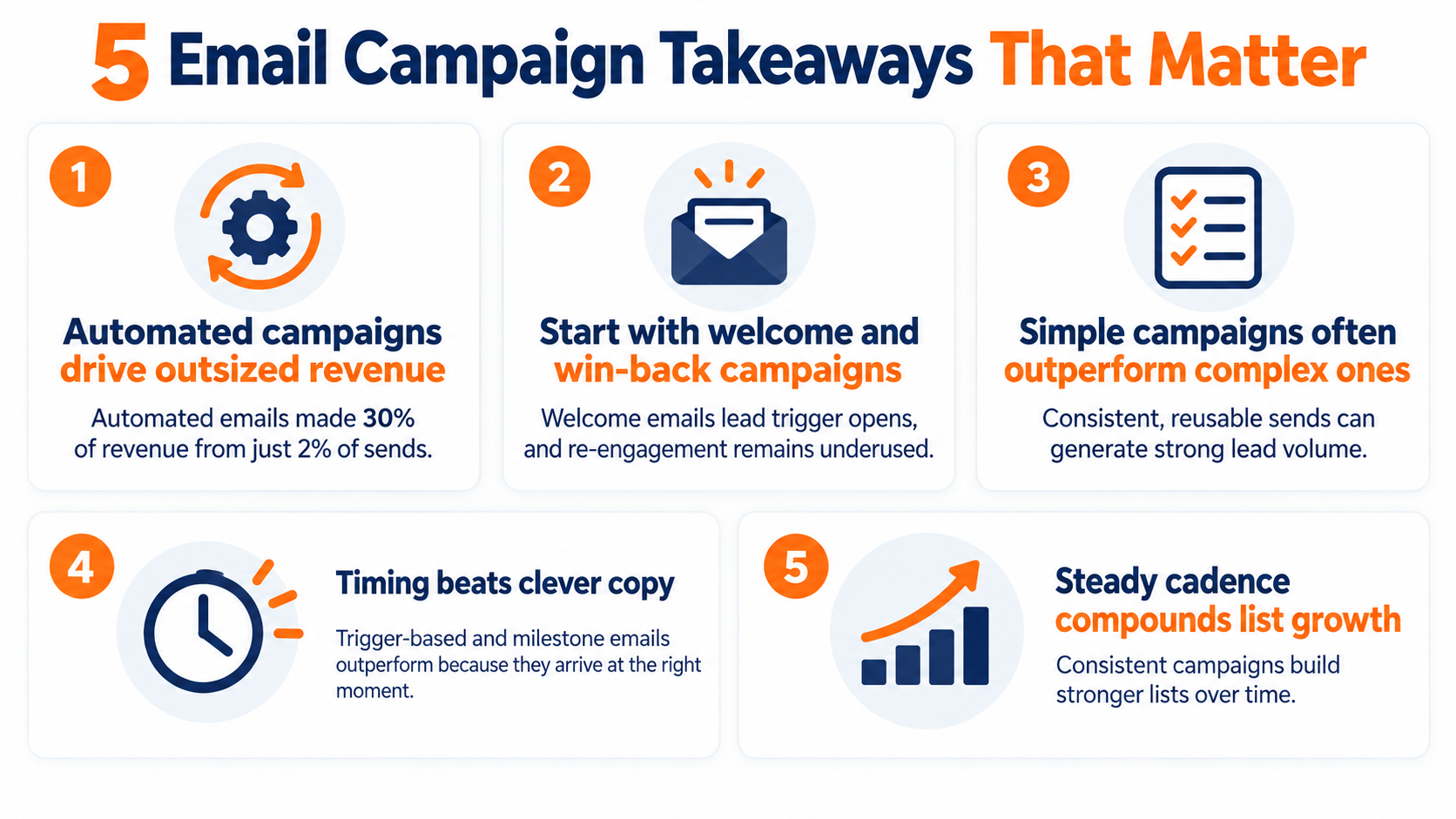
- Behavioral trigger campaigns generate disproportionate revenue: In Omnisend's 2026 ecommerce benchmark, automated emails represented just 2% of sends but generated 30% of email-driven revenue, earning 16 times more per send than one-off campaigns. Abandoned cart and welcome sequences alone drove 76% of all automation-generated orders.
- Welcome series and re-engagement are the highest-priority email campaign ideas to build first: Welcome emails post the highest open rates of any trigger type (GetResponse cross-industry benchmark), and only 24% of marketers currently run re-engagement campaigns despite Return Path research showing 45% of win-back recipients go on to read a subsequent message from the same sender.
- Consistent, simple campaigns outperform complex ones more often than most teams expect: Sterling Commercial Capital ran a weekly promotional email using a single reusable template, generating up to 68 new multi-million dollar loan inquiries per blast at a 10% open rate.
- Milestone and trigger-based campaigns earn their performance through timing, not copy: In Experian's historical birthday email analysis, cited by Litmus, birthday emails generated 481% higher transaction rates than standard promotional emails. A Blueshift analysis of 14.9 billion messages found trigger-based emails outperform batch sends by 497% on engagement.
- Sustained cadence compounds list growth over time: Oaktree Funding Corporation grew its email list from 25,000 to over 400,000 active brokers and realtors over six years by maintaining a consistent daily rate-update campaign using saved templates in Pinpointe.
In this guide
- What Makes an Email Campaign Different From an Email Blast
- The Welcome Series
- The Lead Nurture Drip Campaign
- The Promotional Campaign (and How to Run an Email Blast That Doesn't Feel Like One)
- The Product Launch or Feature Announcement Campaign
- The Educational Campaign
- The Re-Engagement Campaign
- The Behavioral Trigger Campaign
- The Milestone and Event Campaign
- How to Decide Which Campaign to Build First
- The Campaign Comparison at a Glance (Email Campaign Examples by Type)
- Frequently Asked Questions
What Makes an Email Campaign Different From an Email Blast
Before getting into specific ideas, it helps to be clear on terms, because the distinction between a campaign and a blast isn't semantic. It changes how you build, measure, and think about your email program.
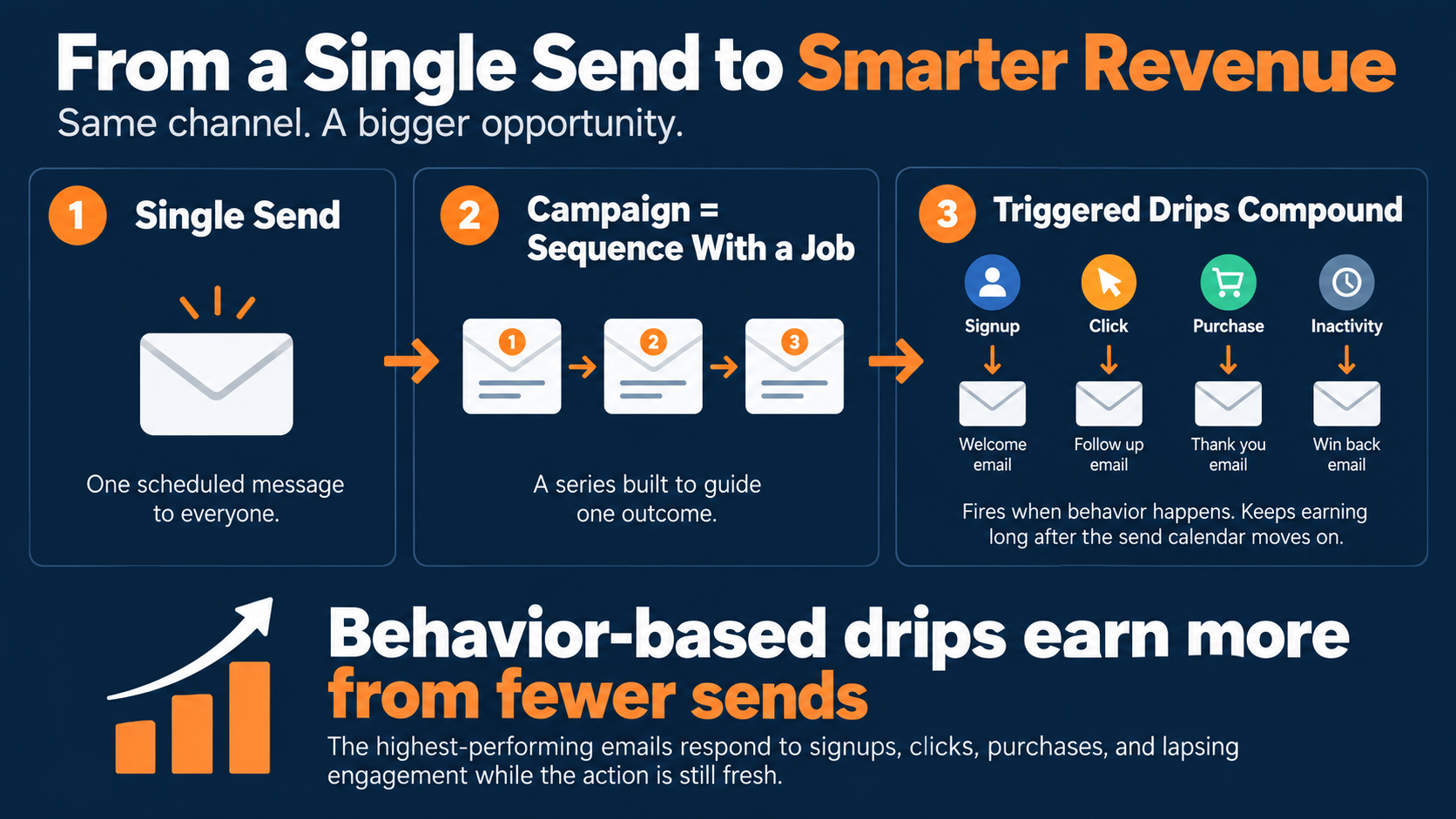
An email campaign is planned, goal-driven, and often sequenced or triggered by subscriber behavior. An email blast is a one-time, broad send to most or all of your list at once, typically for time-sensitive announcements or promotions. The key practical difference: campaigns are usually segmented and sequenced. Blasts are generally unsegmented and one-off.
Both have a place in your digital marketing strategy, but the mistake is treating every send like a blast when most of the ROI lives in the campaigns.
Campaigns you plan and send once
Some of the most effective email campaigns are still one-time sends. A product launch announcement, a promotional offer with a deadline, a company milestone update. These aren't automated. You build them, schedule them, send them, and measure what happened.
The email blast fits here. Done right, it's not a carpet bomb. DocuSign's documented "Pay us less this weekend" blast is a good example of a one-time promotional send that works precisely because it's specific, time-bounded, and offers something real. Intercom's new-feature emails are another, where their subject line states the feature directly, a short clip demonstrates it, and there's one CTA.
Campaigns that run themselves after setup
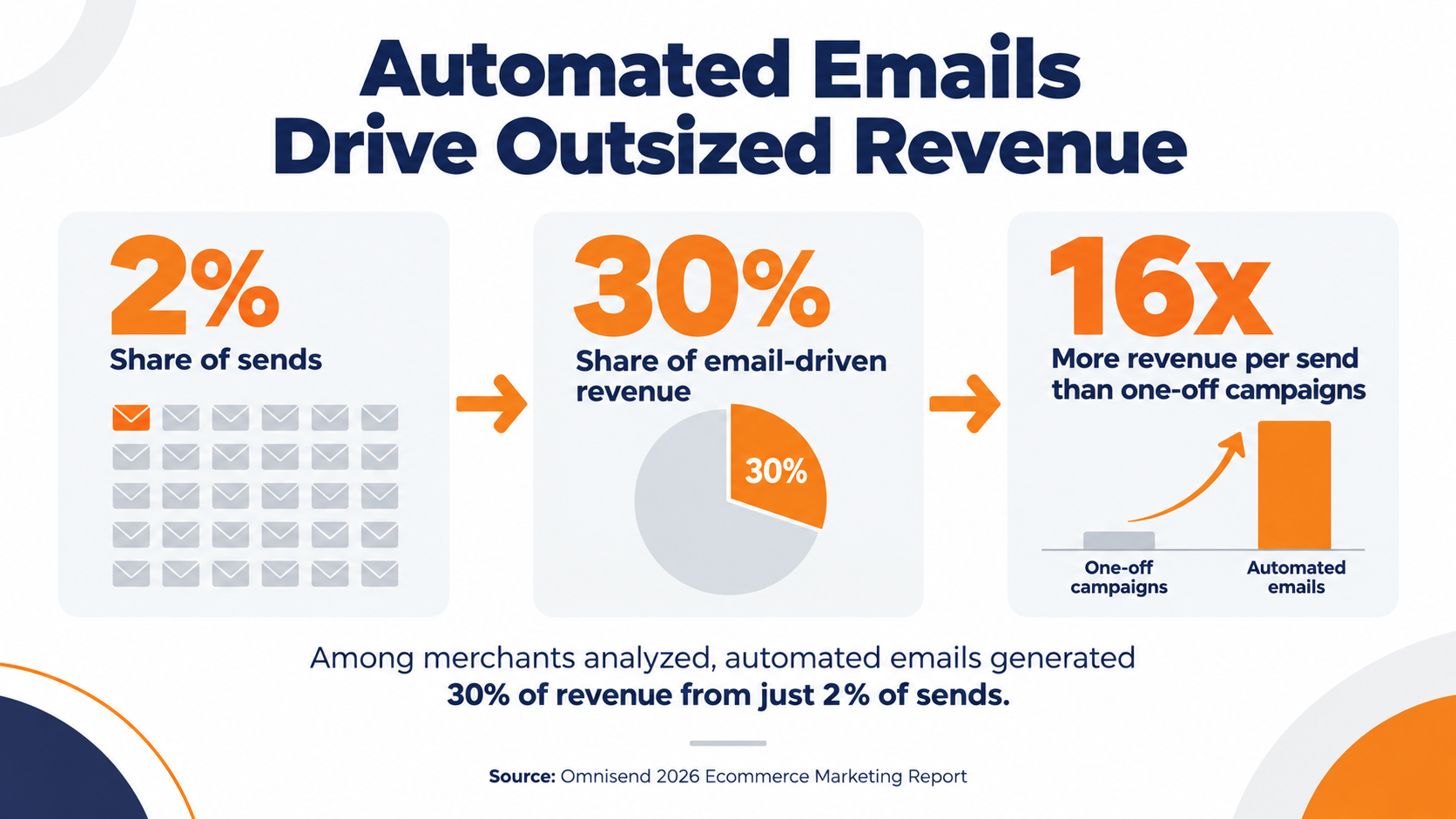
This is where the math gets interesting. In Omnisend's 2026 ecommerce benchmark, automated emails represented just 2% of sends among the merchants analyzed but generated 30% of email-driven revenue, earning 16 times more per send than one-off campaigns.
That difference exists because automated campaigns send at the moment of actual intent. A welcome email arrives when someone just signed up, not three days later. A re-engagement campaign fires after 90 days of silence, not when a marketing manager remembers to clean the list. Trigger-based emails don't forget, don't get delayed by other priorities, and don't depend on someone remembering to hit send. That is the core advantage of automated, behavior-triggered campaigns.
The campaign ideas below split roughly between these two types. The ones you build once and run forever are the ones worth prioritizing first.
The Welcome Series
You set up a welcome email at some point, probably years ago, and it still fires today. When's the last time you actually read it?
The welcome series is the single highest-return campaign to set up because it fires when interest is at its peak, and most teams either have one weak email or nothing at all. A cross-industry benchmark puts welcome email open rates at 83.63%, though open rate figures should be read with the caveat that Apple's Mail Privacy Protection inflates recorded opens for Apple Mail users.
However, what's not inflated is that welcome emails consistently outperform every other trigger by a substantial margin on click-through and conversion.
The structure that works is a sequence, not a single email. Three to five emails over five to seven days, each with a distinct job.
What triggers it and how long it should run
The trigger is simple: a new signup, a content download, account creation, or any action that marks the start of a relationship. The sequence should run 3–5 emails over about a week, with the cadence front-loaded. Email 1 goes out immediately. Email 2 can wait 24–48 hours. Email 3 can go on day 5 or 7.
What changes across those emails is the job each one does. The first email isn't a sales pitch. It's proof that signing up was worth it.
What each email in the sequence should do
Email 1 delivers immediate value and sets expectations. Brands like Island Olive Oil open with a warm welcome plus the signup incentive. Email 2 goes deeper into the brand story or surfaces social proof. Email 3 introduces a clear next step, whether that's a bestseller, a resource, or a soft CTA toward the thing you actually want them to do.
The documented approach from brands like Three Sips shows the same logic: earn trust before asking for anything. For a deeper look at structure and sequencing, this guide to the welcome email sequence covers the specific elements that make the difference in a B2B onboarding flow.
Networld Media Group
Networld Media Group manages 10 trade publications and 20-plus weekly newsletters, including FastCasual, ATM Marketplace, and Pizza Marketplace. They run trigger welcome flows through Pinpointe's API, which pushes newsletter HTML directly from their CMS into campaigns. After migrating from their previous ESP, they drove a 167% increase in link clicks per email, boosting click-throughs from 12–15 to 20–25 per send.
The lesson here is what makes the welcome series scale when you're managing multiple publications or brands: the ability to trigger independent welcome flows for each one, with isolated lists and sending infrastructure, while running everything from the same platform.
The Lead Nurture Drip Campaign
Most B2B teams want a lead nurture campaign. Fewer actually have one that works, and the ones that exist often default to a generic content digest rather than a real progression toward conversion.
A drip email campaign is a multi-touch sequence triggered by a prospect action, designed to move them from initial interest toward a buying decision. The key word is triggered. If your nurture sequence fires on the same schedule for everyone regardless of what they did, it's not a nurture campaign. It's a slow newsletter.
A widely cited Annuitas benchmark found that nurtured leads make purchases 47% larger than non-nurtured ones. It's a legacy figure rather than a fresh benchmark, but the directional point has held up across more recent research: prospects who've been educated before a sales conversation convert at higher values than cold contacts.
The 4-email B2B nurture structure
Litmus documents a standard B2B nurture flow that holds up across most industries:
Email 1 opens with a flagship piece of content that addresses the specific pain point behind the trigger action. No pitch. Email 2 introduces the product as a solution to that pain point, briefly. Email 3 brings in a case study or light proof point. Email 4 closes with an invitation to a trial, demo, or consultation.
Cadence: 3–7 days between each email. Educational content before anything promotional. The sequence should feel like getting advice from someone who understands the problem, not a sales push on a timer.
21st Mortgage Corporation
21st Mortgage, a Berkshire Hathaway company, needed to convert homebuyers who started but didn't finish loan applications. They launched automated drip campaigns through Pinpointe's Enterprise Edition, triggering sequences when an application was abandoned mid-process. The program now sends 2.5 million emails annually across multiple sister companies, each with its own isolated account and database sharing assets centrally.
That's a B2B behavioral trigger campaign running in a regulated financial vertical. Not an abandoned cart. A high-consideration purchase with a multi-step process and a real drop-off point in the funnel.
The Promotional Campaign (and How to Run an Email Blast That Doesn't Feel Like One)
If you've been looking for email blast ideas that hold up, the short answer is: specificity. Promotional campaigns have a reputation problem, and most of them earn it.
A promotional email that works isn't the one that shouts the loudest. It's the one that shows up with a specific offer, a clear reason it's relevant right now, and one thing to do. The email blast format gets treated like a broadcast with minimal craft applied, and the results reflect that.
The fix isn't complicated. It's specificity.
What a high-performing promotional email actually looks like
Three documented real-brand promotional campaigns worth studying:
DocuSign (documented by Mailtrap): subject line "Pay us less this weekend." Bold headline, clean design, a specific time-bounded offer across monthly and annual plans. The offer is framed as rare, the deadline is real, and there's no hard sell. One CTA. Works because it treats the reader's time as valuable and doesn't waste it on setup.
Intercom: announces a new product feature with a subject line that states exactly what the feature is. Short video demonstrates the feature directly. CTA is a hyperlinked phrase, not a button. No preamble, no throat-clearing. The email respects that its readers are busy practitioners.
Ipsy (documented by Sender): flash sale announcement, "⚠️Flash Sale closes soon." Urgency stated immediately, offer is the hero, nothing competes with it for attention. Works because flash sales are actually time-sensitive and the email doesn't pretend otherwise.
The pattern across all three: one job per email, a subject line that delivers the premise, and no hedging on the offer.
The simpler the template, the more sends you can sustain
Sterling Commercial Capital, a direct commercial lender that funded $2M–$10M bridge loans, ran a weekly email program built around a single reusable HTML template. Each week, the CEO updated the rates and hit send. That was the whole operation.
The result: consistent 10% open rates, with 12% of those opens converting into new loan paperwork requests. Most sends generated up to 68 new multi-million dollar loan inquiries.
The lesson from that proof point is that a promotional campaign doesn't need to be elaborate to be effective. What it needs is consistency, a relevant offer, and a list that trusts you enough to open it. A simple, reusable template makes all three easier to sustain.
The Product Launch or Feature Announcement Campaign
Most B2B teams treat a product launch like a press release. One email, broad send, done. The announcement email that actually performs is more deliberate than that.
The distinction matters because existing customers and prospects have completely different relationships with a new product or feature. Customers want to know how it helps them. Prospects want to know why it makes you worth considering. The same launch email sent to both audiences serves neither particularly well.
Two B2B announcement formats that work
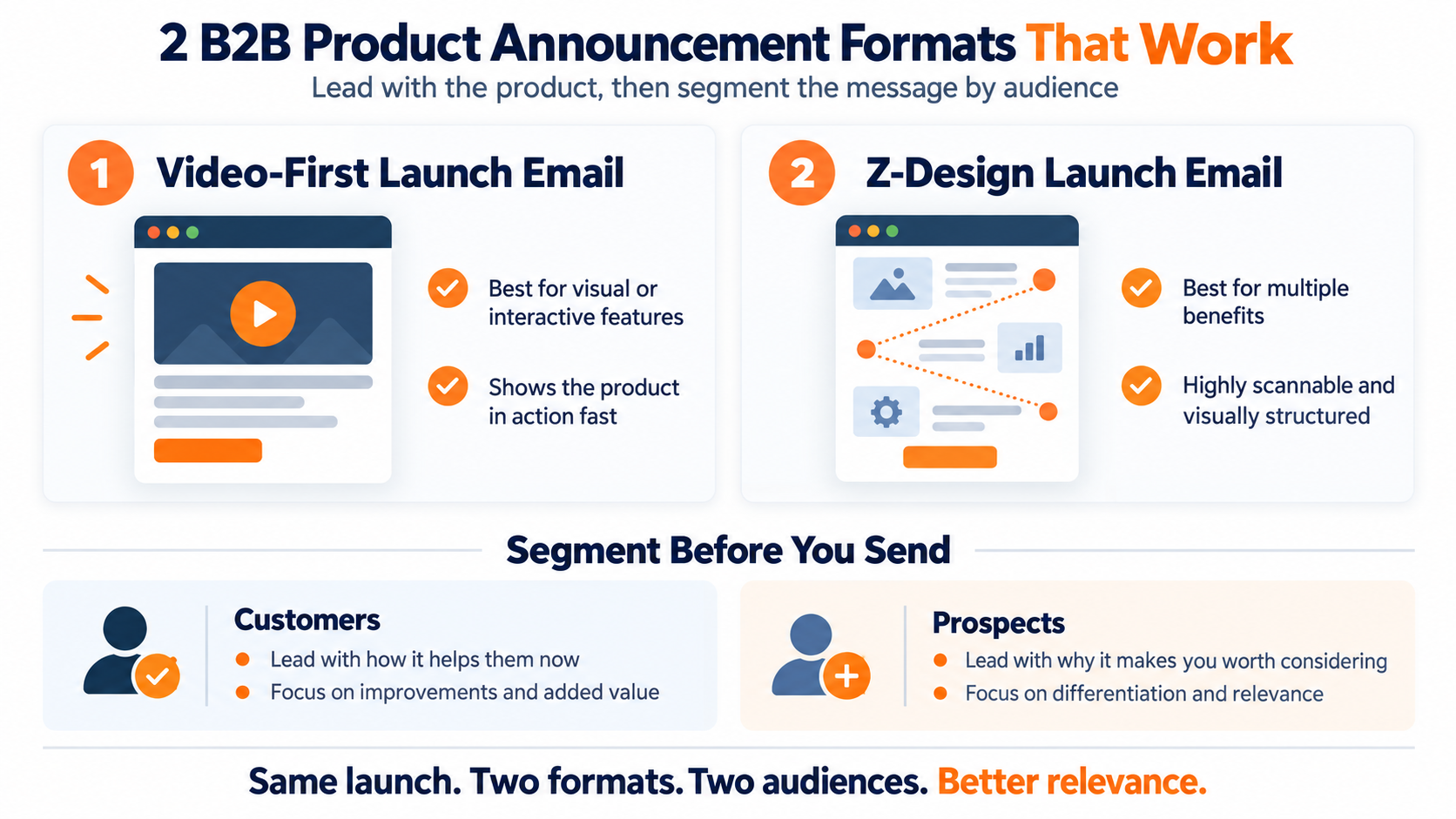
Litmus documents two distinct B2B product announcement email formats that produce results:
The first is a newscaster-style video email. It leads with a short demo clip before going into feature detail. The video does the work that copy alone can't: it shows what the thing actually does rather than describing it. This format works well for features with a visual or interactive component.
The second is a Z-design layout, a structured template that walks through features and benefits visually, using the natural eye movement pattern across a page. More designed, more scannable. Works well for launches with several distinct benefits to communicate.
Both formats share a common principle: lead with the thing, not with the announcement that you're announcing something.
Customers vs. prospects, segment before you send
The launch announcement going to your customer list should lead with how this changes or improves what they already have. The version going to prospects should explain why this makes your solution worth a look.
Same launch, two different emails. The segmentation isn't complicated, but it changes the relevance of the message enough that the results are usually meaningfully different.
The Educational Campaign
Educational emails are the hardest to screw up and the easiest to do badly.
Done well, an educational campaign builds trust faster than any promotional send. It positions the sender as a resource rather than a vendor. Done badly, it's a content digest that nobody reads, a link to a blog post dressed up as an email.
The difference is whether the email itself contains the value or just points at it.
What B2B readers really want from educational emails
The content types that work in B2B educational campaigns are ones that do the thinking for the reader. Trend analyses with an interpretation attached. How-to guides that solve a problem they actually have. Original research with a point of view on what the data means. Curated expert insights with a reason to care about them.
What doesn't work: generic roundups of news the reader has already seen, thinly veiled product content dressed up as education, and content that requires clicking out of the email to get the actual value. If you want a list of ready-to-use formats, this resource on email marketing ideas for your newsletter covers the most practical content types.
The 80/20 rule is a widely recommended heuristic in B2B email: no more than 10–20% of content should be self-promotional, with the rest being educational in a way that earns the open. It's a rule of thumb, not a proven universal law, but the underlying logic is sound. Lists erode when subscribers feel every email is trying to sell them something.
The 80/20 rule for recurring educational campaigns
Subject line mechanics matter here. B2B subject lines between 28–50 characters consistently outperform longer ones, and the formulas that work are specific: "Reduce Shipping Costs 30% in 90 Days" (benefit plus timeframe), or "Study: 73% of B2B Buyers Prefer Self-Service" (data plus insight). Vague subject lines ("Our latest thinking on email") don't give the reader a reason to open.
68% of agencies surveyed for Litmus's State of Email report include newsletters as part of their email strategy, making it the most common email type in that sample. The format is proven. The question is whether the content inside it earns the open. For lifecycle-driven sends that build on that engagement, this guide to customer onboarding emails shows how to keep new subscribers active from the first send.
How Neubauer & Associates retained 15,000 attorneys for 8 years
Neubauer & Associates publishes legal news and civil verdict alerts for California trial attorneys. They started with a single list, sent everything to everyone, and found that attorneys only wanted content relevant to their specific practice area.
The fix was granular segmentation. Using Pinpointe's embedded preference forms and 60-plus custom fields per contact, they let attorneys opt down to specific content types rather than unsubscribing entirely. The result: a list of 15,000 active subscribers retained for up to eight years through consistently relevant content.
That's the argument for educational campaigns done right. It's not just about what you send. It's about building a preference system that keeps the content relevant as subscriber interests change.
The Re-Engagement Campaign
Here's a number worth sitting with: only 24% of marketers currently deploy inaction-triggered re-engagement emails, despite strong evidence that a meaningful share of dormant subscribers can be brought back. Return Path's win-back research found that 45% of subscribers who received a re-engagement email went on to read a subsequent message from that sender, a signal that re-engagement campaigns do move the needle, even if the causal link is hard to isolate perfectly.
Most teams know their list has dead weight. Very few do anything systematic about it. The difference is the whole opportunity.
A re-engagement campaign targets subscribers who've gone quiet, typically 90 or more days without opening or clicking, and tries to bring them back before they become a deliverability problem. The business case is simple: retaining existing customers is 5–7 times more cost-effective than acquiring new ones, and a reactivated subscriber who comes back tends to be a more engaged one.
The reactivation window, why timing matters more than copy
Timing is the variable that matters most, more than the best subject lines, more than offer, more than design. The longer a subscriber goes without any re-engagement attempt, the harder they become to bring back. Practitioners who study this consistently flag 90 days as roughly the threshold after which reactivation rates drop sharply.
The way to do this in practice is to set up the trigger at 90 days of inactivity and don't wait for someone to remember to run the campaign manually. Once a subscriber hits six months of silence, your chances of recovering them meaningfully are low enough that the focus shifts to list hygiene rather than re-engagement.
A 3-email win-back sequence that works
Email 1 opens warm. No hard sell, no dramatic "we miss you" theatrics. A genuine reminder of the value you offer and something recent worth knowing about. The goal is to surface in the inbox and make opening feel worth it.
Email 2 raises the stakes. A stronger offer, a spotlight on something new, or social proof the subscriber hasn't seen. Anastasia Beverly Hills documents this approach: the second touch in a reactivation sequence provides additional value before any ask.
Email 3 is the honest question: do you still want to hear from us? Give them an easy way to opt down to less frequent sends rather than forcing a binary stay-or-unsubscribe choice. This email also serves a list hygiene function. Non-openers who don't click anything across all three emails should come off the active list. That's not a loss. It's what protects your sender reputation for everyone else.
The deliverability case for running win-back campaigns
Re-engagement campaigns aren't just about recovering revenue from dormant contacts. They're about protecting the sender reputation that makes all your other campaigns work. This is why re-engagement campaigns are so valuable, because cleaning your list keeps deliverability healthy for every send that follows.
Surplus Record, an industrial equipment directory with 70,000-plus listings, migrated to a private IP address on Pinpointe and saw a 25–33% increase in open rates. The open rate improvement came directly from better deliverability, which came from better list hygiene and a cleaner sender reputation. Win-back campaigns are part of that hygiene. They either re-engage the contact or give you a clean reason to remove them.
The Behavioral Trigger Campaign
Two percent of email sends. Thirty percent of email revenue.
That's what Omnisend found across an analysis of more than 20 billion campaign emails among ecommerce merchants on their platform. Automated, behavior-triggered emails earn 16 times more per send than one-off campaign emails. The click engagement gap is similarly dramatic: automated flows produce click rates more than three times higher than broadcast sends, according to benchmark data across ecommerce senders.
The gap is that big because triggered emails arrive at the moment of actual intent. They don't approximate timing. They respond to it.
The first B2B triggers you should build
Most articles use abandoned cart as the behavioral trigger example because it's easy to illustrate. But most B2B companies don't have carts. They have high-consideration purchase processes with multiple decision points, and those decision points are the triggers worth building around.
The behavioral signals that should fire a sequence in a B2B context: content download, demo request, pricing page visit, trial account creation, webinar attendance (and non-attendance), trial expiry, and stalled onboarding. For a full guide to building these out, behavioral email marketing covers the journey architecture behind each trigger type. Each of these signals a specific moment in the decision process. A prospect who visited your pricing page is different from one who downloaded a whitepaper. The email they get should be different too.
14.9 billion messages found that trigger-based emails outperform batch sends by 497% on engagement. The performance gap reflects the fundamental difference between sending when you decide to and sending when the prospect tells you they're thinking about you.
What trigger-based emails actually outperform
Behavior-triggered emails generated 10 times greater revenue per send than other email types.
The setup investment is real. Trigger campaigns require connecting your email platform to behavioral data sources, website tracking, or a CRM. But once they're running, they run without ongoing intervention.
21st Mortgage's abandoned-application sequence
21st Mortgage built a behavioral trigger campaign around one specific drop-off point: homebuyers who started but didn't complete loan applications. The trigger fired when an application was abandoned, and the sequence was designed to bring that prospect back to where they left off.
The campaign runs across multiple sister companies from a single Enterprise Edition account, with each company's data kept isolated. 2.5 million automated emails annually. The trigger mechanic is the point here: it's not a nurture sequence on a schedule. It fires because of a specific action, or in this case, an inaction, at a specific moment in the buying process.
The Milestone and Event Campaign
In Experian's historical birthday email analysis, birthday emails generated 481% higher transaction rates, 342% higher revenue per email, and 179% higher unique click rates than standard promotional emails. These figures are from an earlier era of email benchmarking, but the directional finding has been consistent: milestone emails timed to personally meaningful dates outperform generic promotional sends by a wide margin.
The reason this is so effective is that the message is relevant. A birthday email arrives on a date that's meaningful to the recipient. The personalization isn't manufactured. It's real.
Why milestone emails outperform promotional emails by a wide margin
The reason milestone emails perform as well as they do is the same reason behavioral trigger emails do: timing. The email lands when the moment is already meaningful to the recipient, and the brand's presence in that moment creates a genuine connection rather than an interruption.
You don't need to overthink the offer. Something as simple as a modest discount, a free gift, or exclusive access to something works well. The gesture is the thing, not the size of the incentive.
Three milestone campaigns worth setting up
Subscriber birthday: collects the birth month and day at signup or via a preference update email. Triggers an automated email in the subscriber's birthday month with a personalized offer. Low setup cost, high return on a per-email basis.
Customer anniversary: fires on the date of a subscriber's first purchase, first signup, or first account creation. Celebrates the relationship, reinforces loyalty, often includes a loyalty reward or exclusive access.
Usage milestone for B2B SaaS and software: Grammarly does this with documented results. Their "You've reached a new weekly streak milestone!" emails arrive when users hit a defined usage threshold, sending personalized insights about their writing and recognizing their progress.
For any B2B software product where engagement can be measured, usage milestones are a native trigger that requires no demographic data collection.
The webinar and event campaign as a structured milestone
Event campaigns follow a predictable and effective three-part structure: save-the-date, reminder three to five days before the event, and post-event follow-up for people who didn't attend.
The documented approaches from brands like Neil Patel and Slack share a common structure: one focused CTA per email, a subject line that leads with the specific value attendees will take away rather than the format of the event, and a post-event email that repurposes the content so non-attendees still get something useful.
The post-event email is the underused part. Most teams send the reminder and then go quiet after the event. The follow-up email ("here's the recording" or "here are the key takeaways") serves the non-attendees, extends the life of the event content, and keeps the relationship warm for the next one.
How to Decide Which Campaign to Build First
The list of nine campaign ideas above is useful. A list without an order of operations is overwhelming.
The problem most teams have isn't a shortage of ideas. It's that every idea sounds equally important, and "we should set up behavioral triggers" sits on the same roadmap as "we should send a newsletter this month," and neither gets done particularly well because the prioritization question was never answered. As you build out these campaigns, layering in email personalization techniques is what turns a generic sequence into one that actually converts.
Here's what the sequencing actually looks like.
Start here, three campaigns anyone can launch this week
The first three campaigns to set up share two properties: they require the least behavioral data to configure, and they produce measurable results immediately.
Welcome series: triggered by new signup, delivers immediate value, runs automatically from day one. The highest open rates of any trigger type. Every new subscriber gets it.
Re-engagement sweep: run it on your existing list before building anything else. It tells you which contacts are actually active and cleans the deliverability baseline everything else depends on.
First promotional blast: a one-time send to your active list to test the water and generate immediate response. Sterling Commercial Capital ran a weekly promotional program with a single reusable template that generated up to 68 new loan inquiries per send. Start simple. Measure what happens.
Next, build the campaigns that compound over time
Once those three are running, add the campaigns that require behavioral data and more setup but deliver disproportionate returns over time.
Lead nurture drip (triggered by a high-intent action like content download or demo request). Behavioral trigger sequences for each meaningful decision point in your purchase process. Milestone campaigns for subscribers with enough history to trigger a birthday or anniversary email.
Among ecommerce senders, automated email flows deliver 16 times more revenue per send than scheduled campaigns, with abandoned cart and welcome sequences driving 76% of all automation-generated orders. The setup investment is real, but these campaigns run and compound without ongoing manual effort.
How Oaktree Funding turned daily cadence into 400,000 subscribers
Oaktree Funding Corporation, a full-service mortgage lender, started with a list of 25,000 active brokers and realtors. They built their email program around a single recurring campaign: daily rate updates, sent using a saved template with only the rates swapped each day.
Six years later, their list had grown from 25,000 to over 400,000 active contacts.
Build for repeatability first, then fine-tune with smart timing
The lesson isn't that daily sends are right for everyone. It's that a consistent, relevant campaign sustained over time compounds in ways that sporadic, elaborate campaigns don't. Consistency and repeatability beat complexity.
Once your foundational campaigns are running, optimization becomes the next layer. Word Mechanics, a trade publisher covering the stone and hard-surfaces market, used Pinpointe's Send at Local Timezone feature to guarantee delivery at 9:00 AM regardless of subscriber location, driving an immediate uptick in international open rates and same-day media kit requests from Europe. Hallmark Building Supply added Pinpointe's Predictive Send feature to optimize timing automatically, reducing their opt-out rate to less than 0.01% after migrating from an overseas ESP.
Nail the basics, then scale without the friction
This is where the sequence matters. Timing optimization and AI-assisted delivery scheduling don't do much for a list that hasn't been segmented or a welcome series that doesn't exist. The fundamentals come first.
What makes the progression possible at scale, especially for teams managing more than one brand, client list, or publication, is a platform that lets each campaign run independently without the lists, sending infrastructure, or data mixing between them. That's what Pinpointe's multi-tenant architecture is built for: centralized control over multiple independent campaigns, each with its own isolated environment, managed from one place. Every campaign idea on this list can run simultaneously, for multiple brands or client accounts, from a single platform without one campaign's list or performance bleeding into another.
| Campaign Type | Trigger or Cadence | Delivery Type | Primary Goal | Key Outcome |
|---|---|---|---|---|
| Welcome series | New signup or account creation | Automated sequence (3–5 emails, 5–7 days) | Build relationship at peak interest | Highest open rates of any trigger type (GetResponse benchmark) |
| Lead nurture drip | High-intent action (download, demo, trial) | Automated sequence (4–6 emails, 3–7 days apart) | Move prospect toward purchase | Nurtured leads make purchases 47% larger (Annuitas, legacy benchmark) |
| Promotional / blast | Time-based or promotional calendar | One-time broadcast | Drive immediate response | Up to 68 loan inquiries per send (Sterling Commercial Capital) |
| Product launch | Launch event | One-time (or 2-part: teaser + launch) | Drive awareness and adoption | Higher relevance and response when segmented by customer vs. prospect |
| Educational / newsletter | Weekly or bi-weekly cadence | Recurring campaign | Build trust and authority | Subscriber retention up to 8 years (Neubauer & Associates) |
| Re-engagement | 90 days of inactivity | Automated sequence (3 emails) | Reactivate or clean list | List hygiene produced 25–33% open rate lift (Surplus Record) |
| Behavioral trigger | Specific subscriber action | Automated (single or sequence) | Respond at moment of intent | 16x more revenue per send vs. one-off campaigns (Omnisend ecommerce) |
| Milestone / event | Date-based or usage threshold | Automated | Reinforce relationship | 481% higher transaction rate vs. promotional emails (Experian historical) |
| Webinar / event campaign | Event date | Automated sequence (3-part) | Drive registration and follow-up | Extends event value to non-attendees; keeps relationship warm between events |
Frequently Asked Questions
The questions below cover the most common decisions teams face when building their first email campaigns or evaluating what to prioritize next.
What is the most effective type of email campaign?
Behavioral trigger campaigns earn the highest revenue per send, but welcome series have the highest average open rates of any email trigger type and are the easiest to build first. The honest answer is that the most effective campaign is the one that's actually running. Start with the welcome series, add triggers once the basics are working.
How many emails should a drip campaign have?
For a welcome series: 3–5 emails over 5–7 days. For a B2B lead nurture sequence: 4–6 emails spaced 3–7 days apart, starting with education and ending with a conversion ask. For re-engagement: 3 emails with escalating urgency, followed by list cleanup.
What is the difference between an email campaign and an email blast?
A campaign is planned, goal-driven, and often sequenced or triggered by subscriber behavior. An email blast is a one-time, broad send to most or all of your list at once, typically for time-sensitive announcements or promotions. Both have a place in a healthy email program. The mistake is treating every send like a blast.
How do I come up with email campaign ideas?
Start from your subscriber's lifecycle stage, not from what you want to say. Map where contacts are: new subscriber, active lead, lapsed customer, long-term loyal contact. Each transition point is a campaign. The nine types in this article cover the full lifecycle from first signup through long-term retention.
What email campaigns should I send first?
In order: welcome series (captures peak interest, high open rates, automatic from day one), re-engagement sweep (cleans your list before building on it), and one promotional blast (tests deliverability and gauges list responsiveness). Build behavioral triggers and nurture sequences once those three are running and producing data.
Start With One Campaign, Not Nine
The key difference between a strong email program and a weak one isn't the number of campaign ideas on a list. It's execution on a few things, consistently, until they're producing results.
The welcome series fires automatically every time someone signs up. The re-engagement campaign runs in the background and cleans the list. The behavioral trigger sequence responds to real intent without anyone having to remember to send something. Once those three are working, the others compound on top of them.
Pick one from this list. Build it this week. Measure it for a month, then add the next one.
If you're managing email campaigns across multiple brands, product lines, or client accounts and want to see how a platform built for that kind of scale handles the full campaign lifecycle, request a Pinpointe demo, and we'll walk you through it.