Apple launched Mail Privacy Protection in September 2021 as part of iOS 15, tucked into a single settings screen and framed as an opt-in privacy option. At the time, it looked like a modest wrinkle in email open rate tracking. iOS 15 adoption was still climbing, and only a fraction of subscribers had the feature turned on at all.
That changed fast. Adoption tracked iOS 15 uptake itself over the following year, then kept climbing as Apple carried the feature forward into every subsequent iOS release. By 2025, industry estimates had Apple Mail accounting for somewhere close to half of all opens on typical consumer email programs.
Mail Privacy Protection Has Become The New Standard
Today, that trajectory has settled into the new normal, not a shift still in progress. Roughly half of all reported opens across the average program are now inflated by Mail Privacy Protection's pixel pre-loading, according to Litmus data cited in recent deliverability benchmarking. This isn't a change on the horizon.
It's been the operating reality for years, and the marketers still struggling with it are usually running strategy built for the pre-MPP world rather than dealing with anything genuinely new.
Mail privacy features continue to expand
Apple has layered on other privacy features since, including App Privacy Report, which gives users transparency into how apps access their data, and Hide My Email, which lets users subscribe to lists using a disposable alias instead of their real address.
But Mail Privacy Protection remains the one with the biggest impact on email marketing, because it strikes directly at the metric most programs have historically leaned on hardest: the open.
If you're still building digital marketing campaign strategy or automations around open rate tracking as your primary signal, here's what you need to know about how Mail Privacy Protection actually behaves today, and what to do instead.
How Mail Privacy Protection Works
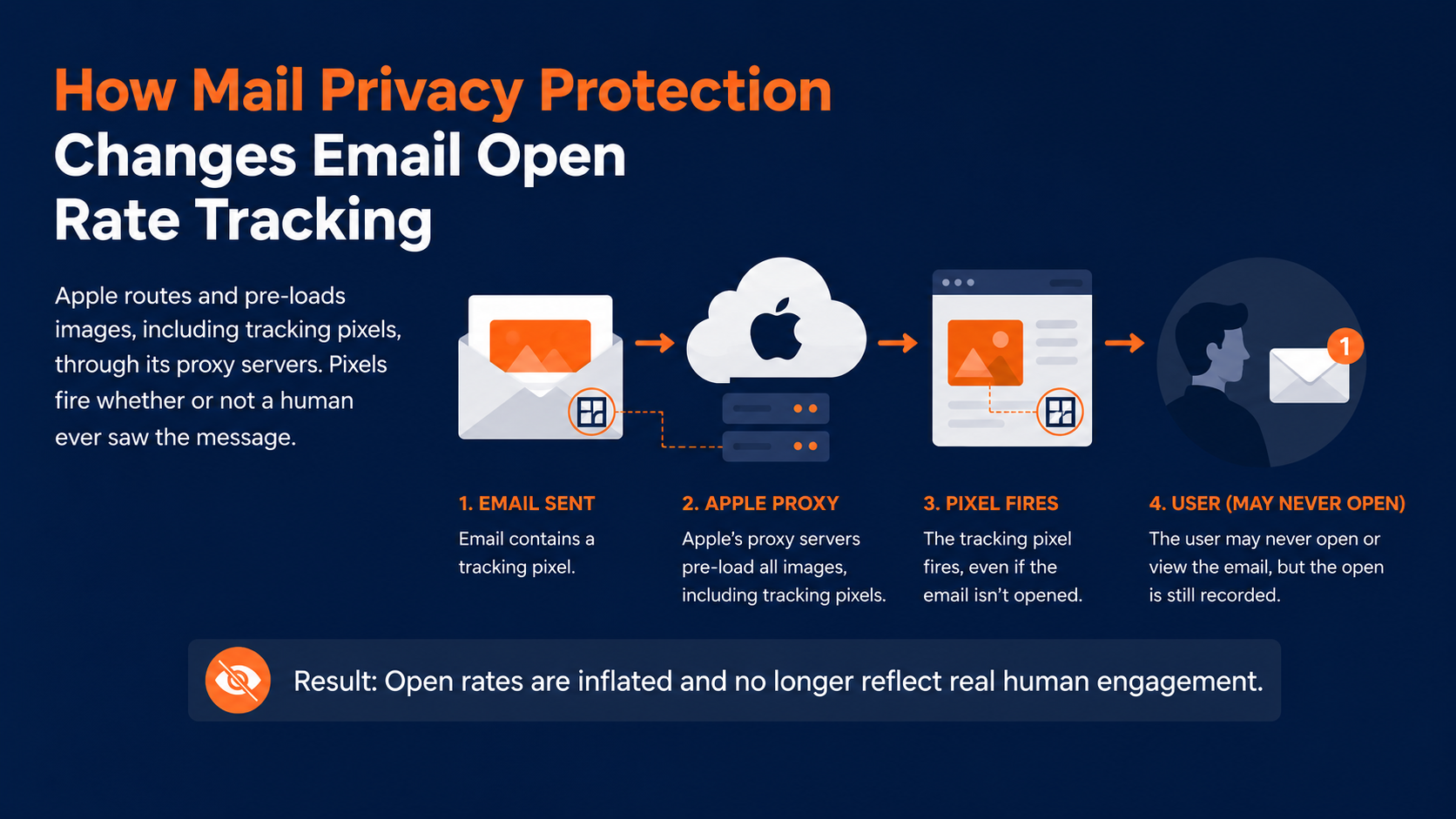
Most marketers are familiar with tracking pixels. A small, invisible piece of code gets placed in an email, and when the email is opened, that code loads and reports back.
That's the entire mechanism behind email open rate tracking that email marketing has run on for two decades.
How this breaks email open rate tracking
This breaks that mechanism for anyone using it. It routes images, including tracking pixels, through Apple's own proxy servers and pre-loads them regardless of whether a person actually opens the email or ever looks at it.
That masks the user's real IP address, hides their location, and, critically, means the pixel fires whether or not a human ever saw the message.
Who Does This Apply To, And What It Means For Email Open Rate Tracking
This is the part that's changed the most since Mail Privacy Protection first launched. Early on, it only affected a small slice of any list, since it was tied to a single app on a single platform that not many people had upgraded to yet. That's no longer the case.
Current estimates put email opens happening inside Apple Mail somewhere in the 34% to 60%+ range depending on your audience, skewing higher for consumer and B2C lists.
This can dramatically change the KPIs you are tracking
And critically, roughly half of all reported opens across the average program are now inflated by Mail Privacy Protection's pixel pre-loading, according to Litmus data cited in recent deliverability benchmarking.
That's not a rounding error. That's your open rate, cut roughly in half in terms of what it actually tells you.
What This Means For Your Email Engagement Metrics
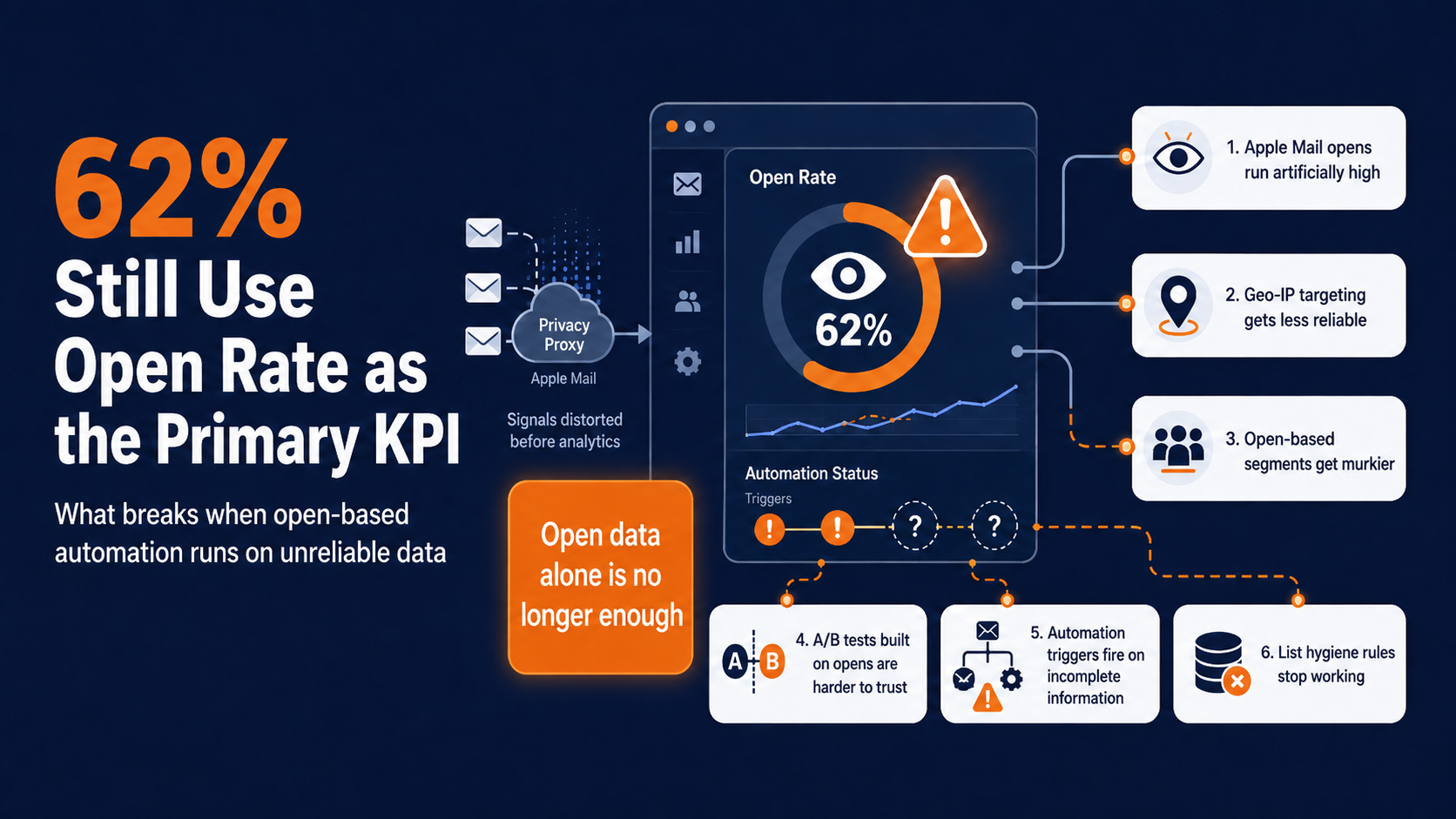
Here's the uncomfortable part: 62% of email programs are still using open rate as their primary KPI, despite that number being unreliable for roughly half of what it's reporting. If you're one of them, here's what's actually happening under the hood:
Apple Mail open rates run artificially high, because the pixel loads through Apple's proxy whether or not the message was actually read.
Geo-IP data marketers rely on for location or time zone targeting doesn't work reliably for these users, since IP masking hides real location.
How this can impact your email marketing automation triggers
Real-time personalization or dynamic content that depends on location signals breaks down for the same reason.
Segmenting your audience by open behavior gets murkier, since you can't tell a genuine open from a pre-loaded one.
A/B tests built around open rate, like subject line testing, produce results you can't fully trust.
Any automation triggered by opens, like re-engagement flows or follow-up sequences, is firing on incomplete information.
List hygiene rules based on “hasn't opened in X months” quietly stop working, because inflated opens can mask genuinely disengaged subscribers.
How Marketers Can Adapt
The good news is this only affects people using Apple's native Mail app specifically, not every Apple device owner, and it doesn't touch third-party apps like Gmail or Outlook Mobile when used directly.
Your first move should be figuring out how much of your list is actually affected. If your subscribers skew heavily toward another platform, the impact on you personally may be smaller than the headlines suggest.
That said, the shift in best practice since MPP arrived has been decisive, and it's worth adopting even if your Apple Mail share is modest.
Make click rate your primary signal, not opens
This is no longer just a stopgap. Click rate and click-to-open rate are the current standard in click-through rate email marketing, precisely because clicks require an actual human action that a pre-loaded pixel can't fake.
Add conversion and reply signals where you can
For programs with e-commerce or lead-gen goals, conversion events tell you more than opens ever did. For B2B programs, reply rate has become a genuinely useful engagement signal, since replying requires real intent.
Rebuild your email marketing automation triggers
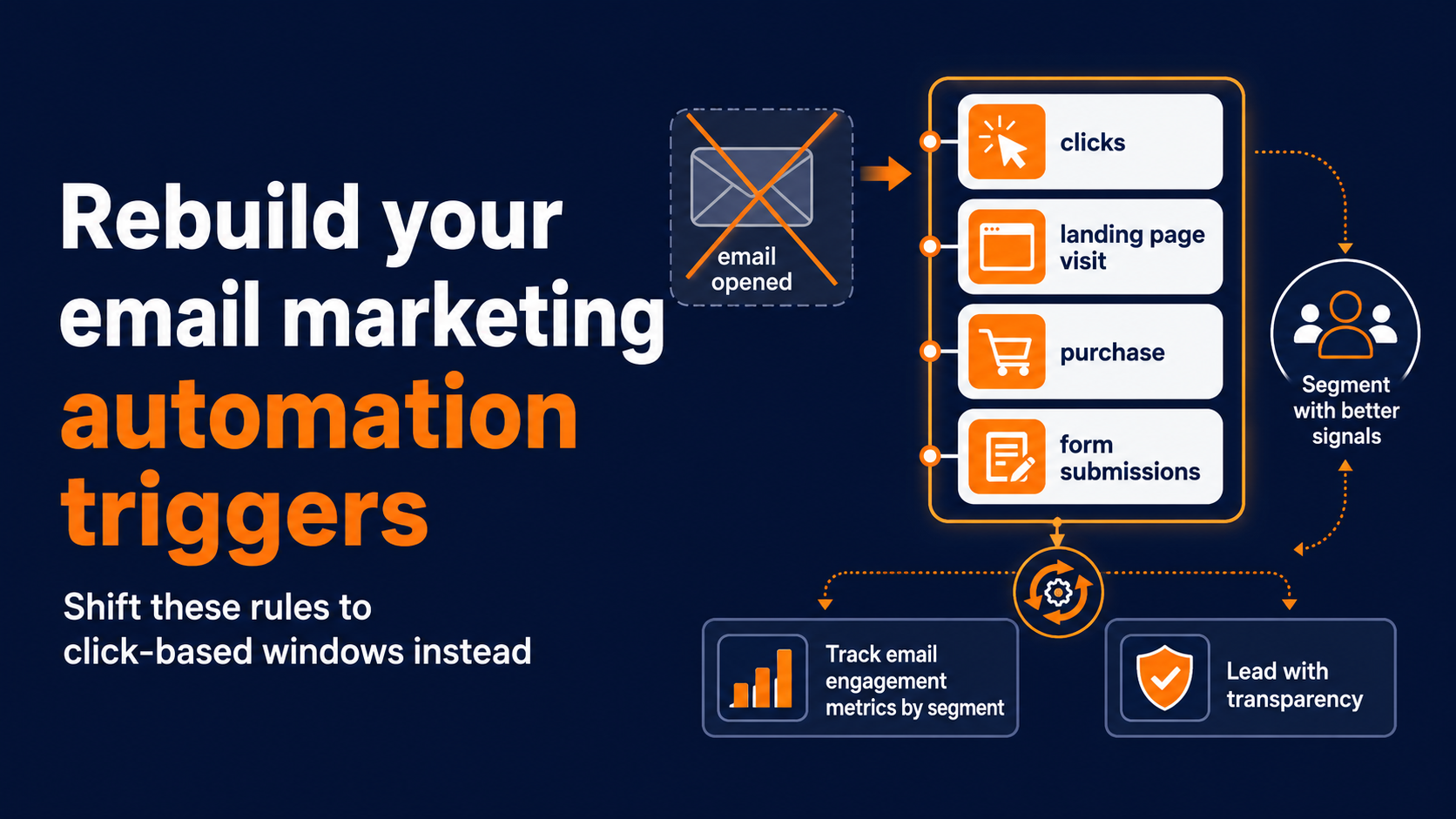
Any flow that's still firing off “email opened” needs a second look as part of your email marketing automation triggers. Rebuild those triggers around clicks or, where available, downstream behavior like a landing page visit or a purchase.
Rebuild your sunset and list-hygiene rules
If you're removing inactive subscribers based on “hasn't opened in 90 days,” you're very likely keeping disengaged Apple Mail users on your list while quietly purging people at other providers who are actually less engaged. Shift these rules to click-based windows instead.
Lean on forms and landing pages for lead capture
Since opens can't carry the weight they used to, direct signals like form submissions and landing page conversions are worth investing in more heavily as primary indicators of interest.
Track email engagement metrics by segment
It can still help to tag Apple Mail subscribers separately in your email engagement metrics so you're not blending unreliable and reliable data together in the same report.
Lead with transparency
Most subscribers want relevant, personalized email. They just don't always connect that to the data collection that makes it possible.
Being upfront about how you use engagement data, and giving people an easy way to manage their subscription, builds the kind of trust that keeps your list genuinely engaged rather than just technically subscribed.
What About Apple's Hide My Email Feature?
Hide My Email lets users subscribe to your list using a randomly generated, disposable email address instead of their real one. They can create or delete these addresses freely.
It hasn't had nearly the same impact on email marketing, but it does mean some subscribers may reach you through an address they can kill at any time. If anything, it can work in your favor: subscribers who know they can cut ties instantly may be more willing to sign up in the first place, since the cost of a bad experience is low for them.
The focus has shifted to click-through rate in email marketing
The bottom line is that the era of relying on email open rate tracking as a stand-alone metric is over, and has been for a while now.
The programs that have adapted are the ones treating clicks, conversions, and direct engagement signals as the backbone of their reporting and their automation, with open rate as a rough directional indicator at best.
The ones still building strategy around open rate are, more likely than not, making decisions on data that's about 50% fiction.
Why Behavior-Triggered Sends Outperform Open-Based Ones
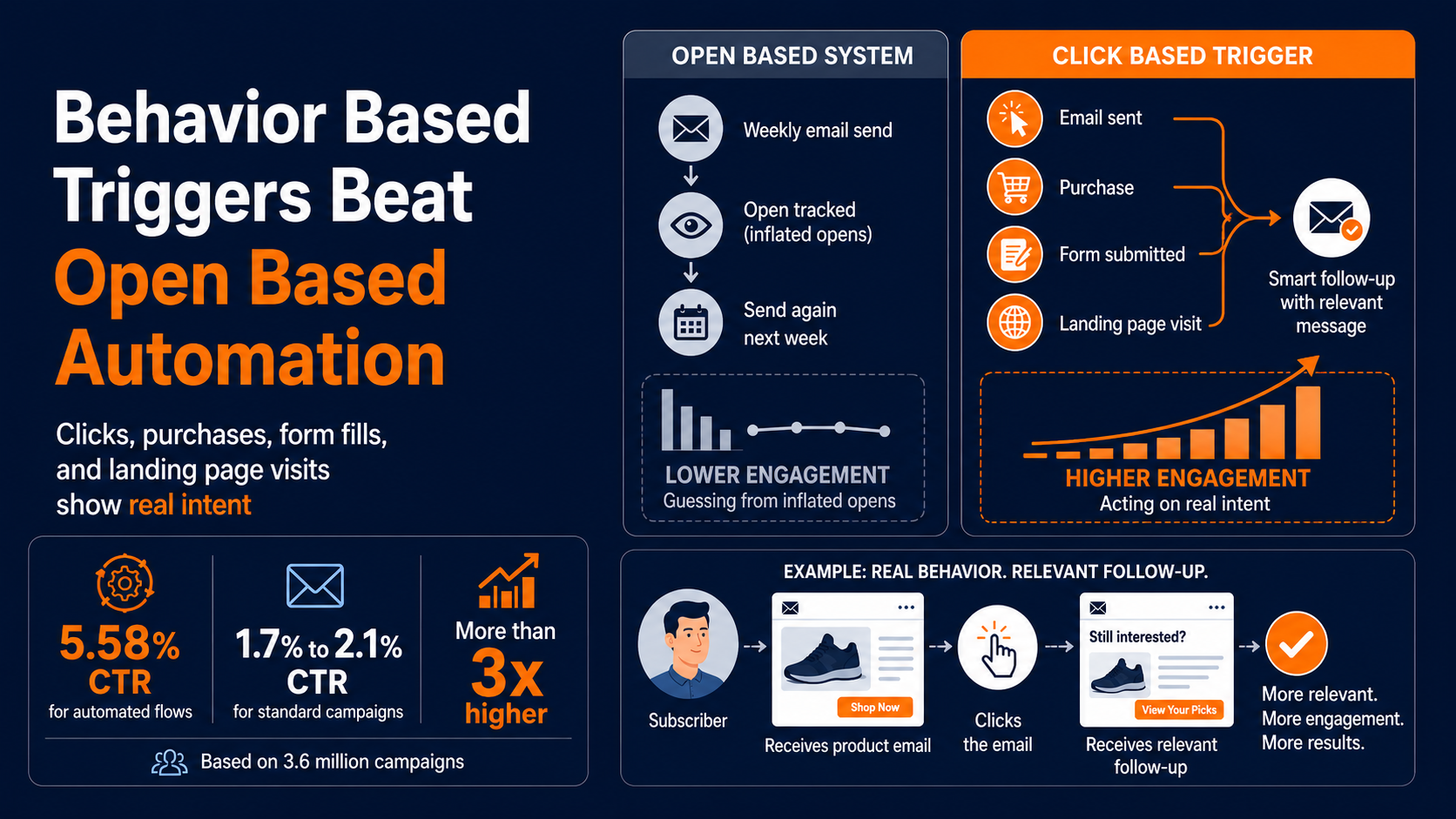
Here's a number worth sitting with. Across a large 2026 dataset spanning 3.6 million campaigns, automated flows averaged a 5.58% click-through rate, compared to roughly 1.7% to 2.1% for standard campaigns, a gap of more than three times, according to a recent benchmarking analysis.
That gap isn't about better subject lines or send-time optimization. It's about timing the message to something the person just did.
That's the part open rate never captured well anyway. An open only tells you a pixel loaded somewhere. A click, a purchase, a form fill, a return visit to a landing page, those are the signals that show someone actually engaged.
Ditching open rates for real customer intent
When your email marketing automation triggers are built around that kind of behavior instead of an open event that may or may not have happened, the whole program gets sharper. Messages go out when there's real intent behind them, not on a schedule built around a metric that's been unreliable for years.
This is also where a lot of teams get stuck, not because the idea is complicated, but because stitching together click data, purchase history, and on-site behavior into a single trigger usually means duct-taping together an ESP, a website analytics tool, and some kind of customer data layer. That's a lot of moving parts for something that should be simple.
Meeting subscribers at the moment of highest intent
Picture a subscriber who clicks through on a product email but doesn't buy. Under an open-based system, that person might get flagged as "engaged" simply because a pixel loaded, then get lumped into a generic weekly send with everyone else.
Under a click-based trigger, that same person gets a much more useful follow-up: a message that references what they actually clicked on, timed to when their interest was highest. One approach is guessing. The other is responding to something real.
Reworking Your Segments Around Signals That Hold Up
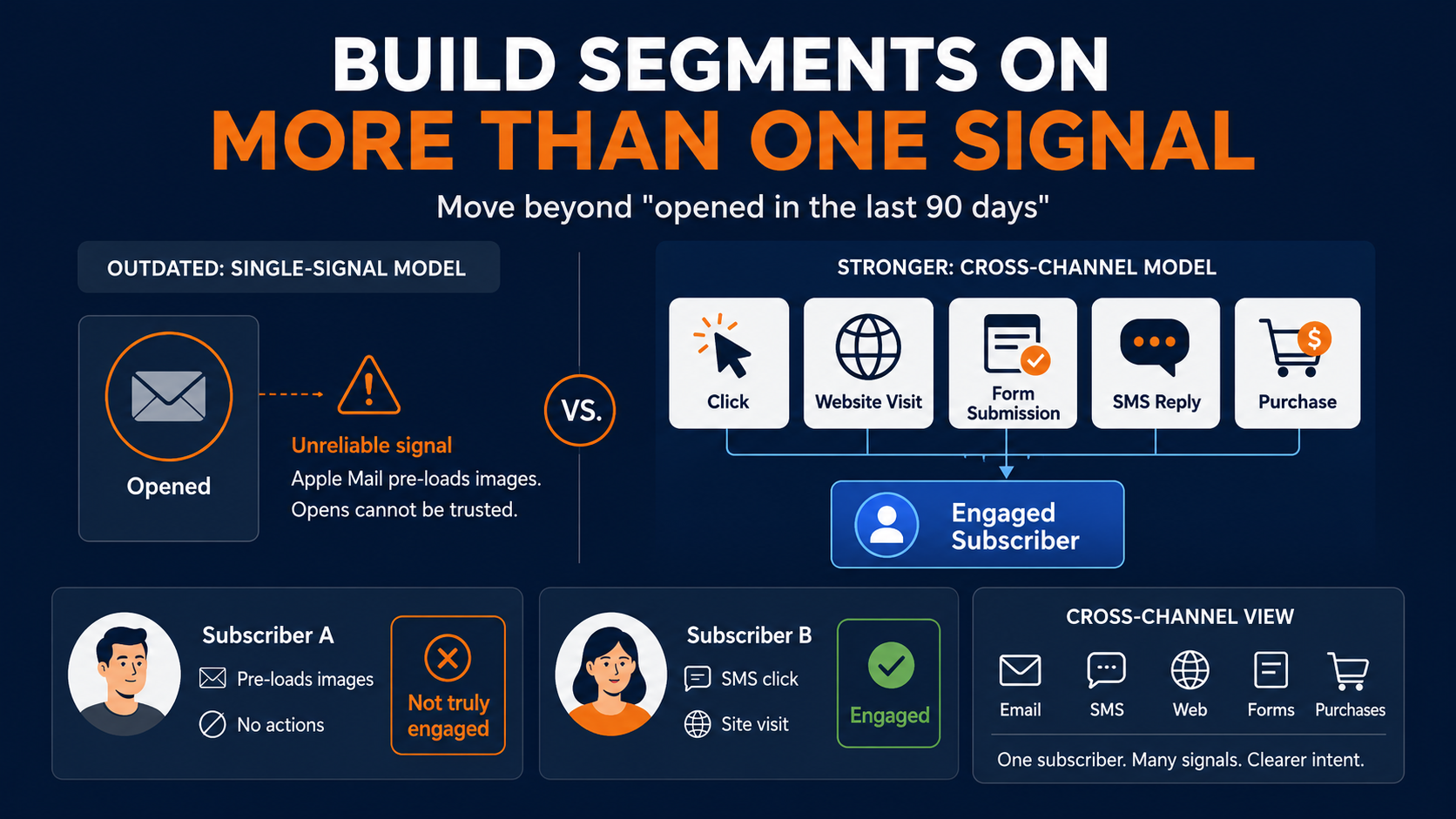
The practical challenge is that most list hygiene and segmentation logic was written years ago, back when "opened in the last 90 days" was still a reasonable proxy for interest.
That logic hasn't been updated in a lot of programs, even though the assumption underneath it stopped holding up once Mail Privacy Protection became standard.
Building engagement models that can't be fooled
Rebuilding those segments isn't just a matter of swapping "opened" for "clicked" in a filter somewhere. It usually means expanding what counts as a signal in the first place. A click is one option. So is a website visit, a form submission, an SMS reply, or a purchase.
The goal is a segmentation model with more than one leg to stand on, so a single unreliable metric can't quietly distort who counts as engaged and who gets suppressed.
Pixel preloads vs. real intent
This is also where email engagement metrics stop being a single number on a dashboard and start being a genuine cross-channel picture. A subscriber who never opens an email but consistently clicks through from SMS is engaged.
A subscriber whose Apple Mail app pre-loads every image but never takes a single action probably isn't. Treating those two people the same, just because open rate says so, is exactly the mistake this whole shift is meant to correct.
How Pinpointe Helps You Move Past Open Rate
We built Pinpointe around the idea that engagement should be measured by what someone does, not by a pixel that Apple pre-loads on their behalf.
Our omni-channel journey builder lets you set triggers on clicks, purchases, site visits, and other real behavior across both email and SMS, so you're never leaning on an open event as your only proof that a message landed.
Reaching the subscribers who actually care
Dynamic segmentation works the same way. Instead of grouping subscribers by "opened in the last 90 days," a segment that quietly fills up with Apple Mail users regardless of their real interest, you can build segments around actual clicks and conversions.
That keeps your email engagement metrics honest, and it means the people getting your next campaign are the ones who've shown you something real, not the ones whose inbox happened to pre-load an image.
Replacing unreliable opens with omnichannel marketing action
The behavioral triggers extend across channels too. If someone clicks through on an email but doesn't convert, that same signal can kick off a follow-up SMS.
If they engage on SMS, that can inform what shows up in their next email. None of it depends on open rate holding steady as a reliable number, because we've built the automation to run on signals that don't get faked by a privacy setting.
For programs that have spent the last few years second-guessing their own open data, this is the fix that actually holds up: automation and reporting built on what people do, not on what Apple's proxy servers do on their behalf.
Building metric stability in an unpredictable privacy landscape
This matters just as much for how you report results internally, not only for how automation fires. A dashboard built on clicks and conversions gives stakeholders a number they can actually trust quarter over quarter, instead of one that quietly shifts every time Apple ships a new iOS update.
That kind of stability is worth more than it sounds like on paper, especially for teams that have to defend their numbers in a planning meeting.
Where This Leaves Your Reporting Going Forward
Open rate isn't going away, and there's no need to strip it out of your dashboards entirely. It still tells you something about deliverability, and a sudden drop can still flag a real problem.
But treating it as a proxy for genuine interest stopped making sense once Mail Privacy Protection became the default experience for a huge share of Apple Mail users, and nothing about that is reversing.
Future-proof your email engagement metrics now, not later
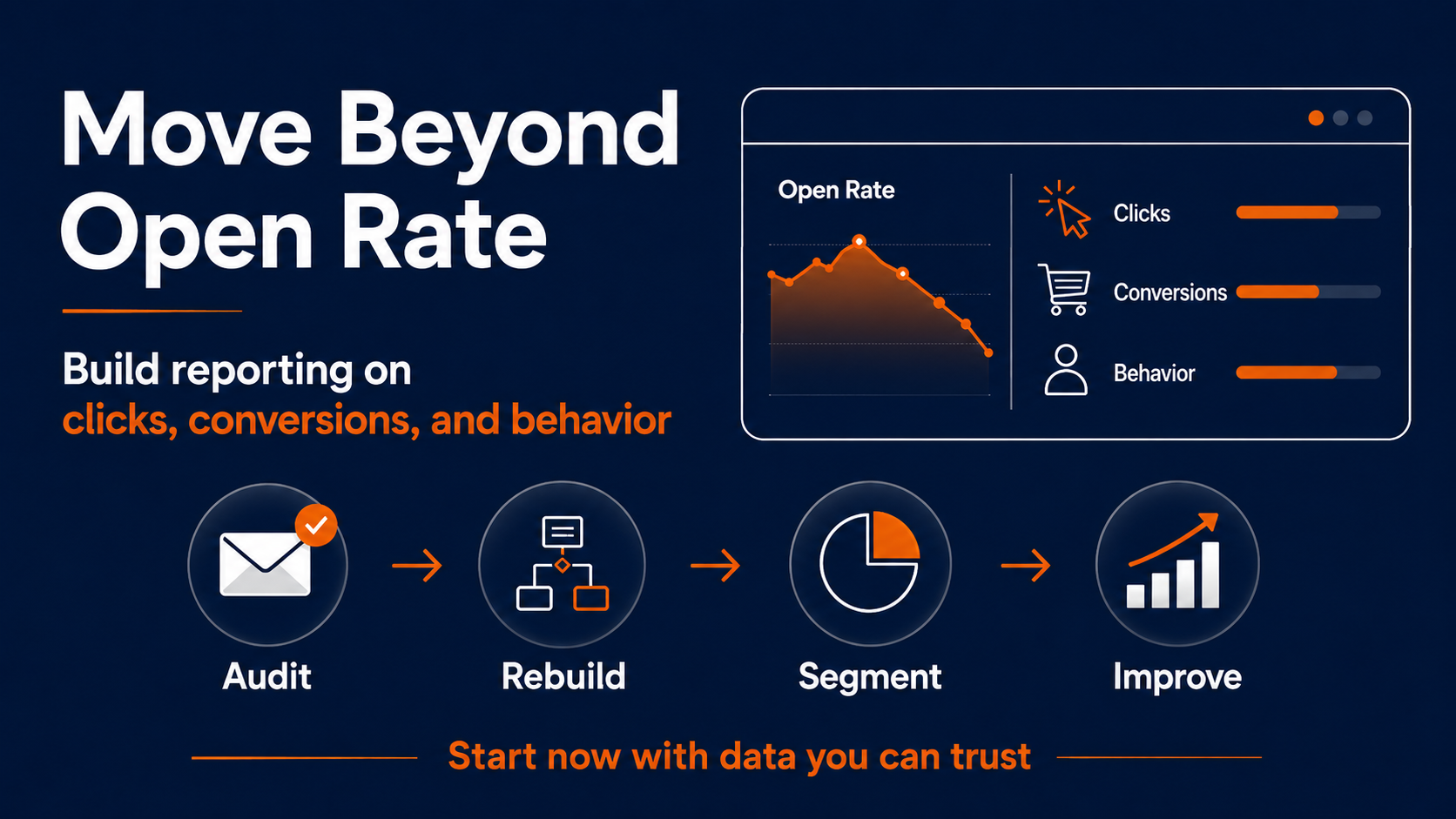
The programs that will hold up over the next few years are the ones rebuilding their reporting and their automation around clicks, conversions, and behavior now, rather than waiting for a cleaner signal that isn't coming.
If your current setup is still leaning on open rate to decide who gets re-engaged, who gets suppressed, and what counts as a win, it's worth a real look at what that data has actually been telling you.
The high cost of waiting for perfect timing
None of this requires ripping out your existing program and starting over. Most teams can make this shift gradually: audit which automations still fire on opens, rebuild those triggers around clicks and conversions first, then work through segmentation and reporting once the automation side is solid.
The order matters less than actually starting, because every month spent building strategy on inflated numbers is a month of decisions made on data that was never telling the full story.
Partner with our team to modernize your automations
If you want a clear picture of how much of your own program is still riding on inflated opens, schedule a demo with our team.
We'll walk through your current triggers and segments together and show you exactly where clicks and behavior should be doing the work opens used to do.