
You've got a subscriber on your list right now who signed up back in 2020, hasn't opened a single email since, and still gets every send you push out. Multiply that by a few thousand contacts, and you're not looking at a healthy, growing email list anymore.
You're looking at a junk drawer. Everyone has one. You know exactly which drawer in your kitchen it is. Dead batteries, a takeout menu from a restaurant that closed years ago, three remotes for devices you no longer own. Your email list is doing the same thing, quietly, every time you hit send.
Protect your reach with routine email list hygiene
Here's the thing about junk drawers: they don't hurt you until you need something out of them fast. Same with your list. A messy list doesn't announce itself. It just slowly drags your numbers down until one day your open rate has cratered, and you're not sure why.
Building a clean email list isn't a one-time project you check off and forget. It's an ongoing habit, and like most habits, it pays off quietly for as long as you keep it up.
The Junk Drawer You Call an Email List
Every list starts clean. Somebody builds a signup form, a few hundred people opt in, and for a while, everything you send lands somewhere real.
Then time happens. People change jobs. They get a new email address and forget to update the old one. They meant to unsubscribe eighteen months ago and never got around to it.
None of that is your fault. But all of it is your problem, because a mailbox provider doesn't care why your list got messy. It only cares whether the people you're emailing actually want to hear from you.
Why "more contacts" stopped being the flex
For a long time, list size was the number people bragged about. Fifty thousand subscribers sounded a lot more impressive than twelve thousand, so nobody wanted to be the one suggesting a cleanout. That math has flipped.
A smaller list of people who open, click, and buy will outperform a bloated one every time. It's not close. Mailbox providers watch engagement, not headcount, and an inbox provider deciding whether to trust your domain is running the same comparison you'd run on that junk drawer: is this stuff useful, or is it just taking up space?
What poor email list hygiene actually costs you
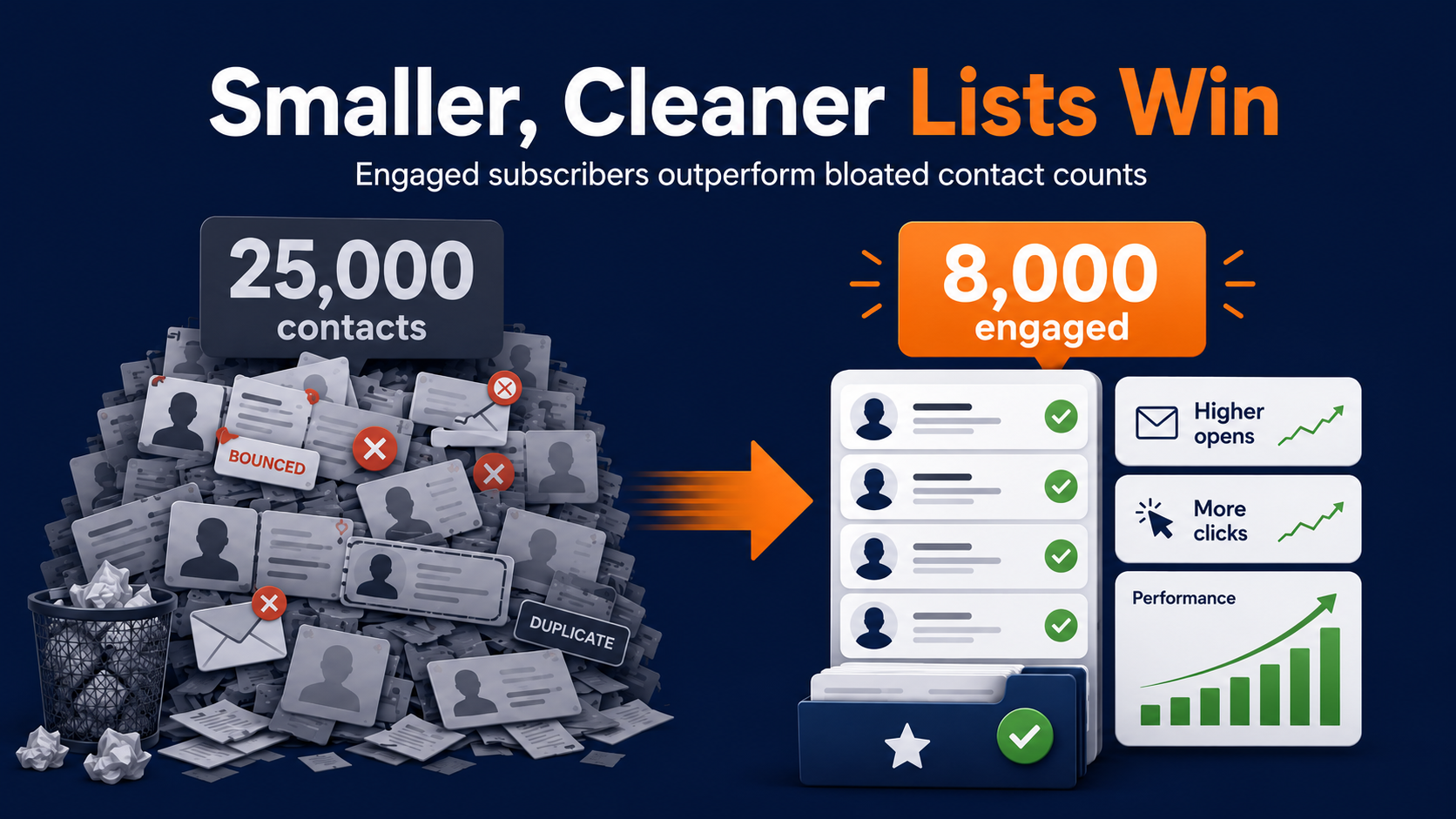
Picture two sends. One goes to eight thousand people who've engaged with your last three emails. The other goes to twenty-five thousand people, most of whom haven't opened anything from you since a Black Friday promo two years ago. The second one feels bigger. It performs worse, and it teaches the mailbox provider that your mail isn't worth prioritizing.
That's the whole argument for email list hygiene in one sentence, so let's actually sit with it: a smaller, cared-for list will make you more money than a larger, neglected one, and the gap grows every quarter you let it go.
If you're new to this, start here
If you're newer to email marketing, list hygiene simply means the ongoing process of keeping your contacts accurate, engaged, and permission-based, rather than something you do once and forget.
It touches four areas: how you organize contacts (segmentation), how you catch bad data (duplicates and typos), how you handle people who've gone quiet (inactives), and how you handle addresses that flat-out don't work anymore (bounces). The rest of this piece walks through each one.
You don't need special tools to start. You need about an hour, a willingness to look at numbers you might not love, and a plan for what to do once you've seen them.
Email List Segmentation Isn't a Nice-to-Have Anymore
Segmentation used to be the thing ambitious teams did once they'd mastered the basics. Now it's the basics. If you're still sending one version of every email to your entire list, you're leaving performance on the table that your competitors are already picking up.
Sorting contacts the way you'd sort a closet
Think about how you'd actually organize a closet. You wouldn't just hang everything back up in whatever order it fell off the rack. You'd group by season, maybe by how often you actually wear something. Email list segmentation works the same way.
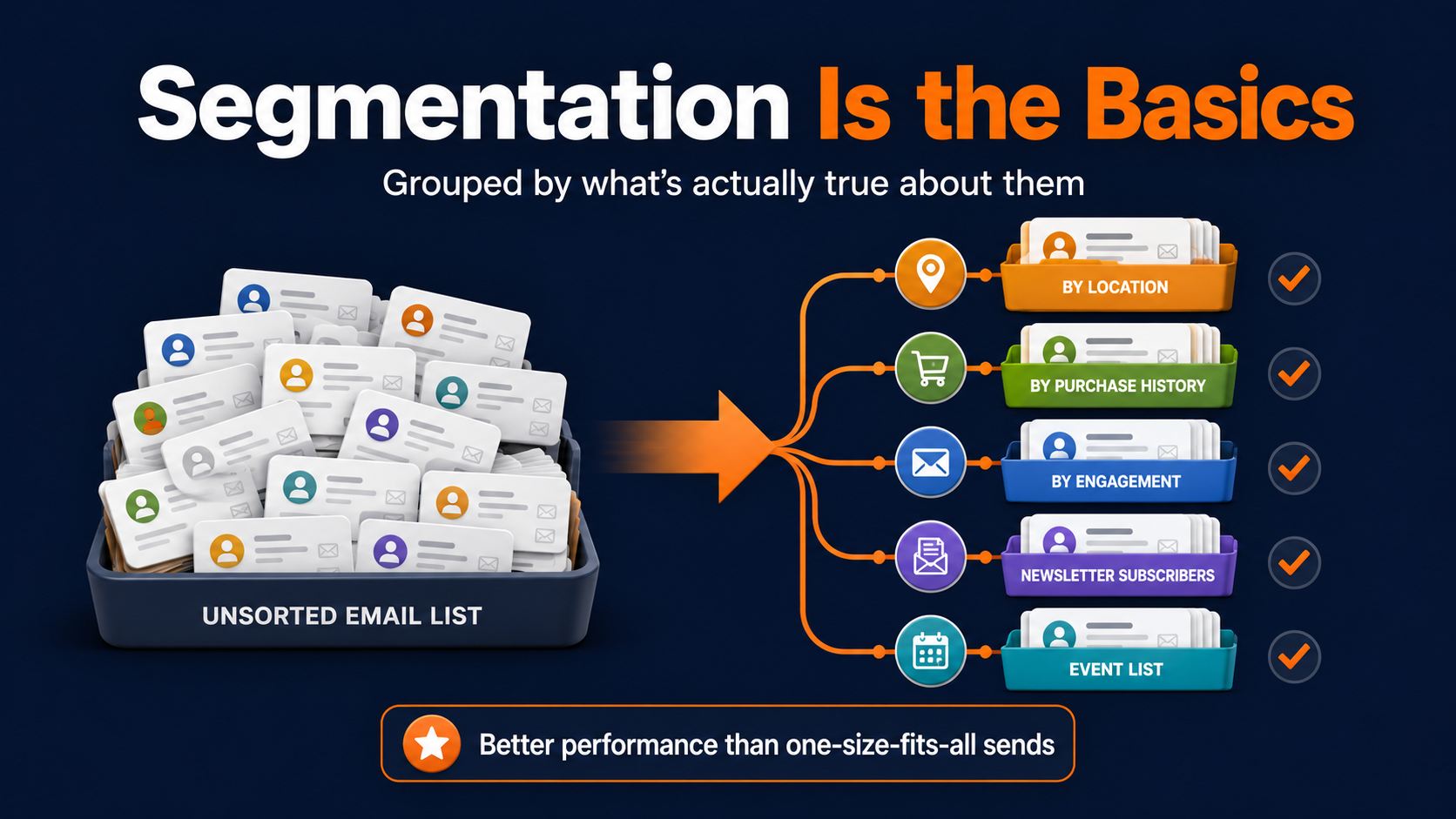
You're grouping contacts by what's actually true about them: where they live, what they've bought, how they signed up, how often they engage.
Use basic data to deliver better messages
Location, job title, industry, purchase history, and where someone sits in your sales cycle are all fair game. So is something as simple as whether they signed up for your weekly newsletter or just your once-a-quarter events list.
The point isn't to build the most elaborate segmentation scheme possible. It's to stop sending the same message to your best customer and someone who signed up for a contest two years ago and never came back.
"Isn't segmentation just more work?"
It feels that way at first. You're building more lists instead of one big one, writing slightly different subject lines instead of a single blast, and it's tempting to assume the extra effort isn't worth it.
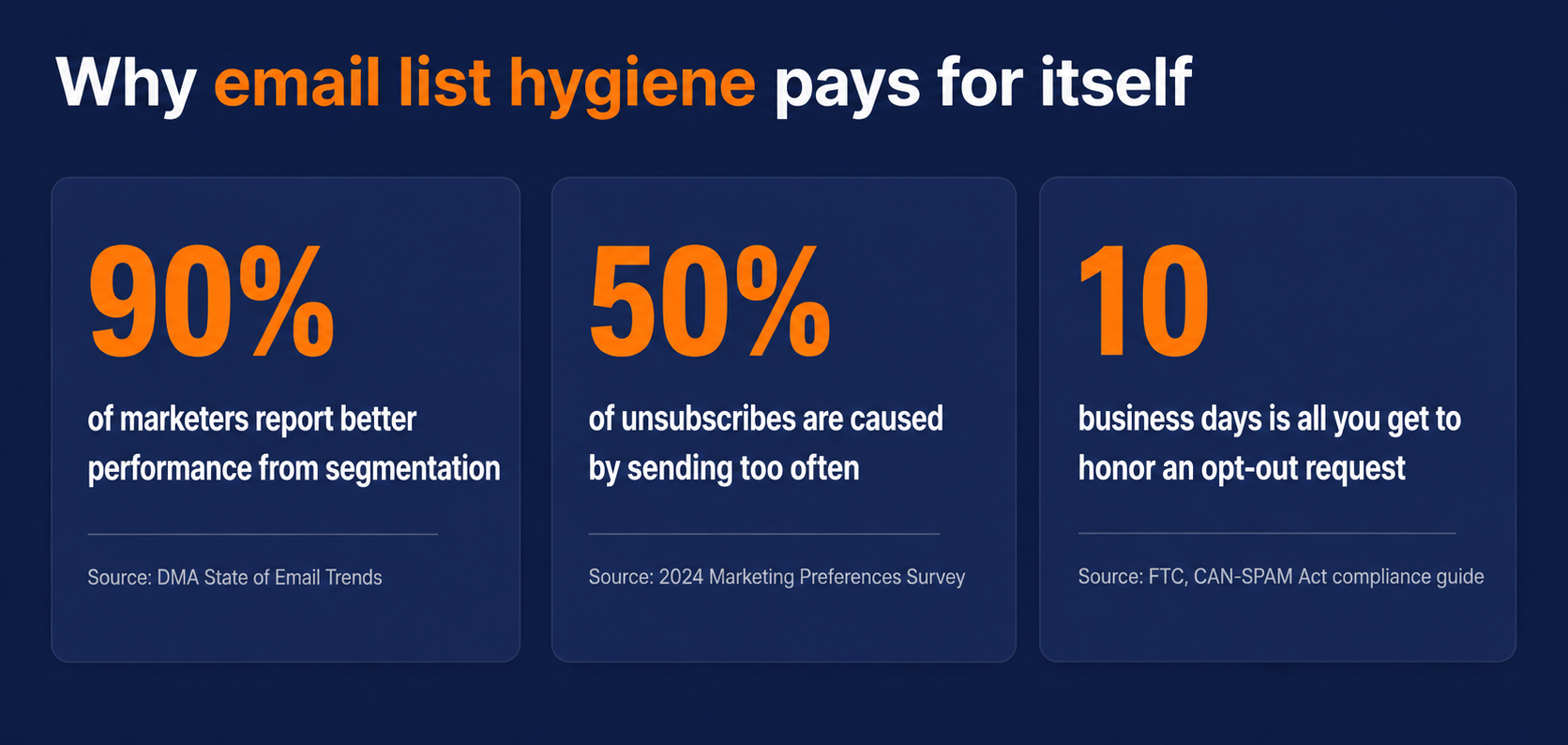
90% of email marketers who segment their lists report better performance compared to sending broadcast blasts, and once you've seen that lift firsthand, the "extra work" framing stops making sense.
Email list segmentation is an investment, not an expense
We've watched this play out with our own send data: a segmented campaign to an engaged group consistently beats a bigger, unsegmented blast, not by a little, but by enough that nobody asks to go back to one-size-fits-all.
The work isn't the cost. The work is the investment, and it pays out every single send after you make it.
Typos, Duplicates, and the Boring Stuff That Wrecks Email List Hygiene
Nobody gets excited about de-duplication. It's the least glamorous part of email list hygiene there is, right up there with checking for typos in domain names. But this boring stuff is exactly where a lot of deliverability damage quietly happens.
The two-letter typo that tanks a campaign
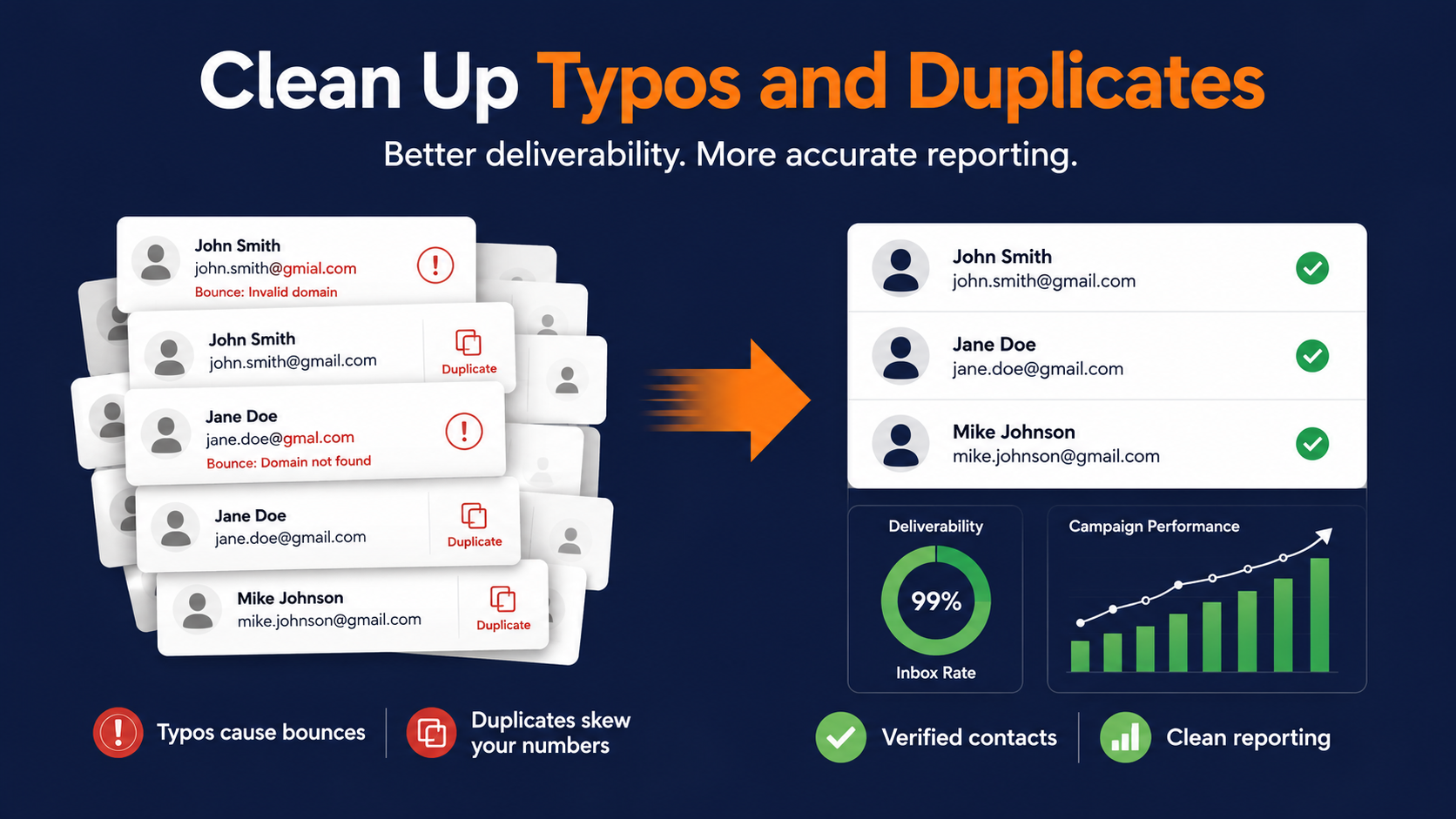
Somebody mistakenly enters "gmial.com" instead of "gmail.com" on a signup form, and that address sits on your list looking perfectly normal until you send to it and it bounces.
One typo doesn't matter. Hundreds of them, accumulated over years of manual entry and imported spreadsheets, absolutely matter.
Most modern email platforms will catch this for you automatically, correcting the obvious domain misspellings and flagging the ones it can't fix with confidence.
If yours doesn't, it's worth a manual pass at least once a year. Think of it as checking the expiration dates in your pantry: tedious, unglamorous, and the reason nothing goes bad without you noticing.
Why duplicate contacts quietly skew your numbers
Duplicates are sneakier than typos because they don't bounce. They just sit there, counted twice, making your list look bigger than it is and your engagement rate look worse than it is, since the same person is technically two "opens" or two "non-opens" depending on which copy the platform tracked.
Clean this up and two things happen at once. Your reporting gets more honest, and you stop paying to send two emails to one person who was only ever going to open one of them.
"They Never Open Anything Anymore": What To Do With Inactive Subscribers
Every list has what we'd call a ghost segment: contacts who are technically still there, still counted, still receiving your emails, and functionally invisible.
They haven't opened, clicked, or replied in so long that sending to them is closer to talking to an empty room than talking to a customer.
Drawing the line between quiet and gone
Defining inactive subscribers isn't the same for every business, and that's the tricky part. A boutique that emails four times a month has a very different definition of inactive than a B2B company sending a monthly digest.
As a general starting point, twelve months without an open or a click is a reasonable line to draw, though you should tighten that if your sending cadence is higher.
Don't wait until someone crosses that line to do something about it. The businesses that handle this well start paying attention the moment engagement starts to fade, not after it's already gone cold.
The re-engagement email that actually works
Before you remove anyone, give them a real chance to come back. A "we miss you" email with a genuine reason to re-engage, whether that's a discount, an update on something they used to care about, or a plain, direct ask about whether they still want to hear from you, will pull back a meaningful chunk of your quiet segment.
The framework below is the version we'd recommend running before you sunset anyone. It's not complicated, and that's the point.
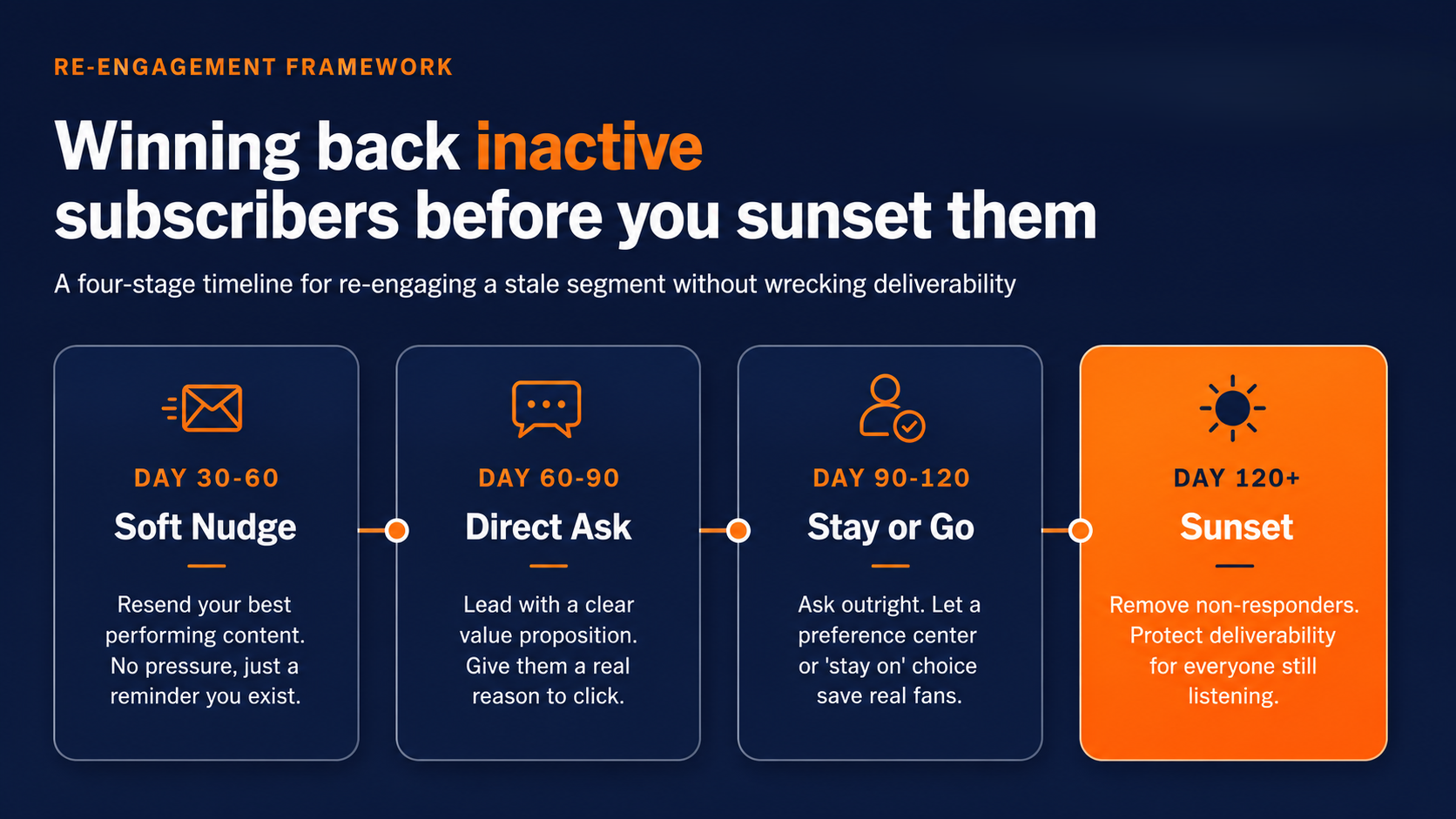
That last stage matters as much as the first three. Removing non-responders after a genuine attempt to win them back isn't giving up on them. It's protecting the deliverability of every email you send to people who are actually listening.
Hard Bounces, Soft Bounces, and Knowing When to Let Go
Bounce management is the part of list hygiene that feels the most mechanical, and it's also the part where the wrong instinct (leave it, it'll sort itself out) does the most damage.
The difference that actually matters
A hard bounce means the address is permanently undeliverable. It doesn't exist, the domain is gone, or the mailbox was closed. There's no scenario where that contact turns into a customer, and leaving it on your list does nothing but tell your email service provider you're not paying attention to who you're emailing.
A soft bounce is temporary. Maybe the recipient's inbox is full, maybe their server had a bad afternoon. One soft bounce is nothing. It's noise. The pattern is what matters, not the single event.
Five strikes and you're out
A workable rule of thumb: if an address soft bounces five times in a row, treat it like a hard bounce and remove it. At that point it's not a temporary hiccup anymore, it's a dead address wearing a temporary-looking disguise.
Most established platforms handle both of these automatically, pulling hard bounces immediately and escalating repeat soft bounces to the same fate. If yours doesn't, this is one of the few list hygiene tasks that really does need to happen on autopilot, because doing it manually at scale just doesn't hold up.
Why ignoring bounces hurts everyone else on your list
Here's the part that's easy to miss if you've never had a deliverability problem: a high bounce rate doesn't just cost you the bounced contacts.
It signals to Gmail, Yahoo, and every other mailbox provider that you're not managing your list carefully, and that reputation hit follows every email you send afterward, including the ones going to your best, most engaged customers.
That's fixable. Clean bounces regularly and consistently, and your reputation with mailbox providers recovers the same way it degraded: gradually, send by send.
Give Subscribers an Off-Ramp Before They Hit Unsubscribe
Every commercial email needs a way out. That's not a suggestion, it's the law. The CAN-SPAM Act requires that you honor an opt-out request within 10 business days, and treating that deadline as a ceiling rather than a target is how sender reputations get quietly damaged.
"Just let me get fewer emails"
Here's a sentence worth sitting with: most people who unsubscribe don't actually want to hear from you less. They want to hear from you *differently*, and you never gave them the option.
Read that again. Frequency and relevance, not "I hate this brand," are driving the vast majority of the people clicking away from you. That's a fixable problem, not a lost cause.
Let subscribers tell you what they actually want
A preference center is the fix. Instead of a binary subscribe-or-leave choice, give people a middle ground: switch to monthly instead of weekly, opt into promotions only, or hear from you about one product line instead of all of them. Every one of those choices you offer is also a piece of zero-party data you didn't have to guess at.
|
Unsubscribe Reason |
Share of Unsubscribes |
What Actually Fixes It |
|
Sending too frequently |
50% |
Preference center with a frequency toggle |
|
Content feels irrelevant |
41% |
Behavioral segmentation, not broader blasts |
|
Never remembered signing up |
Remainder |
Clearer expectations at the signup form |
Double Opt-In: The Best Mess You'll Never Have to Clean
Every tip so far has been about cleaning up a mess that's already been made. Double opt-in is the one move on this list that stops the mess from happening in the first place.
Stopping bad data at the front door
The mechanic is simple. Someone signs up, they get a confirmation email, and they're not added to your list until they click to confirm. It adds one extra step to signup, and yes, that costs you a small percentage of people who don't bother clicking through.
Here's the trade you're making: every contact who does confirm is a real, working email address belonging to a person who actually wants your emails. You've moved the cleanup effort from "after the fact, forever" to "once, at the door."
Filter out low-intent subscribers upfront
If your goal is a clean email list you don't have to keep rescuing, double opt-in is the cheapest insurance policy on this entire page.
The alternative, a list built entirely on single opt-in, tends to drift the same direction over time. One 2026 benchmark found unsubscribe rates climbing from 0.08% to 0.22% across a large sample of campaigns, a jump largely explained by looser signup practices meeting easier one-click unsubscribe buttons.
Double opt-in doesn't eliminate churn. It front-loads the quality control instead of leaving it for a future version of you to deal with.
How Pinpointe Handles the Cleanup So You Don't Have To
We'll be straight with you: a lot of what's above is manual work if you're doing it with a spreadsheet and good intentions. That's not how we think email list hygiene should work, and we're building toward less of it, not more.
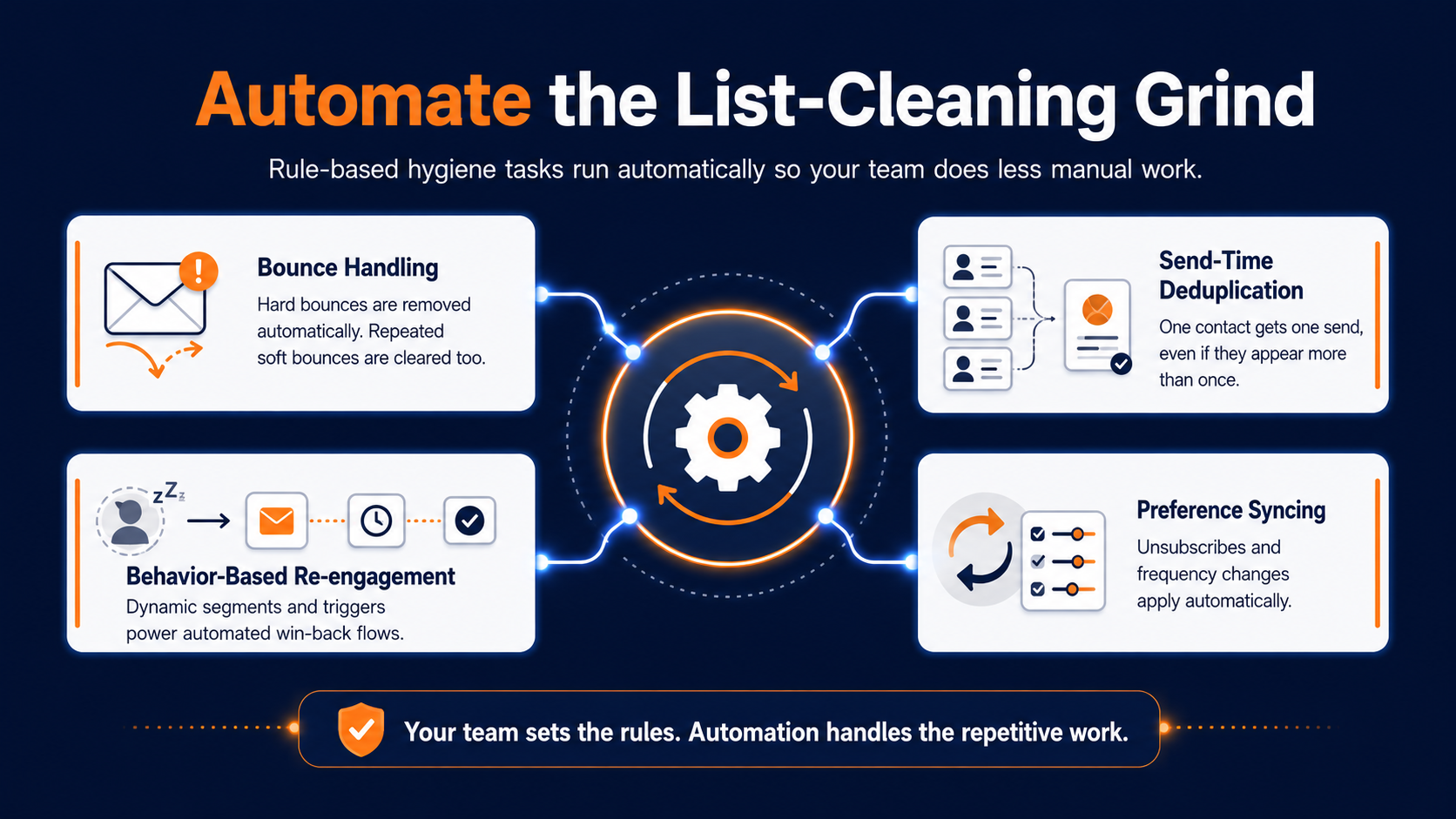
Pinpointe's platform already handles the most mechanical parts of this automatically. Hard bounces are removed the moment they happen. Soft bounces that repeat five times get treated the same way, without anyone on your team having to run that check by hand.
Smart deduplication at the point of send
It's worth knowing how duplicates work under the hood: if you keep contacts across multiple databases within your account, the same person can technically exist in more than one place.
At send time, Pinpointe dedupes automatically against whatever list or segment you're sending to, so a contact referenced twice still only gets one email, or one text, not two.
We're also continuing to invest in smarter, more automated list-cleaning technology across the board, the kind of intelligence that catches messy data patterns, like a typo'd domain, before they ever turn into a bounce. That's an active area of development for us, and it's one we expect to keep getting more capable over time.
Maximize revenue per send with dynamic segmentation
On the segmentation and re-engagement side, Pinpointe's behavioral triggers and dynamic segmentation let you build the kind of automated flows that turn a "we miss you" idea into something that actually runs, targeting the specific slice of your list that's gone quiet without you having to build that list by hand every time.
Abandoned-cart and other automated flows generate meaningfully more revenue per recipient than one-off broadcast sends, and that pattern holds for win-back and re-engagement sequences too: automation built around actual subscriber behavior consistently outperforms a blast sent to everyone at once.
Protect your workflow without replacing your existing tech
Unsubscribes and preference changes flow through the platform automatically as well, so you're never in a position of racing that CAN-SPAM clock manually.
Set up a preference center once, and the frequency or content adjustments people choose get applied without anyone digging through a spreadsheet to make it happen.
We're also expanding the roster of tools Pinpointe connects to natively. If your list hygiene workflow leans on a CRM, a data enrichment tool, or a dedicated email verification service you already trust, expect that list of integrations to keep growing, so the smarter cleaning features we're building work alongside your existing stack instead of asking you to replace it.
Automate the mechanics so you can focus on messaging
None of this replaces judgment. You still decide what "inactive" means for your specific list, what a re-engagement offer should say, and when a segment is worth building.
What Pinpointe automates today is the rule-based grind: bounce handling, send-time deduplication, preference syncing, and that footprint is only going to grow as the smarter list-cleaning and wider integrations roll out.
What this looks like on an ordinary Tuesday
In practice, this means a good chunk of the list hygiene work described in this piece already stops being a quarterly project you have to schedule and remember to do. Bounces get handled the day they happen.
A contact sitting in two of your databases still only gets one email when a campaign goes out, not two. A subscriber who hasn't opened anything in four months gets pulled into a win-back sequence you built once, not one you build from scratch every time someone crosses that line.
That's the direction we're building in: less of the list hygiene workload sitting on your plate every quarter, and more of it just quietly handled as part of how the platform runs.
The Clean List Is the One That Makes You Money
Here's the stakes, plainly: every contact sitting untouched on your list isn't neutral. It's actively working against every email you send to the people who do want to hear from you, dragging down the engagement signals that decide whether your next campaign lands in an inbox or a spam folder.
A clean email list isn't a smaller achievement than a big one. It's the only kind of list that actually does what you built it to do.
Is your list an asset or a junk drawer?
So here's the honest question: if you looked at your list today, segment by segment, bounce by bounce, inactive contact by inactive contact, would you be proud of what's in it, or would you find your own version of that junk drawer?
Ready to see what a properly maintained list could do for your open rates? Schedule a marketing automation audit and we'll walk through exactly what's sitting in yours.