Most new signups decide whether your product is worth their time long before they ever see your best feature. They poke around for a few minutes, hit one confusing screen, and disappear. You never get a cancellation email. You just get a number on a churn report three months later.
Why Onboarding Requires More Than a Welcome Email
The key role that onboarding emails play is bridging the gap between a new sign-up and creating a habit of using your product. Not the welcome email that says hello and calls it a day, but the email drip sequence that actually walks someone from "I created an account" to "I use this every week." Done right, onboarding emails are the difference between a trial that converts and a trial that ghosts you.
8 in 10 people have deleted an app simply because they didn't understand how to use it. The product usually worked fine. The user just never got far enough to find out, which makes it an onboarding problem, and one you should address sooner rather than later.
Why the first week decides the relationship
Customer acquisition typically is the primary focus and gets most of the budget and meetings. But the money you spend getting someone to sign up is wasted if they never reach the point where the product clicks. Onboarding is the cheapest retention work you'll ever do, because you're talking to someone who already raised their hand.
The window is short, though. A new user's attention is highest in the first few days and drops fast after that. Every day you wait to help them reach a first win, you're competing against fading interest and a growing pile of other things demanding their time.
What separates onboarding from a welcome email
A welcome email introduces you. Onboarding does the harder work of building a habit. One is a handshake. The other is a series of small, well-timed pushes that turn a curious signup into someone who depends on what you built.
That distinction matters because a lot of teams check the box with a single welcome message and assume onboarding is handled. It isn't, and the drop-off numbers show it. Greeting people was never the goal. Getting them to the outcome they signed up for is, and then steadily widening what that outcome looks like.
Start Where The New User Actually Is
When someone signs up, they don't want a tour of everything your product can do. They want to accomplish the one thing that made them sign up in the first place. Your first job in any onboarding email is to get them to that moment fast.
Think about what a brand-new user really needs to know to feel the product working. Not the power-user shortcuts. Not the integrations. The single first action that proves the thing does what they hoped it would.
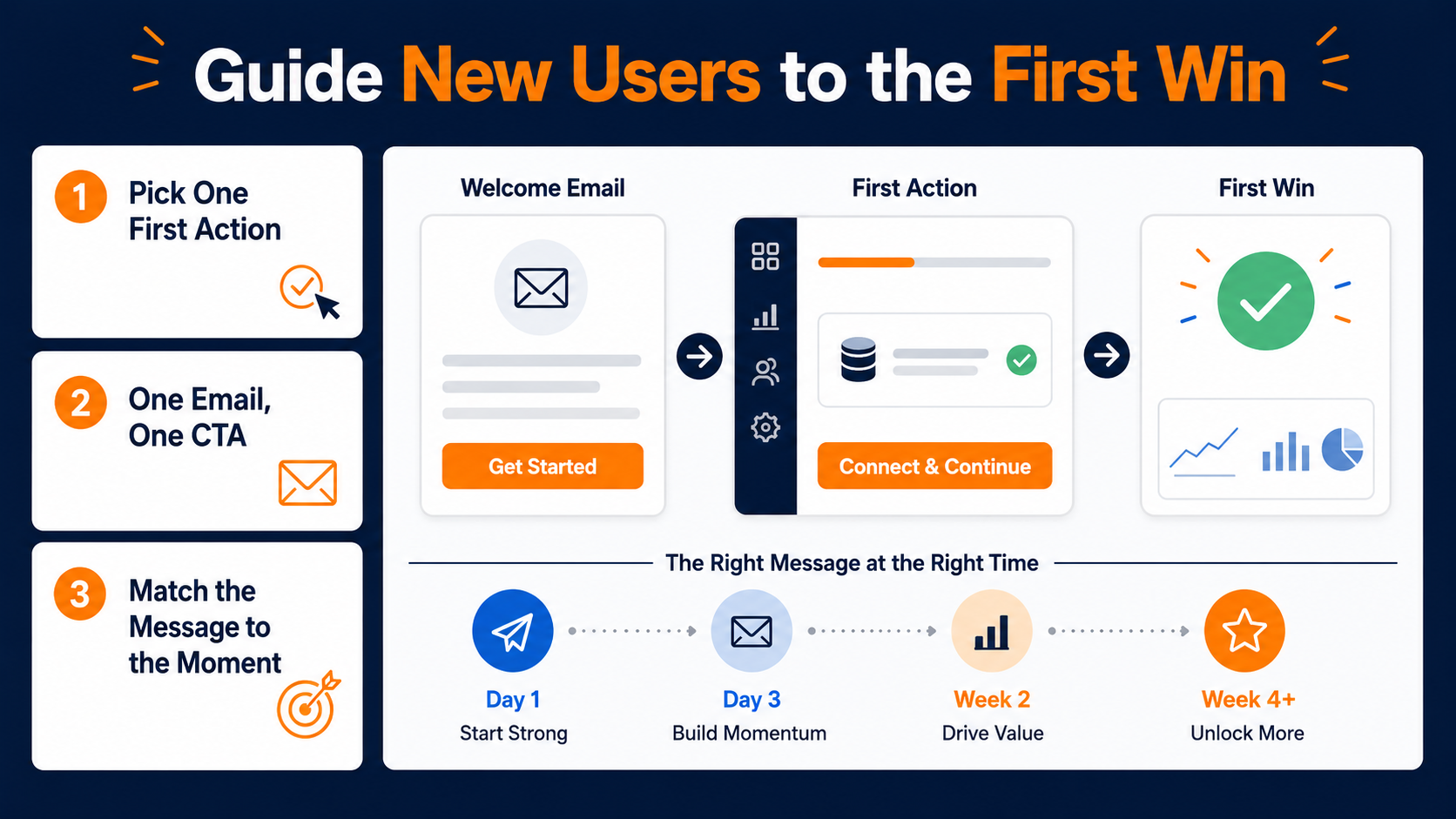
Pick one first action and build around it
Every onboarding email should point at exactly one next step. When you cram five features into a single message, you don't look generous. You look overwhelming, and overwhelmed people close the tab.
A "getting started" email that helps someone set up their dashboard and take one meaningful action will always beat a feature dump. Scheduling, multi-user access, advanced reporting, all of that can wait. Those are answers to questions a new user hasn't thought to ask yet.
Maximize conversions with one clear call to action
The email that converts is the one with a single, obvious call to action that lands the reader somewhere specific. One purpose per message. One button. One outcome.
You can borrow this thinking from the best welcome sequences, which treat the first message as a doorway rather than a directory. Our own rundown of B2B welcome email best practices makes the same case. One job per email, sent the moment someone signs up, because a delay of even a few hours kills your response rate. Onboarding is that principle stretched across a sequence instead of a single send.
Match the message to the moment
A first-day email and a day-nine email are talking to two different people, even if it's the same subscriber. The first-day version earns trust. The later version builds on a foundation that already exists.
That's why the order of your emails matters as much as the content. Reaching people at the right stage, with the right ask, is what separates a sequence that feels helpful from one that feels like noise.
Give Directions, Not A Manual
The instinct when you love your product is to explain all of it. Resist that. Onboarding works best in small, digestible doses, where each email introduces one idea and lets it sink in before the next one arrives.
Short beats thorough here. A new user skimming on their phone will absorb one clear instruction and ignore a wall of text. So write like you're texting a friend who just asked how to get started, not like you're publishing a knowledge base.
Keep the copy lighter than you think it needs to be
Icons, a screenshot, a single line of guidance. That's often enough to move someone forward. The best onboarding emails describe their intent in a sentence and let a visual carry the rest.
If a customer has to read three paragraphs to understand what you want them to do, the email has already failed. Trim it until the action is impossible to miss.

Space the ideas out instead of stacking them
The temptation is to teach everything in email two because you're worried they won't open email three. But for best results, you need to fight that urge. A user who masters one small thing per message builds momentum. A user handed the whole product at once builds anxiety and closes the tab.
Spacing the ideas out also gives each email a reason to exist. When every message carries a single new capability, opening the next one feels worth it. When they all rehash the same overwhelming overview, people stop opening. The cadence is doing retention work on its own.
|
Pro Tip: Write your onboarding email, then delete the first sentence and the last two. What's left is usually the version that converts. |
Timing Is The Whole Game
You can write the perfect onboarding email and still lose the user if it arrives at the wrong moment. Onboarding is a sequence of small nudges delivered when they're useful, which is exactly why sending them by hand doesn't scale.
This is where automation stops being a convenience and becomes the actual strategy. You set up the logic once, and every new user gets the right message at the right stage without anyone on your team remembering to hit send.
Schedule the early sequence around signup
The simplest version is a time-based drip. Three emails, each teaching one entry-level task, scheduled to land one, three, and five days after someone starts a trial. You build it once, and it runs for every signup after that.
Time-based sequences are the training wheels of onboarding, and there's nothing wrong with starting there. Most teams see real lift the moment they move from a single welcome email to even a basic three-part series. That alone puts you ahead of the large share of brands that still send no welcome email at all.
The trap with time-based sequences is assuming everyone moves at the same pace. Some users blow through setup in ten minutes. Others sign up, get pulled into a meeting, and don't come back for a week. A rigid day-one, day-three, day-five cadence treats both the same, which means your day-three email might congratulate someone on a step they haven't taken yet. That's the ceiling time-based drips run into, and it's the reason to graduate to behavioral triggers.
Where each onboarding email should point
It helps to map the early sequence before you build it, so every message has a clear job and a clear next action. Here's a simple onboarding email cadence that works as a starting frame you can adapt to your own product.
|
Onboarding email |
When it sends |
The one job |
|---|---|---|
|
Welcome and first action |
Within minutes of signup |
Get them to a single meaningful step |
|
Feature that solves their reason for signing up |
Day 2 |
Connect the product to their goal |
|
Proof it works |
Day 4 |
Show a result from someone like them |
|
Nudge past the sticking point |
Day 6, if they've stalled |
Remove the friction that stopped them |
Notice the last row. It only makes sense if you can tell whether someone has stalled, which is where fixed timing gives way to reacting to real behavior.
Use behavioral triggers for the next email send
The upgrade from time-based to behavior-based is where onboarding gets really good. Instead of guessing what stage a user is at, you react to what they've done.
Someone clicks a link to a how-to webinar but doesn't register? Fire a follow-up that answers the objection they probably had. Someone finishes the setup step? Skip the basics and show them what's next. You're meeting people where they are instead of talking past them.
Why relevance and timing beat email volume
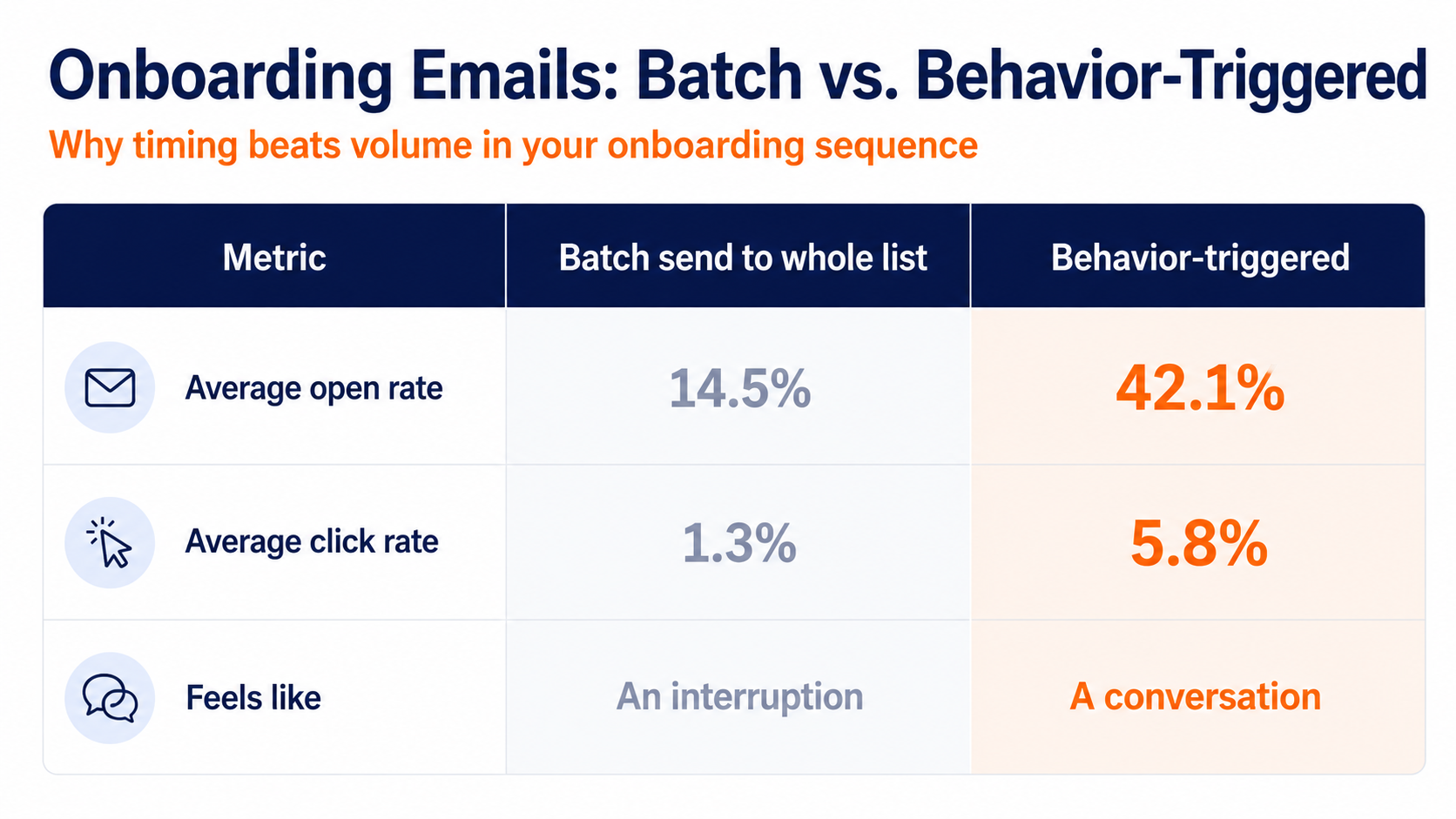
Batch sends to an entire list average a 14.5% open rate and a 1.3% click rate, while behavior-triggered emails hit 42.1% opens and 5.8% clicks. Relevance and timing beat volume every time, and onboarding is the most relevant, best-timed moment you'll ever get with a customer.
The mechanism is simple. A behavior-triggered email arrives because the person just did something, so it's already about them. A batch send arrives because it's Tuesday. One of those is a conversation. The other is an interruption, and your new users can feel the difference immediately.
Build branches, not just a straight line
Once you're reacting to behavior, your onboarding stops being a single track and starts branching. The user who finished setup gets a different email than the user who stalled at step one. The person who explored a specific feature gets follow-up about that feature, not a generic tip they've already outgrown.
This is where onboarding starts to feel less like a campaign and more like a helpful colleague who notices what you're doing. You don't need dozens of branches to get the benefit. Even a handful of "did they do X yet" splits will make your sequence feel dramatically more personal than a fixed drip ever could.
Start with one branch and grow from there. The single highest-value split is usually "activated versus stalled," because those two users need opposite emails. One is ready for what's next. The other is stuck and needs you to clear the thing blocking them. Get that fork right, and you've solved most of what a rigid drip gets wrong.
Move people into the right segment as they engage
Behavior doesn't just trigger the next email. It tells you who someone is becoming. When a new user opens a message about an upgraded plan or a specific feature, that's a signal worth acting on.
Pass that contact into a segment that speaks to where their interest just went. Now your onboarding runs as a set of paths that adjust to the person walking them, rather than one flat track everyone gets pushed down. That's what email personalization actually means in practice.
Keep Onboarding Going After The First Win
Onboarding doesn't end when someone completes setup. The same approach that got a user started can keep pulling them deeper, introducing features they haven't touched and uses they never considered.
Plenty of products do far more than their customers realize. Part of your job is to keep surfacing the next useful thing, so the value of the product grows in the user's mind instead of flattening out after week one.
Show people a second and third reason to stay
A great onboarding sequence doesn't stop at "you're set up." It circles back with "here's something else this can do for you." Four ways to use the tool, one link to discover more, a nudge toward a feature that solves a problem they mentioned at signup.
This is also where upselling stops feeling like selling. If you can show a customer how much they already rely on the product, the case for a higher tier makes itself. You're not pitching. You're pointing at something they've already earned their way toward.
Why post-purchase education is your strongest retention tool
The payoff compounds, too. For most of your customers, doing the retention work is what keeps your churn report from filling up.
The secret to making this work is the same strategy that powered your first emails. Respond to what people actually do instead of just sending messages on a set schedule. The difference between these two approaches is huge.
Offer the resource, not the whole library
When you hand a new user helpful material, give them one thing, not a dozen. A single beginner's guide, a specific blog post, a short walkthrough. The goal is a next step, not a homework assignment.
One resource with a clear call to action outperforms a roundup of ten links every time. Choose the most useful thing for where they are right now, and save the rest for later emails.
Lead with the customer's problem, not your feature
The onboarding emails that land hardest are the ones tailored to a real need. If you can see that a user took an action but never followed through, an email that solves that exact problem will feel like you read their mind.
That's the whole promise of good onboarding. It's less about broadcasting what your product does and more about removing the friction between a user and the outcome they came for.
Don't forget the confirmations that build trust
Onboarding isn't only the teaching emails. The small transactional messages count too. When someone completes setup, upgrades, or takes a meaningful action, a quick confirmation does more than close a loop. It tells the user the product is paying attention, and that you're glad they're here.
These moments are easy to automate and easy to skip, which is exactly why sending them well sets you apart. A receipt, a "you're all set" note, a heads-up that their trial converts on a certain day. Each one is a tiny reassurance that the person made a good decision, and reassurance early is what keeps buyer's remorse from turning into a cancellation.
Deliver personal attention without manual effort
Fold these into the same automated logic as the teaching emails, and they cost you nothing to maintain. The user who just upgraded gets a warm confirmation instead of silence.
The user who hit a milestone gets a nod that says the product noticed. Small touches, sent automatically, that make the whole relationship feel more attended-to than it actually is to run.
Turn Your Onboarding Sequence Into Retained Revenue This Quarter
Most onboarding fails not because the emails are bad, but because they depend on someone remembering to send them. New users churn fastest in those early days, usually because they never reached the first real win.
What you actually need is a marketing automation system that watches for the signup, watches for the behavior, and sends the right message on its own. That's the difference between an onboarding plan and an onboarding program that runs whether or not anyone's paying attention this week.
Drive retention with smart onboarding sequences
So here's what it comes down to. Point each onboarding email at one action, send it when it's useful, and let behavior decide what comes next. Start with a simple time-based series, upgrade to behavior triggers, and use segmentation to give every signup a path that fits them.
That's a real retention lever, and the same onboarding research showed nearly two-thirds of customers weigh the support they'll get after buying before they even commit, so getting this right pays off before the sale closes too.
The teams that treat onboarding as an automated program, not a one-off welcome, are the ones who stop leaking hard-won signups. If you want to see what that looks like in practice, request a demo and we'll walk you through an onboarding sequence built for your product.