Social media and email marketing work best as a loop. Social media marketing reaches people who don't know you yet. Email marketing turns the ones who raise their hand into subscribers you can reach on your own schedule. Putting these two together creates a feedback loop where those subscribers flow back out as followers, sharers, and ad audiences.
However, many teams still run the two on separate calendars with separate owners instead of running them in a coordinated way. The social team posts, the email team sends, and nobody checks whether a follower ever made it onto the list.
This guide covers the practical connections between the two channels. That means growing each audience from the other, running campaigns across both, retargeting your list on social, and measuring what happens. It's written for marketers who already run both channels and want them pulling in the same direction.
Key Takeaways
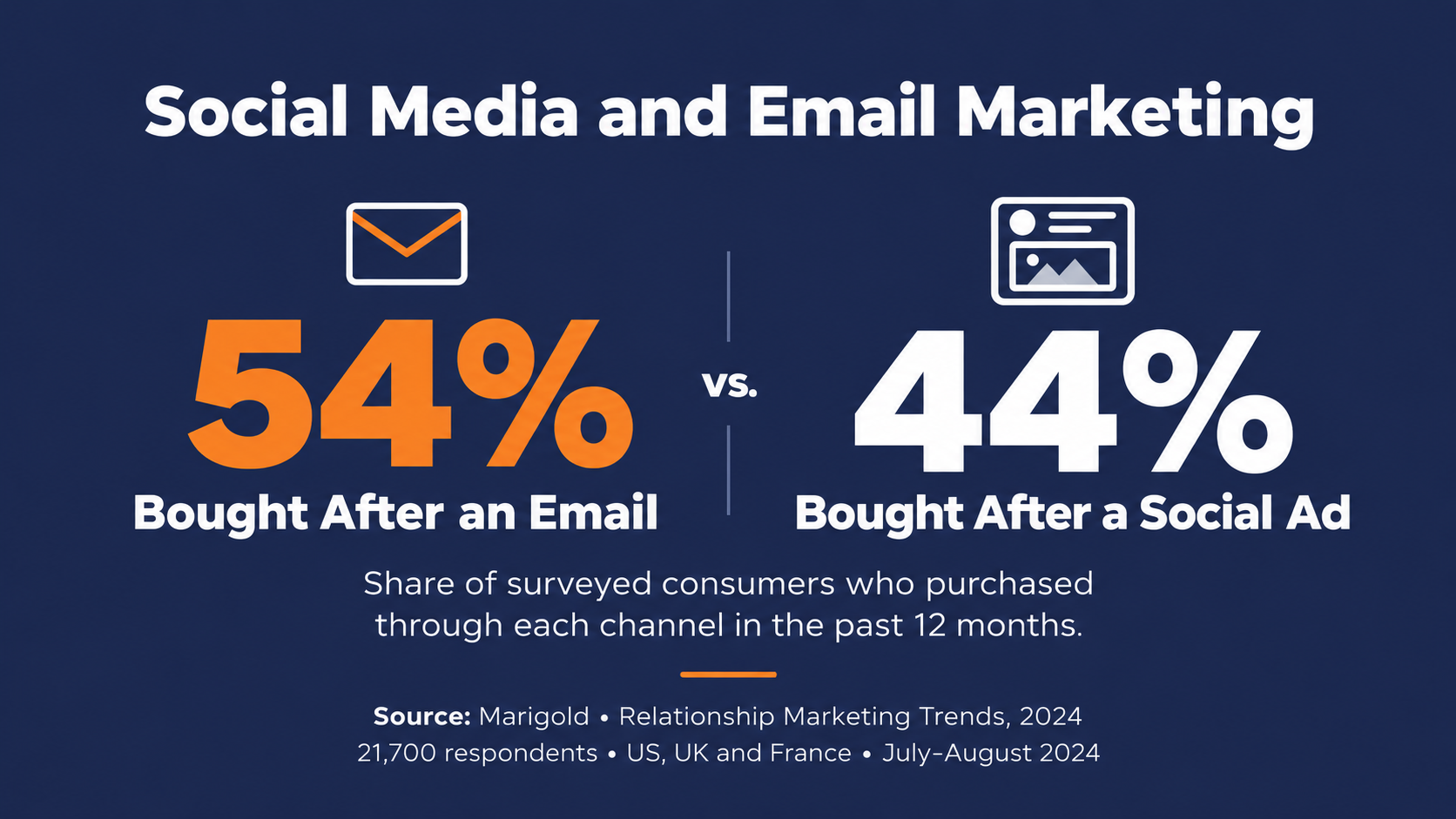
- Email edges out social for reported purchases: In a Marigold survey of 21,700 adults in the US, UK, and France, 54% said they bought something after an email in the past year, compared with 44% for social media ads and 43% for social posts.
- Younger buyers respond more to social: Among respondents aged 65 to 74, 65% reported an email-driven purchase versus just 38% of those aged 18 to 24, while social ads swayed 53% to 54% of 18 to 34-year-olds and social posts swayed 55% to 57%.
- Newsletter promotion converts followers: After a year of promoting its newsletters on organic social, Litmus found 40.7% of the people who signed up through that promotion were new subscribers to its email program.
- LinkedIn sets hard matching minimums: LinkedIn requires at least 300 uploaded rows and 300 matched members before a contact-list ad will serve, caps lists at 20 MB or 300,000 records, and recommends uploading at least 10,000 email addresses to reach that floor.
- B2B marketers already split the work between channels: In CMI and MarketingProfs' 2026 research, 76% of B2B marketers rated LinkedIn the most effective channel for thought leadership and 54% rated email newsletters, while 85% personalize email campaigns versus 34% who personalize social content, evidence for why social media and email marketing work best as a coordinated pair rather than a single channel.
In this guide
- How Social Media and Email Marketing Fit Together
- Turn Social Followers Into Email Subscribers
- Use Email to Grow Your Social Audience
- Run Campaigns That Span Both Channels
- Retarget Your Email List on Social Platforms Responsibly
- Measure What Each Channel Does for the Other
- Connecting Social With Email Automation
How Social Media and Email Marketing Fit Together
Litmus describes email as strongest at the bottom of the funnel, in retention, transactions, and advocacy, while social media does its best work on awareness, community, and consideration.
Social is where people find you. Email is where they decide to stay. Social media and email marketing integration is the work of building clear, measurable paths between those two places.
What each channel does best
A social feed is fast and public. People discover you there, react in the moment, and share you with their own networks. The trade-off is that the platform decides who sees each post and when, and you have little control of the algorithm and how your content is promoted. Many of the platforms have also become more "pay-to-play," and your reach can be quite limited unless you are running paid ads.
Your email list works on different terms. You choose who to send to and when, rather than depending on a social feed's algorithm, and you can tailor each message to what you already know about the subscriber. That's why most integration tactics come down to moving people from the first place to the second.
Mailbox providers still decide whether a message reaches the inbox or the spam folder, so owning the list doesn't make deliverability someone else's problem.
Why your audience splits across both channels
In Marigold's survey of 21,700 adults in the US, UK, and France, 54% said they had bought something in response to an email in the past year, compared with 44% for social media ads and 43% for social posts. Those numbers are closer than the usual "email beats social" framing suggests.
The age split is where it gets interesting. Among respondents aged 65 to 74, 65% reported an email-driven purchase, against 38% of those aged 18 to 24. Social ads moved 53% of 18 to 24-year-olds and 54% of 25 to 34-year-olds, and social posts moved 55% and 57%.
This is consumer data, so treat it as context rather than a hard rule for B2B, but the direction is still sound. The people you want to reach don't all respond to the same channel, and a program built on one of them leaves part of the audience to chance.
What this looks like for B2B teams
B2B marketers already sort the channels this way. In CMI and MarketingProfs' 2026 research on 1,015 B2B marketers, LinkedIn (76%) and email newsletters (54%) were rated the two most effective channels for distributing thought leadership.
The same research found 85% of B2B marketers personalize email campaigns, compared with 34% who personalize social content, and nearly 60% personalize in only one or two channels. This means that LinkedIn tends to carry the reach, and email carries the one-to-one conversation. What's often missing is the handoff between them.
Turn Social Followers Into Email Subscribers
Your followers are an audience that's already engaged with you. They've chosen to see your content, but you only reach them when the platform decides to show it. Moving them into email gives you a direct line that doesn't depend on a feed.
Promote your newsletter on a regular schedule
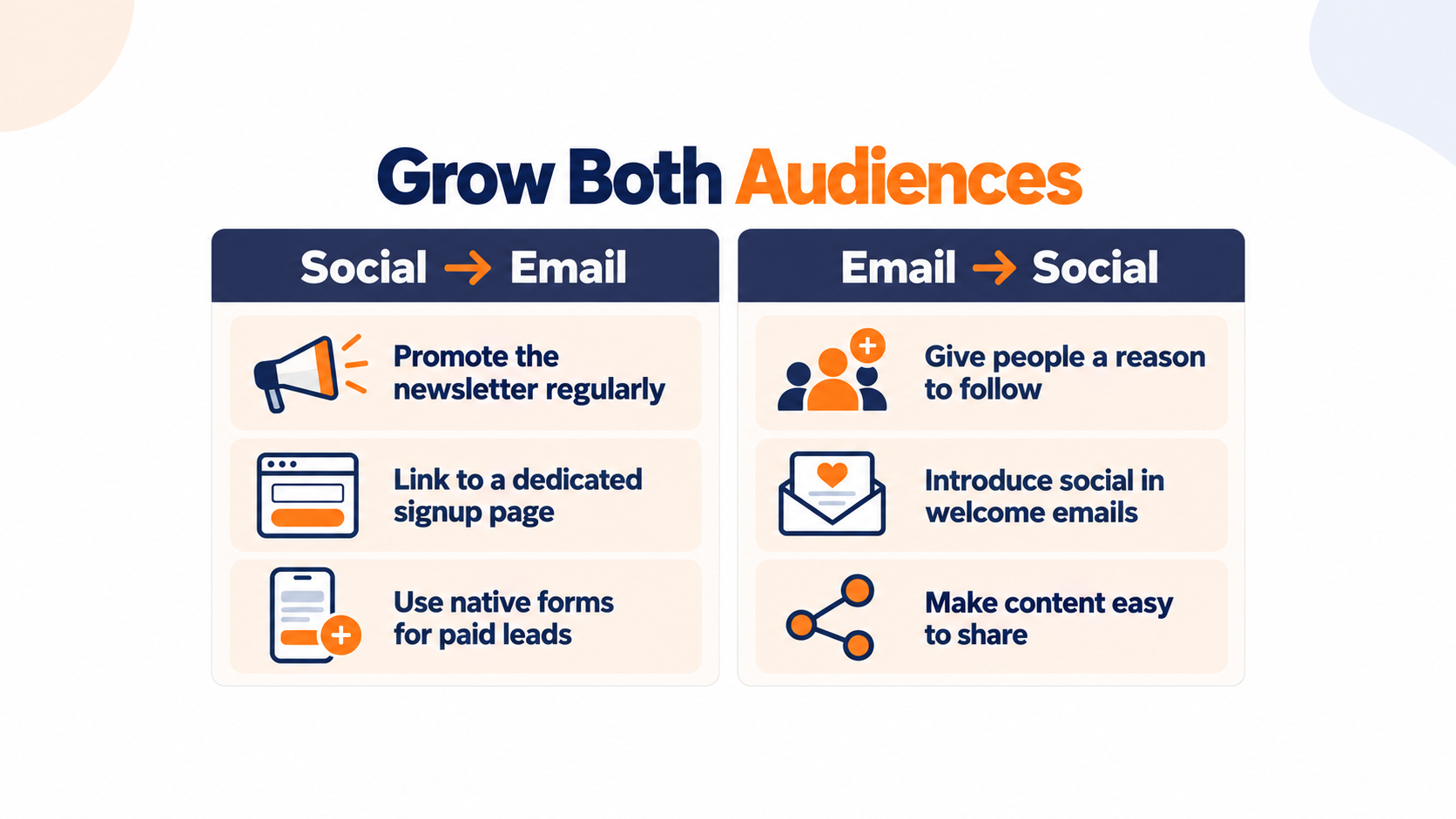
Plenty of followers don't know you have a newsletter at all. After a year of promoting its newsletter on organic social channels, Litmus reports that 40.7% of the people who signed up through that promotion were new to its email program.
That's one brand's result, and it covers signups from the promotion only, not growth of the whole list. But it still makes the case for putting promotions for your newsletter on the social calendar as a recurring item. Show a past issue, say what subscribers get, and link straight to the signup.
If list growth has stalled more broadly, it makes sense to pair this with the rest of your email list building strategies rather than treating social as the only lever.
Use lead forms instead of link posts
Organic posts that send people off the platform tend to earn little engagement. Socialinsider's analysis of 25 million Facebook posts from 130,683 business pages found link posts averaged a 0.05% engagement rate, the lowest of any format, against a 0.15% average across all posts.
That's organic data, so it says nothing about paid campaigns. However, it does suggest a link post is a weak way to ask for a signup.
For paid list-building, native lead forms offer a different advantage. They cut the steps between the ad and the signup, because Meta Lead Ads open a mobile-friendly form that uses information people have already shared with Facebook, so they can sign up without leaving the app. One detail to know before you launch is that leads from a lead ad belong to the Facebook Page that ran it.
Send traffic to a signup form you own
When a post does link out, send people to a dedicated signup form or landing page instead of your homepage. Someone arriving from a feed has a few seconds of attention, and a page with one job uses all of it.
Memphis Zoo grows its list with embedded sign-up forms on its website and uses its Pinpointe reporting to see which content sends readers to its ticketing platform. The zoo's forms aren't a social campaign, but the setup is the one you want waiting at the end of a social link. You get a form built for the signup, plus reporting that shows what happens next.
Whatever tool builds the form, following email opt-in form best practices does more for conversion than the traffic source ever will.
Exclude people who are already subscribed
A lead-gen campaign that reaches your current subscribers spends budget collecting addresses you already have. Meta's documentation on exclusion targeting describes excluding an audience of current customers when you run a campaign to acquire new ones.
Apply the same logic to your list. Upload current subscribers as an exclusion on every list-growth campaign, and refresh it on a schedule so new signups drop out too.
Get the welcome email out while interest is fresh
A lead collected on a social platform sits there until something moves it. If that means a weekly CSV export, your new subscriber gets a welcome email days after they asked for it.
Connect the lead source to your email platform directly so the welcome sequence starts when the signup happens. The same welcome email sequence thinking applies here. The faster it fires, the more it capitalizes on interest that's still fresh.
Pro Tip. Put the offer from the lead ad in the subject line of the first email. The subscriber signed up for that specific thing a few minutes ago, and seeing it again confirms they're in the right place.
Use Email to Grow Your Social Audience
This strategy works when you flip it the other direction as well. Subscribers already trust you with their inbox, which makes them a natural audience to invite to follow, share, and advocate. The key is giving them a reason beyond a row of share icons.
Give every social link a reason to click
Litmus's director of brand and content marketing, Jaina Mistry, advises against dropping in bare social icons. Tell subscribers what they'll get on each channel instead, and weigh whether social links pull attention from the email's main call to action.
"Follow us on LinkedIn" asks for something. "Get the monthly benchmark chart on LinkedIn before it hits the newsletter" offers something. The second one earns the click and the follow.
Add social in your welcome series
New subscribers are still figuring out what you're about, which makes the welcome series a natural place to introduce your social channels. Litmus suggests saving dedicated "follow us" emails for new subscribers or your most engaged readers rather than sending them to the whole list.
One email in the welcome sequence is usually enough. Say which channel carries what, and link to each profile.
Make sharing one click
Share-with-your-network links let a subscriber post your content to a social network in one click. Support for pre-filled share text varies by network, so test each link before it goes out.
The reach inside a shareable list can be large. Byron Ltd., a bespoke tailoring business built on referrals, used Pinpointe's Forward to a Friend forms and website embeds to multiply its customer database 30x, from 5,000 to 150,000 subscribers in just over a year.
That growth came from forwarding and embedded forms rather than social platforms, but it shows what happens when passing your content along takes almost no effort.
Offer social to disengaged subscribers
Some subscribers stop opening email but still want to hear from you. Litmus recommends offering social channels as an alternative in re-engagement emails or on the unsubscribe confirmation page, so the relationship moves instead of ending.
A quiet subscriber who follows you on LinkedIn keeps the relationship alive on another channel, and that leaves the door open for them to come back to email later. It's the same instinct behind re-engagement campaigns for inactive subscribers. You are offering another way to stay in touch before you let them go.
Run Campaigns That Span Both Channels
The third kind of integration Litmus describes runs one campaign across both channels at once, rather than using each channel to fill the other. Done well, a follower who sees the launch on LinkedIn and a subscriber who gets the email are hearing the same story at the same time. It's the same logic behind coordinating email and SMS marketing. You pick one message and let each channel carry it in its own format.
Tell one story in two formats
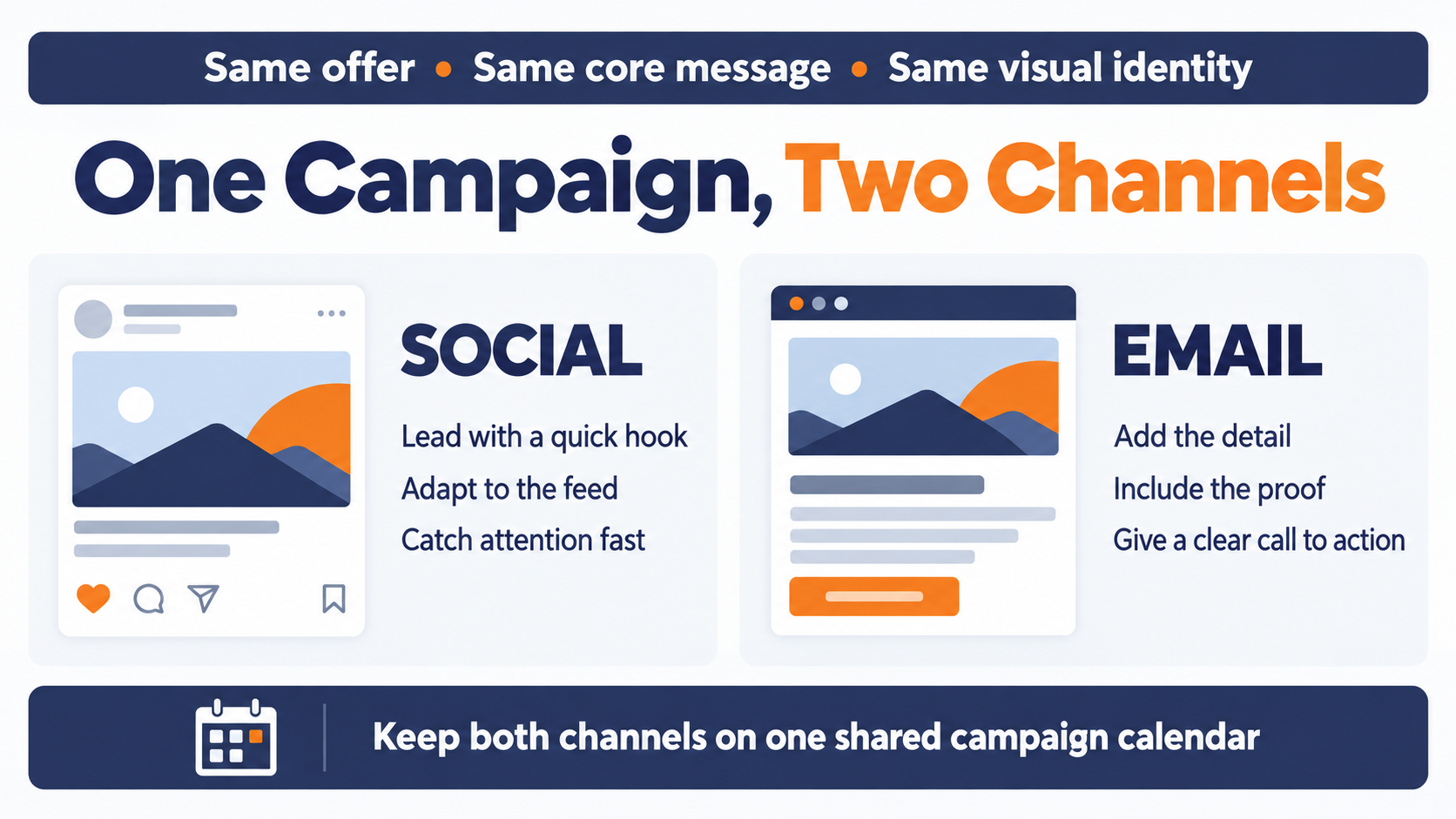
Keep the offer, the core message, and the visual identity consistent, then adapt the format. A social post needs a hook that works in two seconds. The email can carry the detail, the proof, and the full call to action.
The practical way to organize this is with a shared campaign calendar. When the social post and the email for the same launch sit in the same row, mismatched dates and offers get caught before anyone sees them.
Put social proof into the inbox
Social content can do real work inside an email. Litmus recommends featuring a curated set of your social posts, highlighting your most-liked posts, or asking subscribers to tag you on social.
You don't need special tooling for this. A screenshot of a customer post, used with permission, carries more weight than another paragraph about how much people like you.
Retarget Your Email List on Social Platforms Responsibly
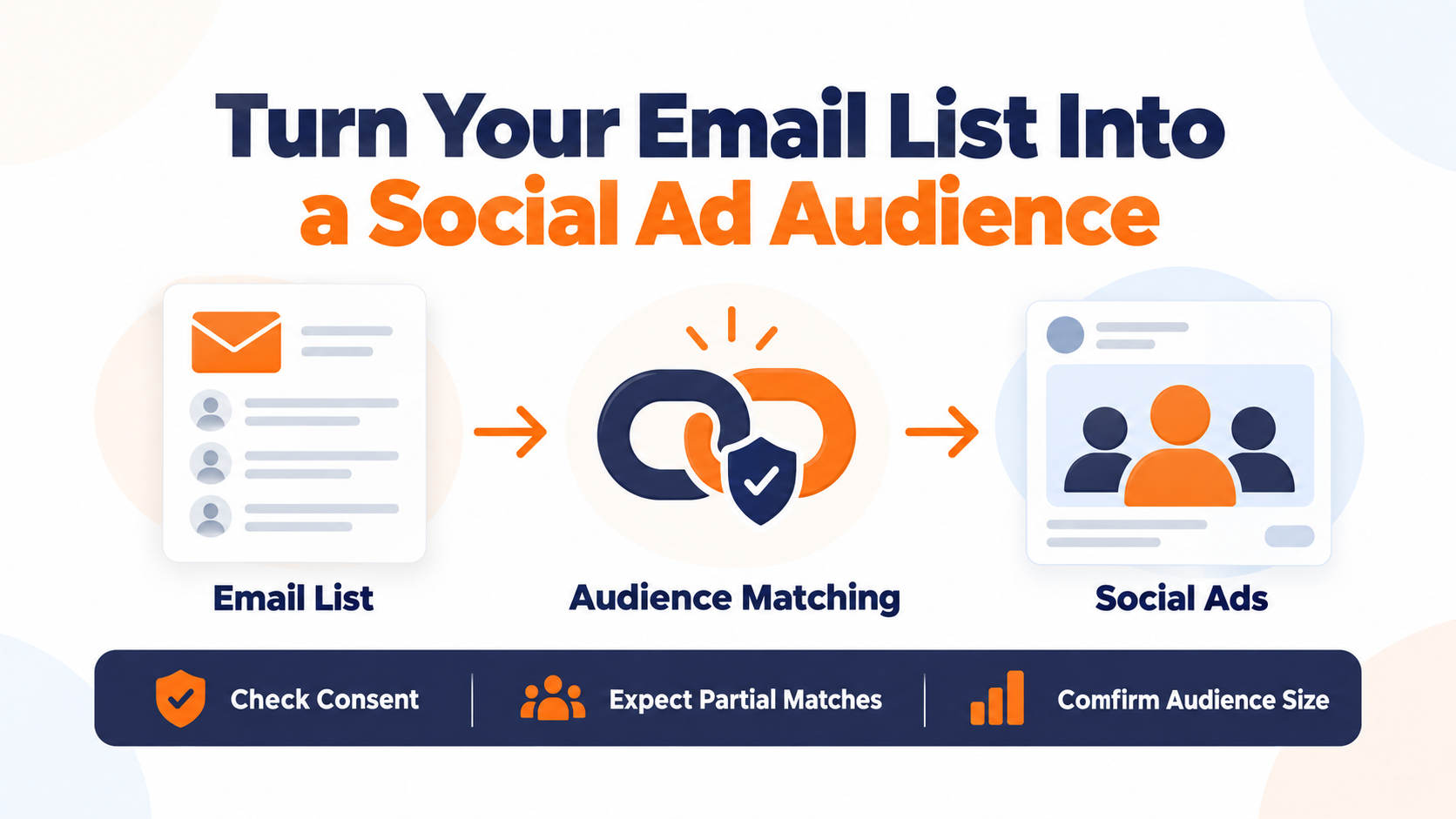
Your email list can also become a social ad audience. That lets you reach subscribers in their feeds with a launch or offer, or keep them out of campaigns meant for new prospects. It also means handing personal data to another company, so the setup deserves some care.
How list matching works on Meta
Meta's Customer List Custom Audiences let you upload identifiers you've collected, such as email addresses and phone numbers, so you can advertise to those people on Facebook, Instagram, and Audience Network. The list is hashed on your side before it's sent to Meta, and Meta compares those hashed values against its own to find matches.
Match rates depend on the identifiers you provide and whether they line up with what people used on the platform. Expect only part of any list to match, especially when you are uploading lists from B2B efforts into social platforms.
LinkedIn minimums for B2B lists
LinkedIn is the natural retargeting channel for most B2B lists, and it has hard floors. LinkedIn's contact-list rules require at least 300 rows to upload and at least 300 matched members before a campaign will serve, with a cap of 20 MB or 300,000 records per list. LinkedIn recommends uploading at least 10,000 email addresses to reach that 300-member minimum.
A smaller or niche B2B list may never switch on. Check the match rate after upload before you plan a campaign around the audience.
Check consent before you upload
Uploading a list comes with obligations. Meta's Customer List Custom Audiences Terms require you to represent that you have the rights, permissions, and lawful basis to use the data.
For EU and EEA audiences, the European Data Protection Board's final guidelines on targeting social media users treat uploading lists of email addresses or phone numbers for matching as its own form of targeting, called list-based targeting. For UK audiences, the ICO's direct marketing guidance says this kind of customer-list targeting must be fair, lawful, and transparent, with a clear lawful basis.
Don't assume the permission or notice behind your email program automatically covers ad matching. Confirm the intended use with whoever owns privacy at your company before the first upload.
Measure What Each Channel Does for the Other
Plenty of teams can tell you their open rates and their follower counts. Far fewer can tell you what one channel does for the other. In Litmus's 2025 State of Email survey, 36% of marketers said they use multi-channel attribution models to measure email's role, and 21% said they don't measure email ROI at all. Getting this right is what eventually lets you tie email ROI to something more than opens and clicks.
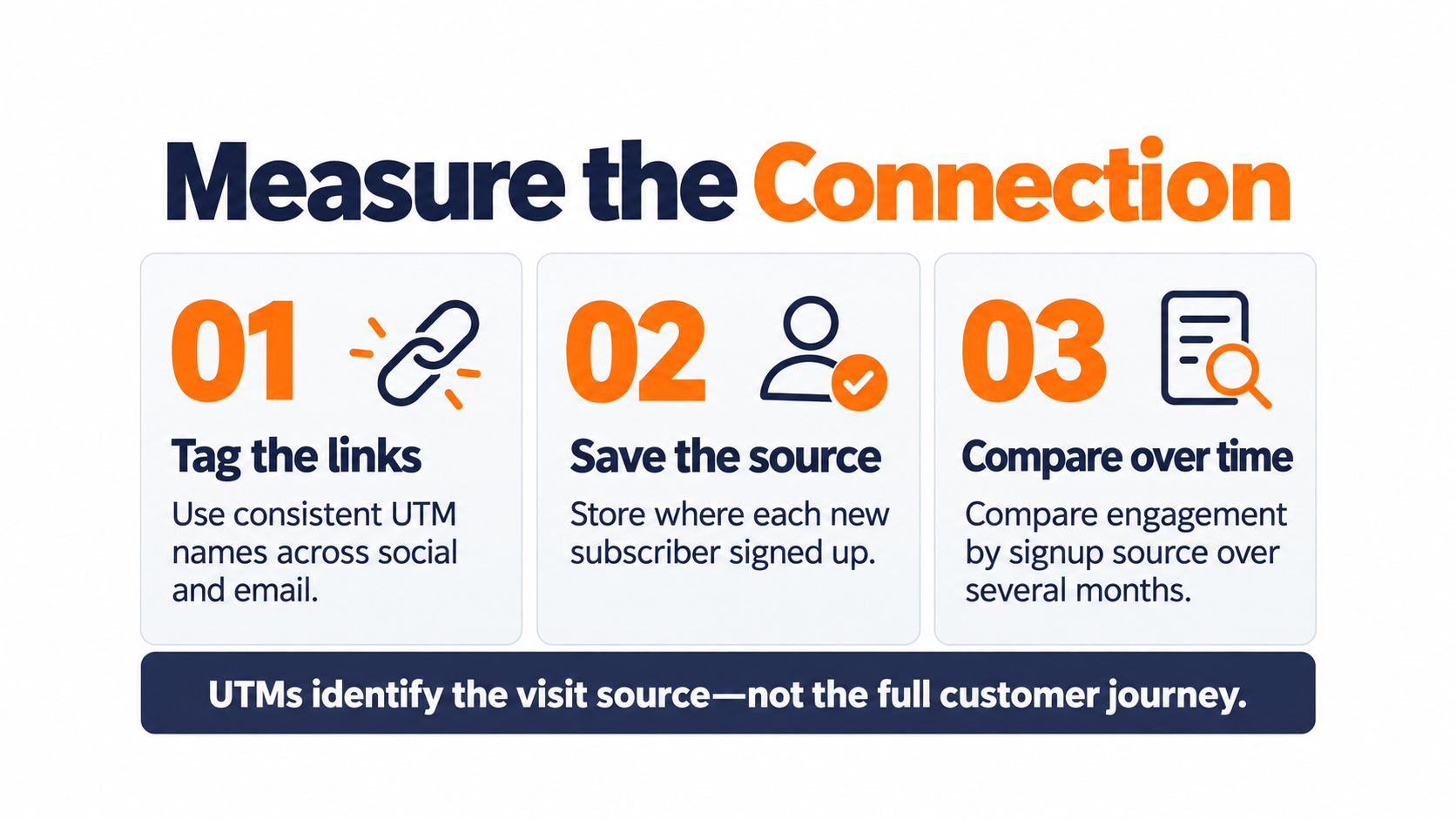
You don't need an attribution model to start. You need consistent tagging and a record of where each subscriber came from.
Tag every link with UTMs
Google Analytics uses UTM parameters, such as utm_source, utm_medium, and utm_campaign, to attribute visits to campaigns in its Traffic acquisition report. Parameter values are case-sensitive, and utm_content can separate two call-to-action links inside the same email.
Google recommends one unique utm_source per platform, one unique utm_medium per channel, and a strict naming convention applied everywhere. Here is one way to set that up. It's a sample convention, not a Google standard.
| Where the link lives | utm_source | utm_medium | utm_campaign |
|---|---|---|---|
| LinkedIn organic post | social | spring_webinar | |
| LinkedIn sponsored post | paid_social | spring_webinar | |
| Instagram bio link | social | newsletter_signup | |
| Newsletter call to action | newsletter | spring_webinar |
Tagging works best when nobody has to remember to do it. Networld Media Group, which runs 10 publications on Pinpointe, has automated Google Analytics UTM tagging built into its sending setup to streamline this process.
Know what UTMs can't tell you
UTMs tell you which link brought a visit. They don't connect the person who saw your LinkedIn post on Tuesday to the email they opened on Friday.
To close part of that gap, store the signup source on each new subscriber record, so you can later compare how subscribers from social behave against those who joined another way. That comparison, run over a few months, tells you more about the loop than any single campaign report.
Connecting Social With Email Automation
A good marketing plan connects social media ads with automated emails. Posts, ads, and web pages grab someone's interest first, but turning those interested people into real customers depends on how quickly you move them onto your email list, and that's where your marketing automation platform comes in.
Instant lead ingestion and automated welcome journeys
When prospective customers convert through social channels or web forms, your marketing automation platform should ingest those contacts instantly. Direct form embeds and landing page connections ensure new subscribers enter your database in real time.
For leads captured through native social ad forms or third-party tools, robust REST APIs and integration platforms automatically sync data to trigger welcome sequences immediately, eliminating delays caused by manual imports.
Cross-channel tracking and webhook event syncing
Maintaining visibility across the buyer journey requires seamless data exchange between your email and advertising tools. Integrated link management automatically appends Google Analytics UTM parameters to email dispatches, making it easy to attribute web visits and conversions back to specific campaigns.
Real-time webhooks push critical engagement data, such as clicks, bounces, and unsubscribes, directly to your CRM and advertising systems. This keeps downstream exclusion lists fully updated and prevents paid social campaigns from wasting budget on disengaged or opted-out contacts.
Additionally, timestamped opt-in logging records exactly when and where subscribers joined your list, supporting data privacy compliance when building custom audience matches for social ad platforms.
Multi-tenant control for multi-brand operations
For agencies and enterprises managing social and email programs across multiple clients, brands, or locations, multi-tenant account architecture is critical.
Marketing cloud platforms, like Pinpointe, with sub-account capabilities keep subscriber databases, user permissions, and sender identities strictly isolated.
Centralized administration allows operators to manage multiple client accounts from a single dashboard, maintaining privacy standards and ensuring target audiences never cross paths across ad networks or email lists.
Start Connecting Your Social and Email Channels
Social media and email marketing do different jobs. Social reaches people and gives them a reason to notice you. Email turns that attention into a relationship you control, and sends it back out as follows, shares, and ad audiences.
The connections that matter most are practical ones. Promote the newsletter on social, capture leads with native forms, keep current subscribers out of acquisition ads, and get the welcome email out fast.
On the email side, give every social link a reason and make sharing easy. Check consent before any list leaves your system, and tag every link so you can see what each channel does for the other.
If you'd like a second set of eyes on how leads move from your social channels into your email program, schedule a marketing automation audit with our team, and we'll look at where the handoff is losing people to optimize your marketing engine.
Frequently Asked Questions About Social Media and Email Marketing
Here are quick answers to the questions that come up most when teams start connecting these two channels.
Is email or social media better for marketing?
Neither wins everywhere, which is why using both makes sense. In Marigold's consumer survey, email edged out social media ads and posts for reported purchases overall, but younger respondents were more likely to say social ads and posts led them to buy. Use social to reach people and email to keep them.
How do I use social media to grow my email list?
Promote your newsletter on social on a regular schedule, use native lead forms instead of link posts, and exclude current subscribers from list-growth ads. Send anyone who does click through to a dedicated signup page, and connect your lead source to your email platform so the welcome email goes out right away.
Can I upload my email list to Facebook or LinkedIn for ads?
Yes, both Meta and LinkedIn match uploaded lists against their users. For Meta, the list is hashed before it's sent and matched against Meta's own hashed data. LinkedIn needs at least 300 matched members before a campaign will serve, and Meta's terms require that you have the rights and lawful basis to use the data.
How do I know if social media is driving email signups?
Tag every social link with consistent UTM parameters and store a signup source on each new subscriber. UTMs show which link brought the visit, and the signup source lets you compare how social subscribers engage over time against everyone else.