
Most marketers can tell you their last open rate off the top of their head. Fewer can tell you why it's climbing or dropping, because nobody's actually looked at the whole system in months.
That's what an email marketing audit is for. Not a vibe check on your last send. A real look at the process, the list, the deliverability numbers, and the platform behind all of it.
If you've never sat down and figured out how to audit your email campaigns properly, this is the walkthrough to actually do it, start to finish.
Inspect your campaigns regularly instead of waiting for a breakdown
Do this once, and you'll find things worth fixing. Do it on a schedule, and you'll stop finding the same problems twice.
You don't need to block off a week or bring in outside help to run this. Sit down with your last few campaigns, your list, and your email platform, and actually look instead of assuming everything's fine because nothing's obviously broken.
Start By Mapping How An Email Actually Gets Made
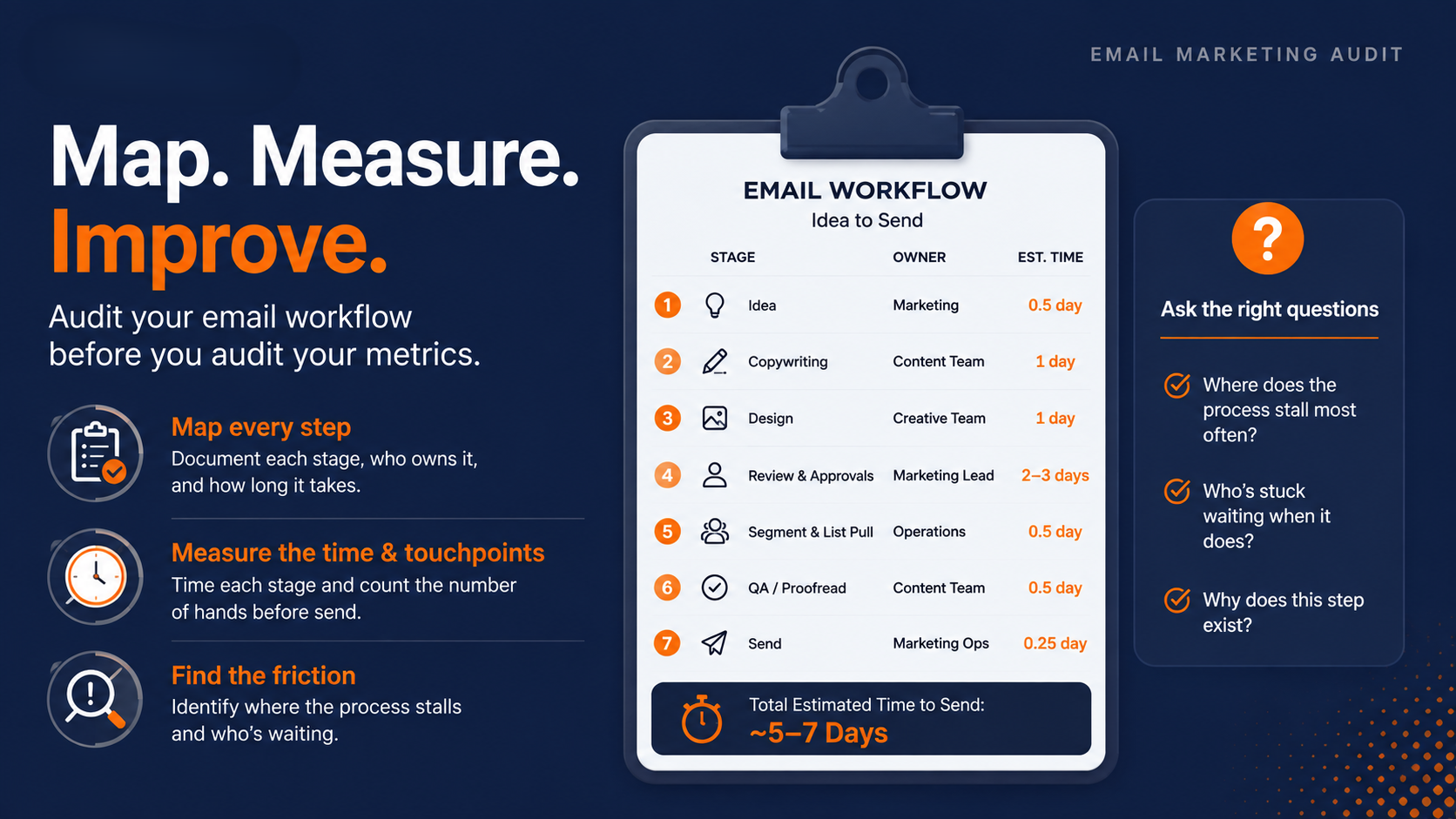
Before you touch a single metric, write down how an email actually gets built at your company. Idea to send, every step, every hand it passes through.
Grab a blank doc and list each stage. Who owns it, what they do, and how long it takes. You'll probably be surprised at how many steps exist that nobody remembers agreeing to.
Most teams have never written this down. They just do it the way it's always been done, and that's exactly why nobody notices when it slows down.
Include the small, easy-to-forget stuff too, like who pulls the segment, who proofreads, and who actually hits send. The steps that feel too minor to mention are usually the ones nobody's questioned in years.
Time each stage from idea to send
Put a rough time estimate next to every stage. Copywriting, design, approval, list pull, QA, send.
If approval alone eats three days on a campaign you wanted out in one, you've already found your first fix. You don't need new software for that. You need fewer people in the approval chain, or a clearer sign-off rule.
Write the number of hands that touch a single email before it goes out. If that number is higher than four or five for a routine send, ask why. Some of those approvals exist because someone got burned once, years ago, and the extra step never got removed.
Ask where the process gets stuck
Every workflow has a chokepoint. Usually it's approval, sometimes it's list prep, occasionally it's one person who reviews everything and is also on vacation half the time.
Ask yourself plainly: where does this stall most often, and who's stuck waiting when it does? Write the answer down. You'll use it later when you turn this audit into an actual plan.
If the answer changes depending on who you ask, that's a signal too. It usually means the process was never actually agreed on, just inherited from whoever built it first.
Run Three Real Campaigns Through A Checklist
Pulling every email you've ever sent isn't realistic, and it isn't necessary. Pull three: your best performer, a middling one, and your worst.
Comparing those three tells you more than staring at thirty average ones. You'll see exactly what separates a send that works from one that doesn't.
Pick a winner, a middle performer, and a flop
Go by the numbers, not your gut. Highest open and click rate, one in the middle, and whatever tanked hardest.
If you're not sure which is which, pull your last quarter of sends and sort by click rate. The extremes will be obvious fast.
Pick emails from a similar time window if you can. Comparing a holiday promo against a random Tuesday newsletter mixes too many variables into one comparison, and you'll end up chasing the wrong lesson.
The nine things every send should have
Run all three emails through the same nine checks: sender name and domain, subject line length and personalization, a working preheader, a clear headline, short scannable body copy, a single obvious call to action, compressed and alt-tagged images, visible branding, and an easy-to-find unsubscribe link with working footer links.
Checking three emails against the same list makes the pattern obvious fast. Your best email checks almost every box. Your worst one is probably missing four or five of the same ones every time.
Go item by item, not email by email. Look at all three subject lines together, then all three preheaders, then all three calls to action. Patterns jump out faster that way than they do reading each email start to finish.
|
Checklist Item |
Top Performer |
Mid Performer |
Underperformer |
|---|---|---|---|
|
Professional from-name and domain |
Yes |
Yes |
No |
|
Subject line length and personalization |
Yes |
Yes |
No |
|
Preheader present and useful |
Yes |
No |
No |
|
Clear, readable headline |
Yes |
Yes |
Yes |
|
Short, benefit-focused body copy |
Yes |
No |
No |
|
Single clear call to action |
Yes |
Yes |
No |
|
Optimized, alt-tagged images |
Yes |
No |
No |
|
Consistent branding and logo link |
Yes |
Yes |
Yes |
|
Easy-to-find unsubscribe and footer links |
Yes |
Yes |
Yes |
PRO TIP: Whatever's unchecked across all three emails, not just the worst one, is your real fix. A gap that shows up even in your best send is a process problem, not a one-off mistake.
Check how each one renders on a phone
Open all three on your own phone before you move on. A headline that looks sharp on a widescreen monitor can turn into three cramped lines on mobile, and most of your list is reading on one.
Check that your call-to-action button doesn't get pushed below the fold, and that images load fast enough that someone doesn't give up scrolling before they see them. This step takes five minutes and catches problems a desktop review never will.
Check Your List Health Before You Check Anything Else
You can rewrite every subject line you send, and it won't matter if half your list is dead weight. List health comes before copy, before design, before anything else on this list.
Your list is losing accuracy every single year whether you touch it or not. Email lists naturally decay by about 22.5% every year due to people changing email addresses, unsubscribing, and abandoned accounts.
That's not a sign you did something wrong. It's just what happens while you're busy running campaigns instead of watching the list. Jobs change, domains get retired, people abandon inboxes they signed up with years ago, and none of that shows up until your open rate quietly starts sliding.
Segment before you delete anyone
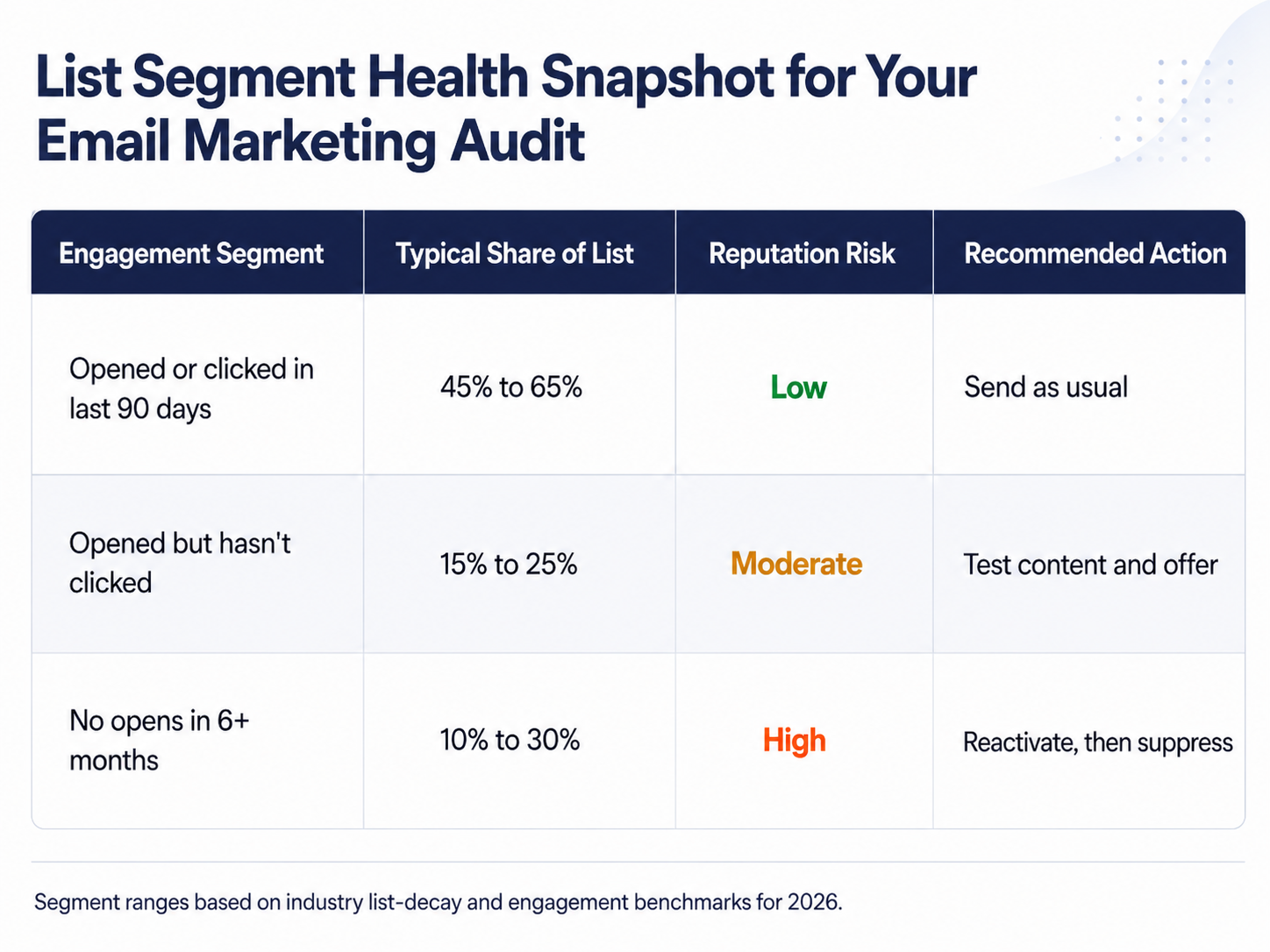
Split your list by real engagement. Opened or clicked in the last 90 days, opened but hasn't clicked, hasn't opened anything in six months or more.
That third group is where your bounce rate and spam complaints are quietly building. Don't blast them the same way you blast your active segment.
Look at each segment's share of your total list, not just the raw count. If a quarter of your contacts haven't opened anything in six months, that's a quarter of every send working against your reputation instead of for it.
Give inactive contacts one real shot
Before you cut anyone, run a short reactivation sequence. Two or three emails, a clear ask, nothing complicated.
Anyone who clicks goes back into your active list. Anyone who doesn't gets suppressed, not deleted outright, so you're not sending to dead weight but you're also not losing the record entirely.
Keep the reactivation sequence itself lightweight. This isn't the place for a discount code stack or a five-email drip. One clear question, sent once or twice, tells you almost everything you need to know.
Check where bad contacts are entering in the first place
While you're in the list, trace a few of your worst addresses back to where they signed up. A form, an event list, a purchased list from years ago, an integration pulling in contacts automatically.
If one source keeps producing the addresses you end up suppressing, that's not a list hygiene problem anymore. That's an intake problem, and no amount of monthly cleanup fixes it if the same leaky source keeps refilling the list.
Look At Deliverability And Sender Reputation Numbers
You can have a gorgeous email that nobody sees because it never made it past the spam folder. A proper email deliverability audit is the part most marketers skip, and it's the one that actually decides whether your other fixes matter.
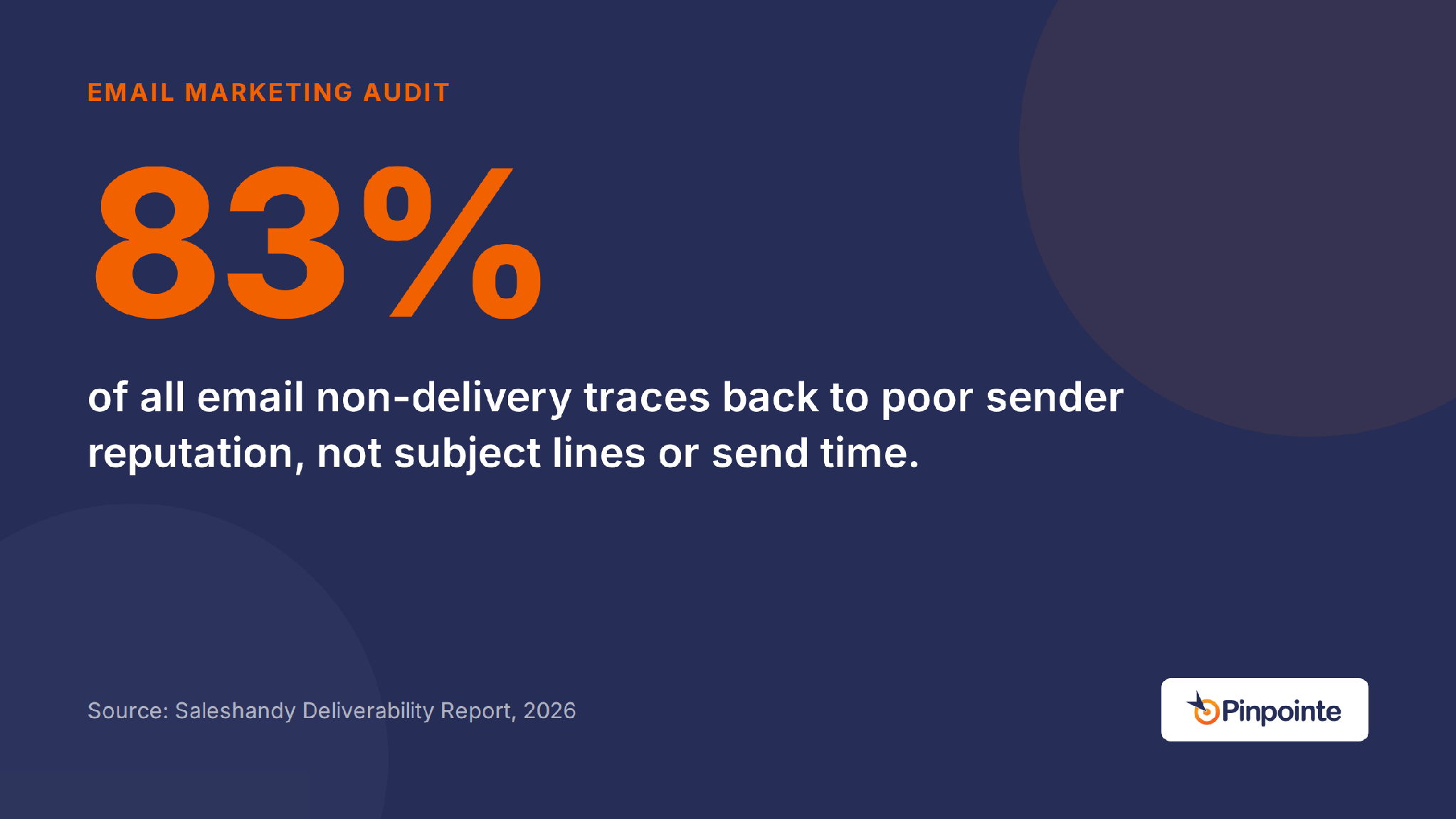
Sender reputation is the biggest lever here, bigger than subject lines or send time. 83% of all non-delivery traces back to poor sender reputation. Not your subject lines, content, reputation, or sending time.
That number should change how you prioritize this audit. Fix your reputation signals first, then worry about the creative. A brilliant subject line on a domain with a damaged reputation still ends up in spam.
Track bounce and complaint rates monthly
Set a simple threshold and check it every month, not once a year. Under 2% bounce rate is healthy, 2% to 5% means a real list quality problem, and anything over 5% is active reputation damage.
Spam complaints matter even more. Keep them under 0.1%, and you're in safe territory with Gmail and Yahoo, both of which will start throttling you hard past 0.3%.
Getting your authentication setup right (SPF, DKIM, and DMARC) is the fastest lever you have here, and it's worth a closer look at how those rules have shifted in 2026 before you assume your setup still passes.
Providers have gotten stricter about this in the last year, not looser, so a setup that cleared the bar in 2024 isn't guaranteed to clear it now.
Watch inbox placement, not just delivery
Delivery rate tells you the server accepted your email. It says nothing about whether it landed in someone's inbox versus their spam folder.
If your ESP only shows you delivery rate, you're missing the number that actually matters. Ask your provider for inbox placement data, or run a placement test yourself before your next big send.
This distinction trips up a lot of teams during an audit. A dashboard showing 98% delivered feels like a clean bill of health, right up until someone checks how much of that 98% actually reached the inbox instead of the spam folder.
That gap between delivered and actually seen is exactly why deliverability deserves its own line item in your audit instead of getting folded into a general “things looked fine” note at the bottom.
Decide If Your Email Service Provider Still Fits
Once you've looked at process, list health, and deliverability, turn the same eye on the platform running all of it. Plenty of brands outgrow their ESP quietly, sending the same way for years past the point it stopped serving them.
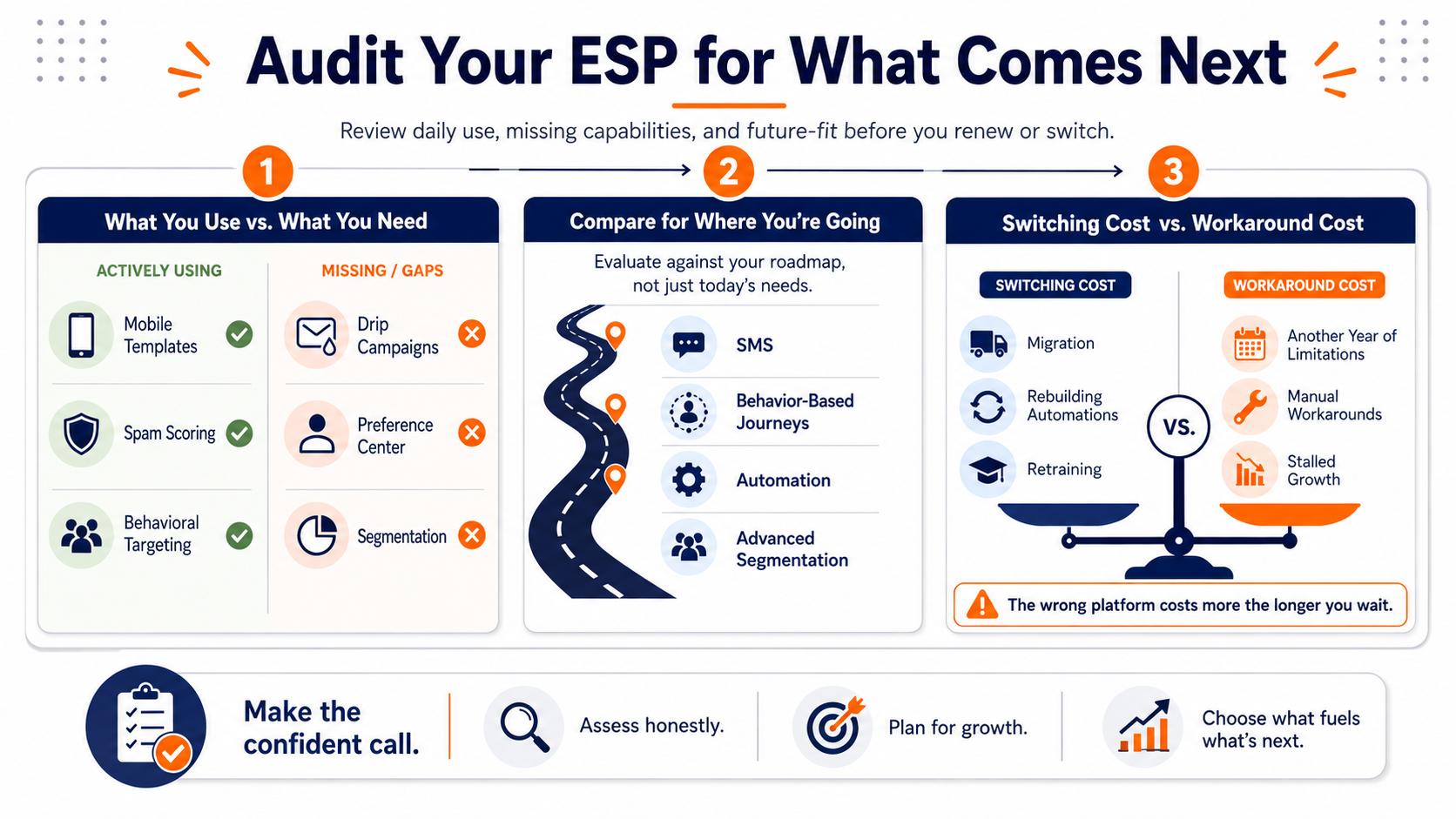
Ask yourself what you actually use versus what you're paying for and never touch. Run your own email service provider comparison against that list instead of trusting a generic feature comparison page.
List what you use against what you're missing
Write down what you rely on daily and what you've never opened. Mobile-friendly templates, spam scoring, behavioral targeting, drip campaigns, a real preference center, actual segmentation, not just tags.
If half your list is features you're not using and the other half is gaps you keep working around, that's your answer already.
Ask your team this directly, not just yourself. The person building campaigns daily usually has a sharper sense of what's missing than whoever signed the contract two years ago.
Compare platforms against where you're headed
Don't compare platforms against where your program is today. Compare them against where you want it to be in a year.
If you're planning to add SMS, or want journeys that respond to behavior instead of a fixed calendar, map that out as an actual campaign strategy before you commit to a platform that can't grow with it.
A platform that fits your program today but can't handle where you're headed just means you're doing this same audit again in twelve months, for the same reason.
Short-term migration hassles beat another year of bottlenecks
Weigh the cost of switching honestly too. Migrating a list, rebuilding automations, and retraining your team on a new interface isn't free, and it isn't quick.
That cost is real, but it's still smaller than the cost of another year spent working around a platform that can't do what your program actually needs.
Turn The Audit Into An Actual Plan
An email marketing audit that ends in a document nobody opens again wasn't worth running. The value is in what changes because of it.
Go back through everything you found: the workflow bottleneck, the checklist gaps, the list health numbers, the deliverability data, the platform fit. Turn each one into a specific, owned action.
Resist the urge to tackle all five at once. Pick the one or two that are actually dragging down performance right now, fix those first, and let the rest wait for the next review instead of trying to overhaul everything in a single sprint.
Assign owners to what's broken
Every gap needs a name next to it. Not “we should fix this,” but “Sarah owns cleaning the 6-month-inactive segment by the 15th.”
Vague ownership is how audits turn into a slide nobody revisits. Specific ownership is how they turn into a cleaner list three weeks later.
Put a real date next to each name too, not just a task. A gap with an owner and no deadline drifts the same way a gap with no owner does, and six months later you're back where you started.
Put a follow-up date on the calendar
Suppressing your least-engaged contacts isn't just a hygiene chore, it moves the number that matters most. Pruning the least engaged 10% to 25% of a list often lifts inbox placement by 3 to 10 points within 2 to 6 weeks.
Put a date on the calendar to check that number after you clean the list. If you skip that step, you'll never actually confirm the audit worked, and you're more likely to backslide within a quarter or two.
Even if your suppression numbers alone don't move the needle enough, a handful of other performance levers tend to compound well alongside a cleaner list, so don't treat list pruning as the only fix on your list.
PRO TIP: Set your follow-up review for exactly 30 days out, not sometime next quarter. That's roughly the window it takes reputation signals to actually move after a clean list goes live.
This Comes Down To Who's Checking These Numbers Next Month
Every gap this audit just surfaced stays fixed only as long as somebody's actually watching the bounce report and the segment sizes after today. An audit that sits in a doc nobody reopens just becomes next year's same audit.
If it's been over twelve months since your last real email marketing audit, that's worth fixing before your next big send, not after it underperforms. Schedule a marketing automation audit with our team, and we'll walk through what your list and deliverability actually look like right now.