
Here's an uncomfortable number: more than 30 percent of email that passes every authentication check still lands in spam. That's roughly the miss rate 2025's deliverability data found for fully authenticated mail, even when everything technical is set up correctly. Passing authentication was supposed to be the finish line.
Email Authentication Is No Longer Just Nice-To-Have
Turns out it's the entry fee. Google, Yahoo, and Microsoft have spent two years turning authentication from a nice-to-have into a hard requirement, and most marketing teams have caught up. What almost nobody's caught up on is what happens after the setup is done, and that's exactly where this guide picks up.
For a lot of senior marketers, that setup happened quietly, handled by IT while marketing looked the other way. Problem is, the person who flips the switch is rarely the person whose revenue depends on it. This guide is for that second person, and we'll keep the technical parts as plain as the subject allows.
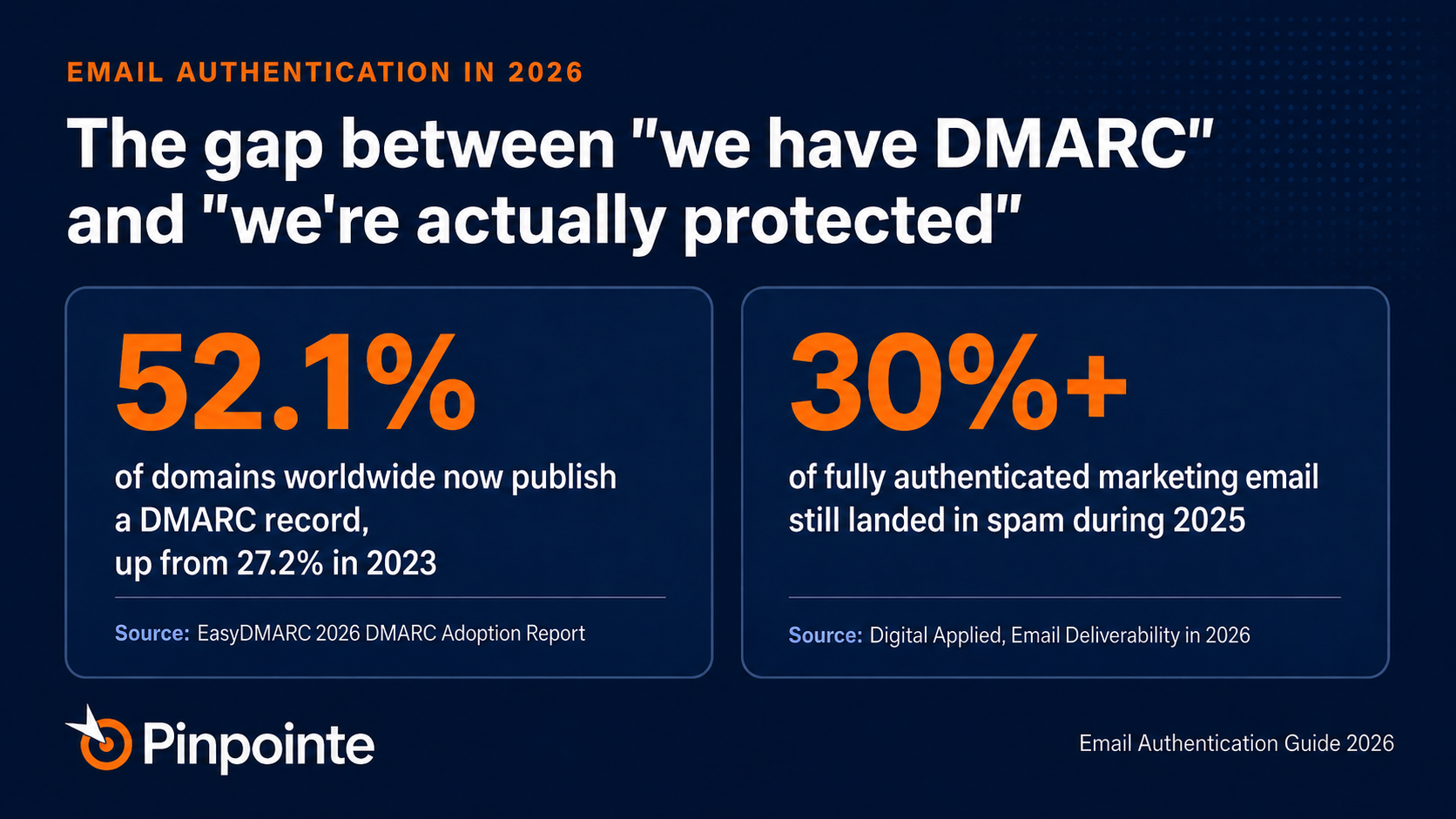
Fig. 1: The headline numbers behind 2026's authentication gap.
Why Authentication Stopped Being a Best Practice
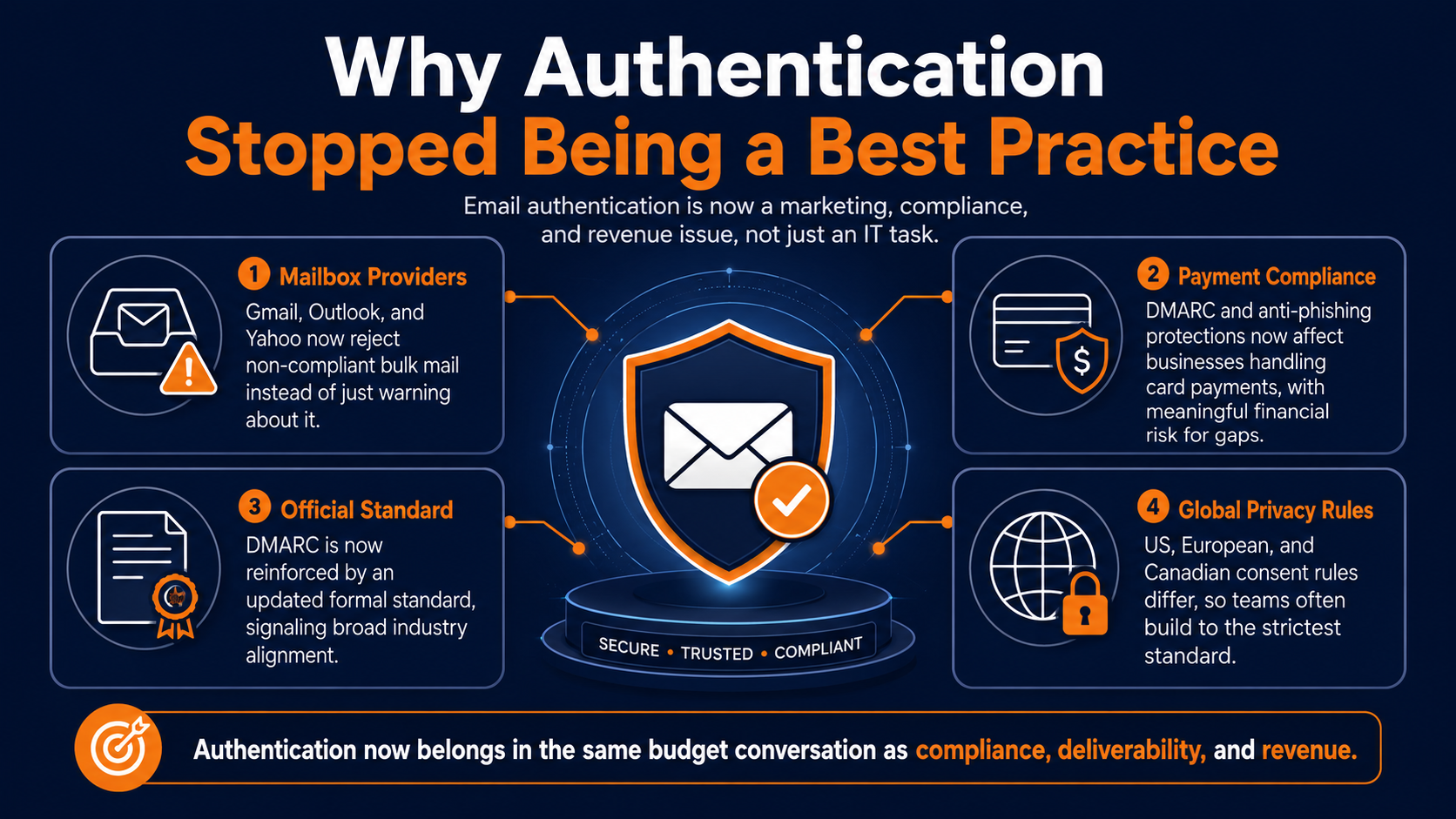
Email authentication used to be something a deliverability specialist worried about while marketing focused on subject lines. That separation is gone now. Three changes collapsed it into one compliance requirement that marketing owns just as much as IT does.
Gmail moved from soft warnings to permanently rejecting non-compliant bulk mail in November 2025, and Outlook followed with its own hard rejection rule that same month. Yahoo plays by the same rules. Fail the check today, and your message doesn't get delayed, it just gets refused.
Processing payments has become more strict
Payment card rules got serious too. Handling card payments now requires anti-phishing protections that specifically call out DMARC, and skipping it can mean fines from five thousand to one hundred thousand dollars a month.
For a business processing payments through its marketing emails, a lapsed authentication setup stopped being just an IT headache.
DMARC has become an official internet standard
Even the internet standards world caught up. The core specification behind DMARC got a formal update in May 2026, making it an official standard rather than just a convention everyone happened to follow.
None of this changes what a team actually has to do day-to-day, but it confirms that mailbox providers, card networks, and standards bodies are all pulling in the same direction now.
International privacy law has changed the game
There's one more layer international teams have to juggle: privacy law. US, European, and Canadian rules don't agree on how consent needs to work before that first email goes out, and a list built to satisfy one rarely satisfies the strictest one by accident. Most experienced teams build for whichever rule is strictest and treat the rest as automatically covered.
That convergence changes the conversation marketing needs to have with leadership. This isn't a request to patch some technical annoyance anymore. It's a compliance and revenue conversation that belongs in the same budget meeting as the platform license itself.
The Three-Layer Stack, in Plain Terms
SPF, DKIM, and DMARC aren't new to anyone who's run email programs for a while.
What trips people up isn't what each one does, it's where each one quietly breaks as a company adds more tools and more ways of sending mail.
Here's where each layer actually fails in 2026, without the technical manual version.
SPF: YOUR DOMAIN'S GUEST LIST
SPF is basically a guest list for your domain. It tells a receiving mailbox exactly which servers are allowed to send mail on your behalf, and anything not on the list gets treated with suspicion.
The catch is that this list has a hard limit on how many other lists it can point to, and once a company crosses it, the whole check can quietly stop working instead of just getting stricter.
Warnings not included
There's no bounce message and no warning, the failure only shows up if someone actually reads the authentication reports, which almost nobody does on a regular basis.
A company that's added a marketing platform, a help desk, and a CRM over a couple of years, each adding its own entry to that list, can hit the limit without anyone touching the setup directly.
It's just basic system maintenance
The fix is mostly good housekeeping. Recheck the list any time a new sending tool gets added, remove entries for tools nobody uses anymore, and lean on your email provider or a dedicated service to manage the list automatically once it gets complicated.
Most teams don't need to understand the mechanics behind this, they just need someone checking it periodically instead of never.
DKIM: THE TAMPER-PROOF SEAL
DKIM attaches a digital signature to every email a company sends, proving it actually came from them and wasn't altered along the way.
Two things are worth checking here in 2026: is the signature using strong enough encryption, and how old is it.
Refresh Your Keys Before a Vendor Compromise Does It for You
Plenty of companies are still signing mail with outdated, weaker keys that technically still pass but represent exactly the kind of technical debt an authentication audit should flag. Refreshing that signature regularly matters less because of the math behind it and more because keys can leak.
The signing key lives somewhere outside a marketing team's control entirely, tucked inside whatever platform or vendor sends mail on the company's behalf, and if one of those is ever compromised, a leaked key can keep working until someone replaces it.
Keep to a routine schedule
Refreshing it on a regular schedule, most guidance suggests roughly twice a year, limits how much damage a leak can do.
Done well, this is a simple swap: turn on a new signature, let it run alongside the old one for about a week so nothing already in transit breaks, then retire the old one.
Skip that overlap and a routine update can accidentally break a company's own mail.
DMARC: THE REFEREE
DMARC doesn't check anything on its own.
It looks at the SPF and DKIM results and asks whether either one actually matches the domain a recipient sees in their inbox, and that matching step, not the individual checks themselves, is where almost all the real failures happen.
Mail can pass SPF, pass DKIM, and still fail DMARC if neither one lines up with the visible sender.
The Silent Deliverability Killer: Forwarded Mail
Forwarded mail is the clearest example. When someone forwards a newsletter internally, or a mailing list relays a message to its members, the message changes just enough that the original signature stops matching, and the forwarding server rarely matches the original sender list either.
There's a companion standard, called ARC, built specifically to preserve some of that trust through a forward, and companies that skip it quietly lose legitimate reach without a single visible error.
Setting Up DMARC Reports Right
A DMARC setup also has a few dials worth knowing about, even without memorizing the technical names for them.
A company can control what percentage of failing mail actually gets blocked, which is exactly how teams roll out stricter enforcement gradually instead of flipping a switch overnight.
A company can also set different rules for subdomains, and it can choose where the monitoring reports get sent, since a report nobody's reading isn't actually being monitored.
Why Rushing DMARC Enforcement Backfires
One sequencing rule matters underneath all three checks. Get SPF and DKIM passing cleanly for a couple of days before turning on DMARC enforcement, so both are confirmed stable before a policy starts acting on failures. Skip that step and a rushed rollout can end up blocking a brand's own legitimate mail.
Routine Inspections Prevent Hidden Deliverability Bugs
None of this needs to be tracked by hand. Free tools will send a test message across every sending source a company uses and hand back a plain readout of what's working and what isn't.
Running that check every few months, not just once at setup, is what catches a new tool quietly breaking things before it turns into a real problem.
The Monitor-Only Trap
DMARC adoption looks like a genuine success story on paper. Global adoption grew from 27.2 percent to 52.1 percent between 2023 and 2026, more than doubling in three years.
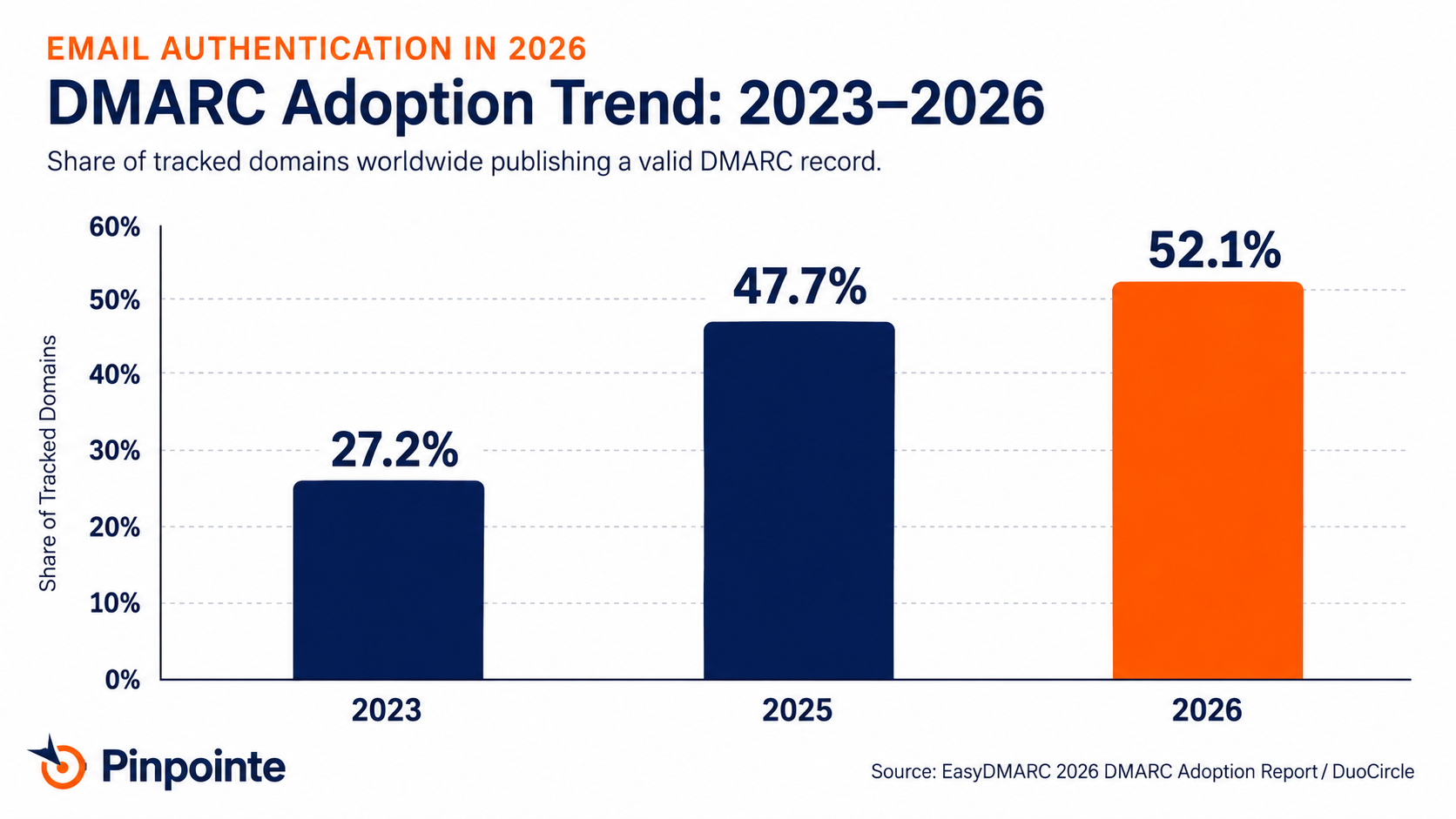
Fig. 2: DMARC adoption has more than doubled since 2023, but adoption is not the same as protection.
The headline number hides the real story, though. Of the roughly 938,000 domains with DMARC set up, only about 412,000 actually have it blocking anything. The rest are stuck in what's technically called monitor-only mode, which reports on spoofing attempts without stopping a single one.
That gap matters because monitor-only mode checks the box for Google and Yahoo's rules while leaving a domain exactly as vulnerable as it was before.
Picture a smoke detector with the battery left out. The alarm's there, it just won't do anything when something actually catches fire.
The Safe Path to Full Enforcement
Getting from monitor-only to full protection typically takes four to twelve weeks.
Start by watching the reports to map every legitimate way a company sends mail, then start blocking a small percentage of failing mail, and slowly increase that until the team is confident enough to block all of it.
Rush this and legitimate mail ends up blocked right alongside the fake mail everyone was trying to stop.
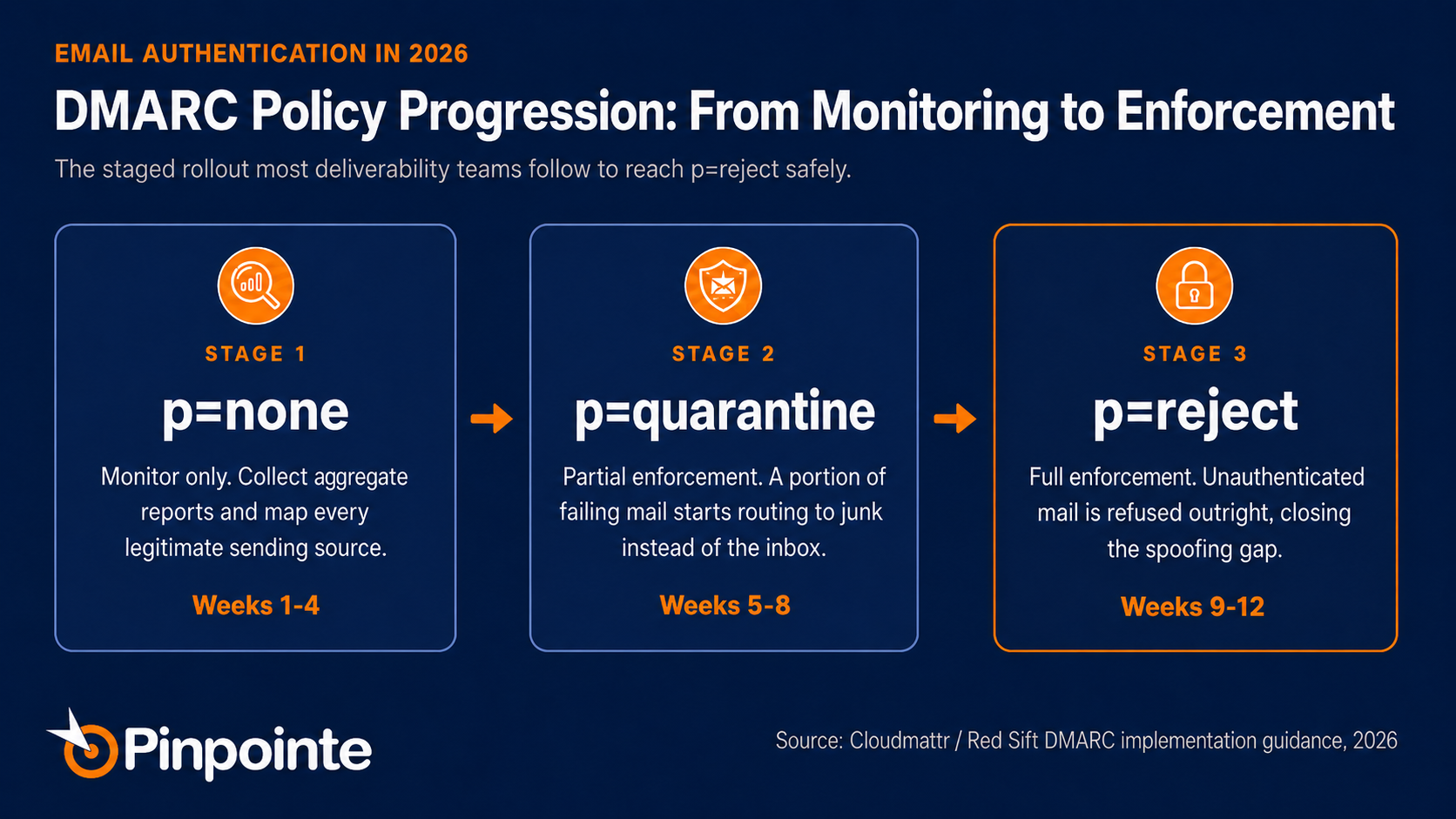
Fig. 3: The staged rollout that gets a domain to full protection without breaking legitimate mail.
One underrated shortcut through this whole process: use fewer tools. Every separate platform sending mail on a company's behalf, a help desk, a CRM, three marketing tools picked up over the years, is one more thing to set up, watch, and eventually troubleshoot. Fewer moving parts means fewer things that can quietly break.
The reports themselves are worth a mention too, since the raw version shows up as a dense file nobody actually reads. A dashboard that turns that into a plain list, who's sending what, what's passing, what's new or unrecognized, is the difference between this being a five-minute weekly check and a task nobody ever gets around to.
BIMI: The Trust Signal Still Sitting on the Table
BIMI is the reward for finishing the DMARC work, and most brands never bother to claim it. Adoption jumped more than 53 percent in a single year, yet it still covers barely 22,000 of the top ten million domains worldwide.
Leveraging DMARC for Brand Recognition
The idea is simple once the DMARC groundwork is done. A company publishes its logo in a specific format, and inboxes that support it display that logo right next to the sender name before anyone opens a thing. Gmail goes a step further and adds a blue checkmark, but only for brands that complete a formal verification process tied to a registered trademark.
That verification process needs a trademark on file, which rules it out for some companies. There's a cheaper alternative that only needs proof of a documented history of using the logo, though Gmail is currently the only major inbox that recognizes it. Either path still needs full DMARC protection as the prerequisite, so neither is a shortcut around the earlier work.
Safe Rollouts Across Multiple Brands
If a company runs multiple brands under one umbrella, this is also a low-risk place to test the whole rollout. Pick the smallest brand in the portfolio, walk its domain through the DMARC and BIMI process first, and let whatever breaks there become the lesson plan for the flagship brand later. Nobody notices a hiccup on the brand nobody's heard of yet.
Put a reminder on the calendar for renewal once the logo's live, since the certificate expires quietly if nobody's watching. A brand that earns the checkmark and then loses it to an expired certificate actually looks worse than a brand that never bothered, since the sudden disappearance reads like a trust signal running in reverse.
From Security Setup to Better Open Rates
The real payoff lands at the exact moment that decides whether an email even gets opened. A recognizable, verified logo in a crowded inbox works the same way a familiar face works in a crowd. People trust what they recognize before they've read a single word of the subject line.
Where Deliverability Actually Breaks Now
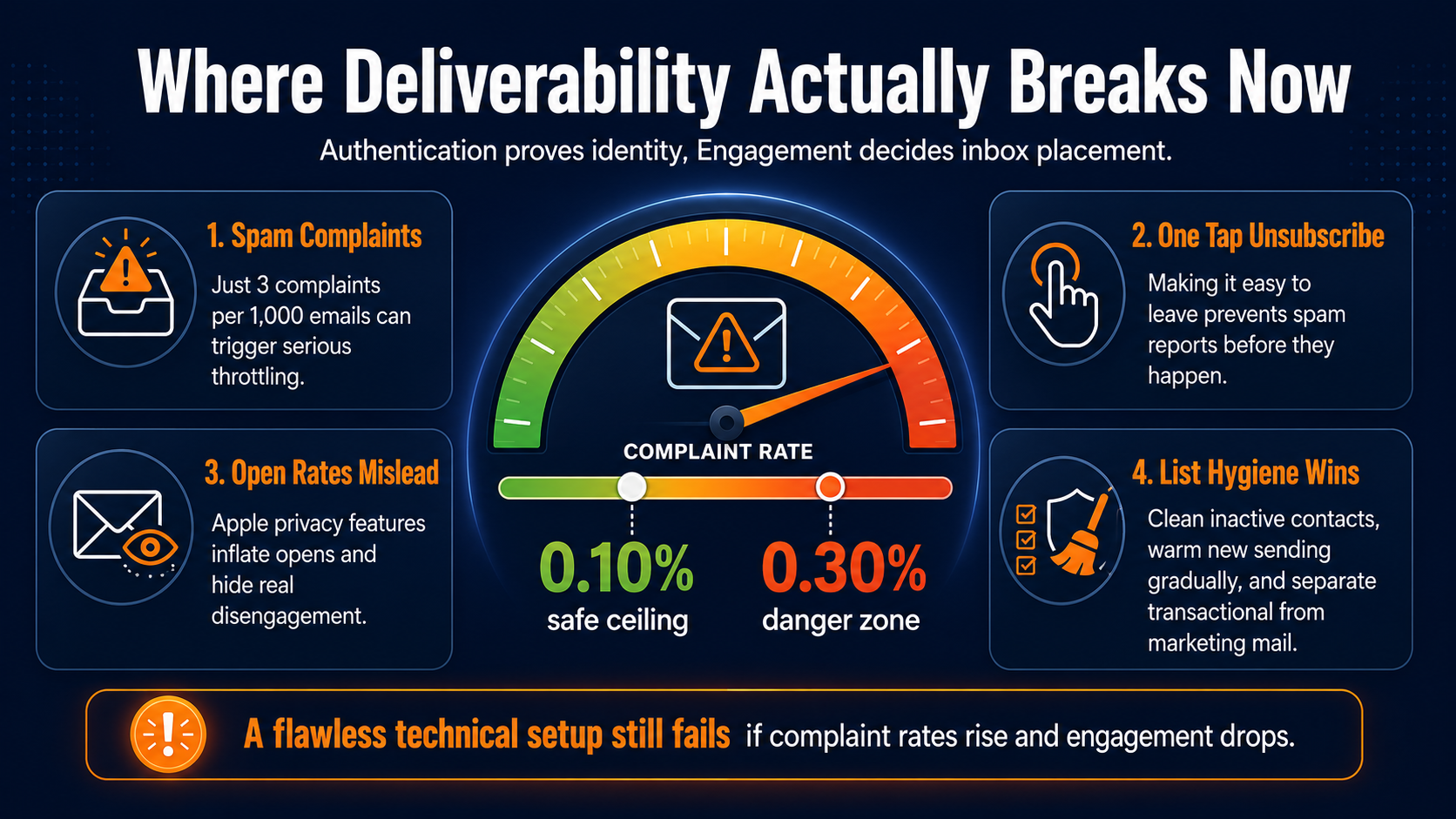
Authentication proves a sender is who they say they are. It doesn't decide whether the inbox actually wants to hear from them, and that gap is where most 2026 deliverability problems really live.
Google enforces two thresholds on spam complaints: 0.10 percent as the safe ceiling, 0.30 percent as the point where enforcement kicks in hard. Three complaints per thousand emails sent is enough to trigger real throttling. That's a thin margin for any list that hasn't been actively cleaned up.
Protecting Your Sender Reputation with One-Tap Unsubscribes
A built-in, one-tap unsubscribe button is the main defense against that threshold.
Gmail and Yahoo can show that button directly next to a sender's name when the sending platform supports it correctly, so nobody has to visit a page or hunt for a tiny footer link.
Every person who taps that button instead of hitting report spam is a complaint that never happened.
Why Open Rates Can’t Guide List Hygiene
There's a second wrinkle worth knowing about: open rates just aren't as reliable as they used to be. Apple's privacy features automatically open a lot of emails behind the scenes, which inflates open counts and hides real disengagement behind a number that looks perfectly healthy. Relying only on open rate to decide who to stop emailing is increasingly unreliable.
Good list hygiene is the unglamorous work underneath all of this, and it's still the fastest lever available. Removing people who haven't opened, clicked, or bought anything in a defined window, easing new sending infrastructure in slowly over four to eight weeks, and keeping receipts and confirmations separate from marketing mail all cut complaint risk before a single technical setting changes.
Authentication Gets You In, Engagement Keeps You There
The companies getting hurt in 2026 are rarely the ones with a broken technical setup. They're the ones with a flawless setup and a complaint rate creeping toward that 0.3 percent limit, because nobody's watching real engagement. Authentication earns a seat at the table. Real engagement decides whether a brand gets to keep it.
Who Actually Owns This Now
Most companies still let whoever controls the technical settings make all the decisions here, usually IT or security. That made sense back when this was a one-time setup task. It makes a lot less sense now that this is ongoing work with real revenue riding on it.
The companies handling this well in 2026 stopped treating it as a handoff and started sharing it instead. Marketing owns list quality, targeting, and the unsubscribe experience, since those actually drive the complaint rate. IT and security own the technical setup and the timeline for tightening enforcement, since that's where the technical risk sits.
Turning Technical Risk into Executive Visibility
A simple routine covers most of what a marketing leader actually needs here. Check the monitoring reports once a month to catch anything unrecognized before it becomes a real problem. Check in every quarter on complaint trends, the unsubscribe experience, and whether the BIMI logo is still working, so the brand-trust side of this doesn't get lost between technical conversations.
It's worth putting a simple version of that quarterly check in front of leadership too, right alongside the metrics that already get attention. One slide showing where things stand, the current complaint rate against the target, and whether the verified logo is still active turns an invisible risk into something that gets funded before it becomes a problem, not after.
None of this requires marketing leadership to become technical experts overnight. It just requires knowing which few questions to ask, and asking them on a schedule instead of only after something breaks.
How Pinpointe Handles This in Practice
None of this is theoretical for the teams running campaigns inside Pinpointe, because getting DNS right is exactly where we spend the most time with new customers. The fix usually isn't more technical knowledge on the customer's end. It's having someone who's done this hundreds of times sit down and get it right the first time.
Tailored Setup for Complex Multi-Domain Workflows
That's the part of working with Pinpointe that doesn't show up on a feature list. Our customer service team personally reviews a customer's DNS and helps manage the SPF, DKIM, and DMARC setup directly, rather than handing over a help article and wishing them luck. For a marketing team without an in-house DNS expert, that's the difference between guessing at a record and knowing it's actually configured right.
That hands-on review matters most at the exact failure points covered above: a company running marketing mail from one subdomain and receipts from another, or one that's added a few sending tools over the years without anyone rechecking the setup. A person walking through the actual configuration catches those gaps in a way a generic checklist never quite does.
Seamless Continuity Across Email and SMS
Because Pinpointe runs email and text messages from the same platform, a domain going through this kind of setup work doesn't have to take the whole customer relationship down with it. A group of customers can shift toward text messages for a stretch while an email domain gets sorted out, and they never notice a gap in communication.
Real-Time Insight for Lasting Email Security
The next step is making that confidence something a customer can check on their own, not just something they hear in a setup call. We're building automated checks and setup guides directly into Pinpointe, so a team can see its own authentication status at a glance and catch a problem before it turns into a support call. Personal review gets the setup right today, and the automation coming next is what keeps it right as things change.
For teams running the same customer journey across email and text inside one platform, this also means there's one setup to get right, and one team to call when something needs a second look, rather than a different vendor for every channel.
Email Authentication in 2026 Is a Trust Problem, Not a Technical Problem
The gap between companies that reach the inbox and companies that quietly disappear from it keeps growing, and it's going to keep growing through the rest of 2026. A working setup, a verified logo, and a clean complaint rate are turning into the bare minimum mailbox providers expect, not something that sets a brand apart.
Here's the direct question worth asking this week: not whether a company has DMARC set up, but whether it's actually blocking anything, and whether anyone on the team could answer that in under five minutes without filing a ticket to IT.
Teams that treat that question as urgent now will spend 2026 competing on message and offer. Teams that wait will spend it explaining to leadership why a perfectly good campaign never reached anyone. That's not a trade worth making twice.
From Technical Setup to Logo Readiness
If that answer took longer than five minutes, that's the gap worth closing now instead of later. Schedule a marketing automation audit with Pinpointe's team, and we'll map where things stand today, from technical setup to complaint risk to logo readiness, in a single session instead of a drawn-out back and forth.