Email lead scoring assigns points to what a contact does with your emails, such as clicking a pricing link or replying to a message, so your marketing team can rank leads and send the most engaged ones to sales. It covers the engagement half of a lead score and works best paired with a quick check on whether the contact fits your buyer profile.
Here is where it usually goes wrong. A rep calls a lead who just crossed the threshold, and the prospect has no memory of your emails, because their company's security scanner did the clicking. This is why you need better lead scoring systems in place to prevent these kinds of issues.
This guide is for B2B marketers who run email nurture and want a scoring model sales will act on. You'll see which email signals deserve points, a sample model with caps and decay, and the mistakes that fill a sales queue with the wrong people.
Key Takeaways
- Score engagement, then check fit: Email lead scoring assigns points to what a contact does with your emails, such as clicking a pricing link or replying to a message, and a quick fit check keeps a high score from sending the wrong person to sales.
- Qualify opens and clicks before they score: Apple's Mail Privacy Protection downloads remote content in the background regardless of whether the recipient engages, so opens get little or no weight. Security scanners can record clicks too, so count one click per link per email.
- Weight clicks by destination: In the sample model, a click to a pricing, demo, or contact page earns +15 points, capped at 1 per 30 days, while a click to blog or newsletter content earns +2.
- Add decay and an agreed threshold: In the sample lead scoring model, engagement points are cut in half after 60 days without a qualifying click, and 40 engagement points plus a passed fit gate makes an MQL.
- Hold outreach until behavior supports it: In a Gartner survey of 632 B2B buyers, 73% said they actively avoid suppliers who send irrelevant outreach, which is the case for keeping unengaged contacts in nurture.
In this guide
What Email Lead Scoring Is and Where It Fits Into Your Email Marketing Strategy
Lead scoring ranks prospects by assigning point values to their behaviors and to demographic or firmographic traits, then uses the total to decide which leads sales should work. Email lead scoring is the slice of that system fed by email engagement.
It answers one narrow question. Based on how this person has interacted with your emails, how interested do they look right now?
Engagement and fit answer different questions
Engagement tells you how interested someone looks. Fit tells you whether they are the kind of buyer you can sell to. General lead scoring models blend both, pulling behavior from website visits, downloads, events, and sales activity alongside company and role details.
A sky-high email score from a student, a job seeker, or a competitor is still a dead end. That's why the lead scoring model later in this guide treats fit as a quick pass-or-fail gate rather than a second scoring track.
How email lead scoring narrows the model
An email-only approach limits the behavioral side to the signals your email program produces, mostly opens, clicks, and replies. That's useful, because it is data that hubspoyou already own.
However, it's also fragile, and without the right precautions in place, you might end up routing the wrong types of leads. Opens and clicks can both be recorded without a person doing anything, and some replies are automatic, like out-of-office notices. A scoring model can't tell the difference unless you build the rules to account for it.
Why Scoring Email Engagement Is Worth the Effort
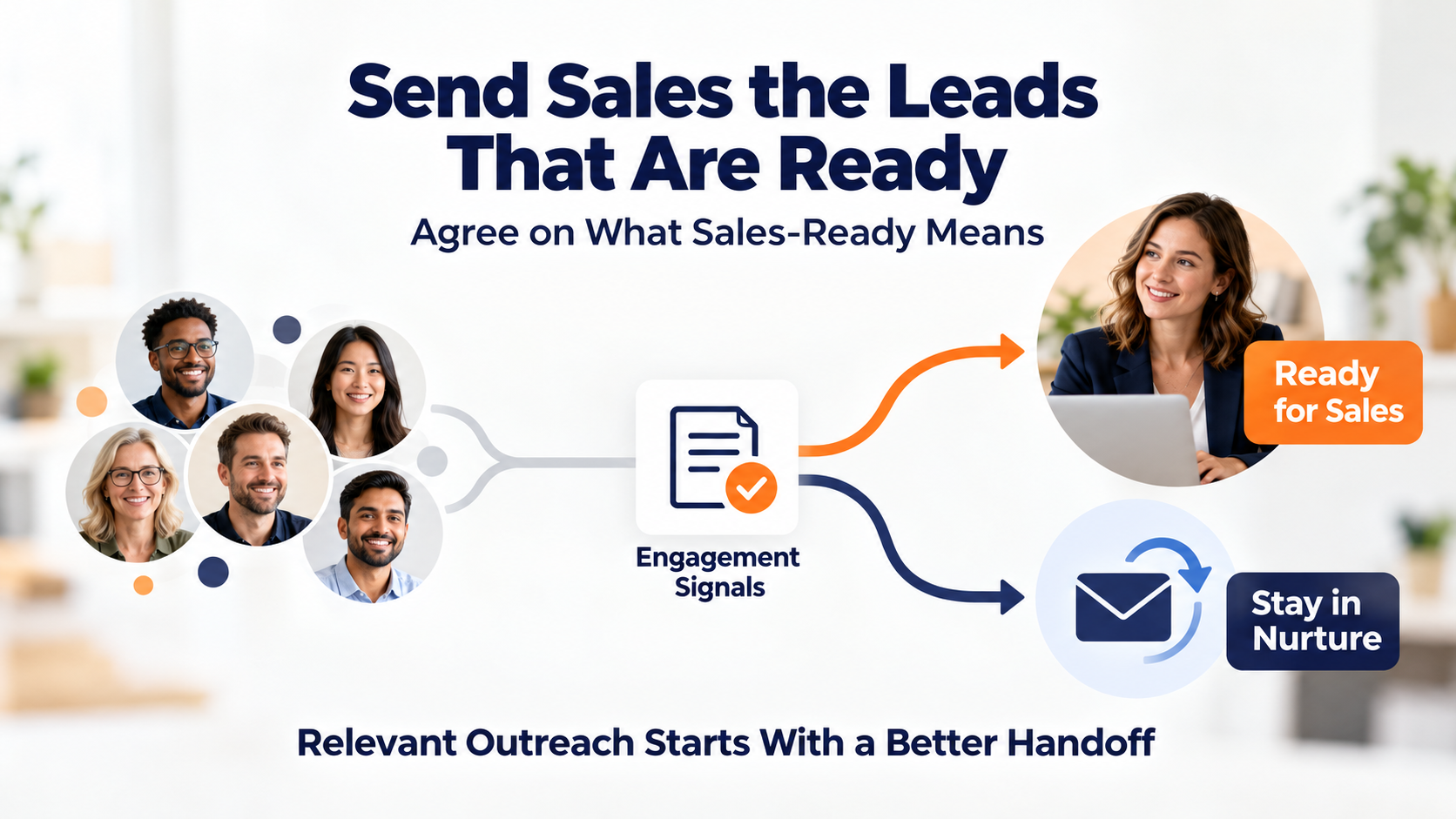
Without a score, every lead in your nurture program looks the same to sales. Reps either call everyone, which burns their time, or after enough bad leads, call no one, which burns your pipeline.
A working score fixes the handoff. It also forces a conversation most teams avoid having.
Create a shared definition of sales-ready
Ediware's guide makes the case that a common definition of the qualified lead, translated into points, gets marketing and sales to agree on facts rather than impressions. At the same time, that only holds while the score keeps sending reps people worth calling.
One bad week of handoffs and reps go back to gut feel. Most of this guide is about keeping false positives out, because a score sales ignores is worse than no score at all.
Buyers notice when outreach comes too early
In a Gartner survey of 632 B2B buyers, 73% said they actively avoid suppliers who send irrelevant outreach. A score won't make a sales call relevant by itself.
What it does give you is a reason to wait on the outreach. Contacts who haven't shown interest should stay in nurture capaigns, and the call shoudl only go to the people whose behavior suggests they want one.
Engagement can decide who reaches your CRM
As an example, an enterprise SaaS company uses Pinpointe to nurture old trade show leads with webinars and newsletters, appending URL tracking so click data flows into its CRM.
This way only highly engaged leads pass to sales, which keeps the company from paying for CRM seats on contacts who never engaged.
That setup routes on engagement rather than a formal points table. It shows the core idea in practice, though. Email behavior decides who earns a spot in the sales system.
Setting Lead Scoring Rules for Email Engagement
Every scoring rule starts with an event. Before you assign a single point, decide which email events you trust enough to count.
Some deserve heavy weight, some deserve none, and choosing the wrong actions can quickly erode the quality of your leads.
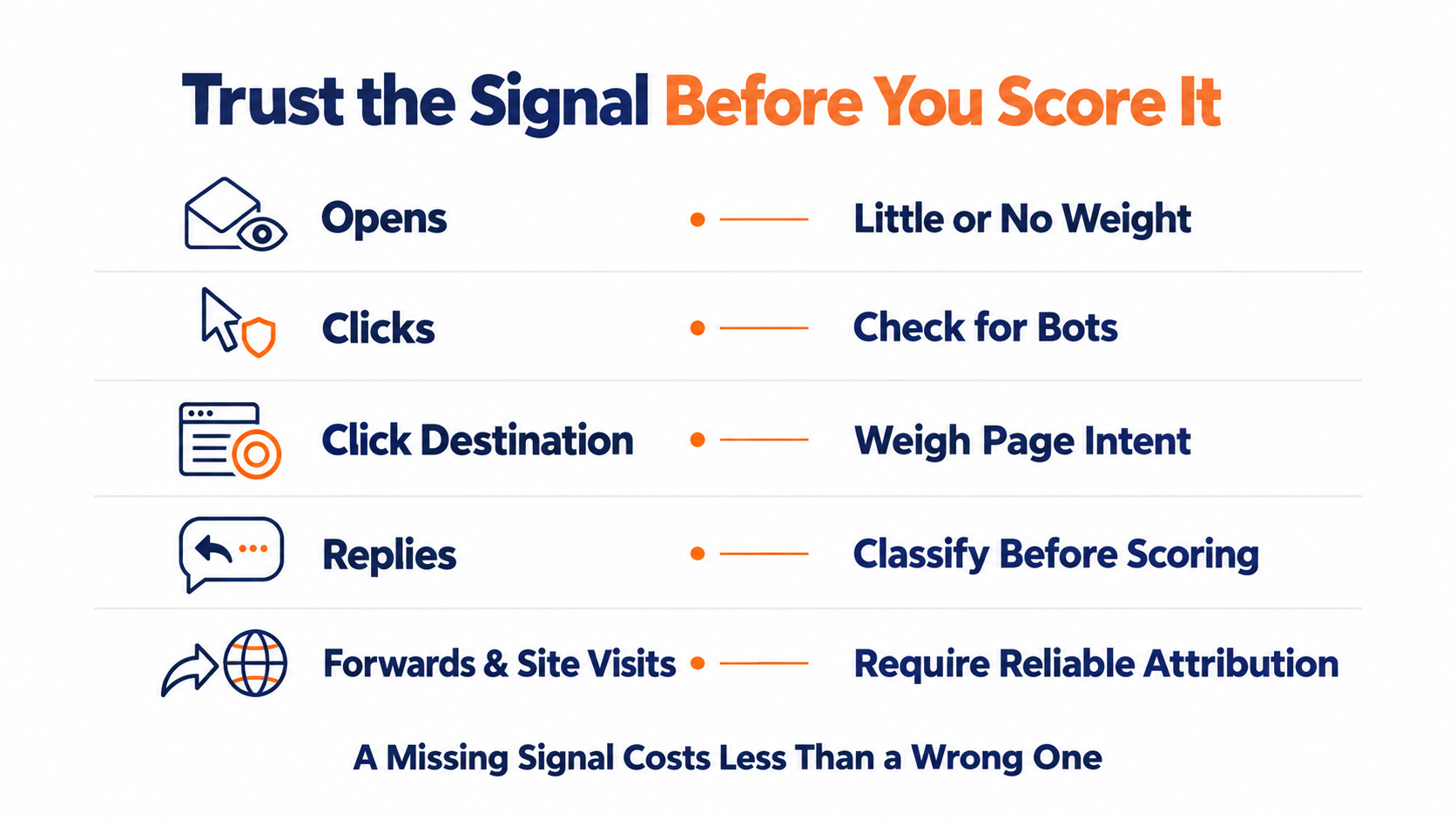
Opens are the weakest signal you have
With Apple's Mail Privacy Protection turned on, Mail downloads remote content in the background by default, regardless of whether the recipient engages with the email.
Since open tracking depends on that remote content loading, a recorded open from a protected inbox doesn't prove anyone read the message.
Keep tracking opens for deliverability, but give them little or no weight in the score.
Link clicks need a bot check
Clicks look sturdier, and that's a common trap marketing teams fall into. Salesforce's own support documentation explains that firewall, anti-spam, and anti-virus systems scan emails and trace the links inside them, which records clicks and inflates click rates. The tell, per the same article, is a pattern where recipients appear to click every link in an email at nearly the same moment, which no human can do.
In B2B, the cost of a fake click is a wasted sales call. Count one click per link per email, and treat a near-simultaneous burst across every link as a scanner until something else proves otherwise.
Where the click lands matters
A click on your pricing page and a click on a blog post are different signals. Ediware's guide makes the same point, noting that weighting clicks by the destination page sharpens the reading of intent, with pricing and demo pages carrying more weight than a case study.
Treat that ranking as a way to refine your lead scoring model. Base the value of each clik on your own closed deals and what page visits had a reasonable connection to them to decide which pages predict a sale.
Replies carry intent but need sorting
Illustrative email scoring tables, like the starting grid in Ediware's guide, weight a reply above an open or a click. A reply from an interested person is one of the clearest signals you can get.
It's also messy. Out-of-office notices and "please remove me" requests arrive in the same inbox as real interest, so someone or something has to classify replies before they score.
Replies also tend to land in a person's inbox or your CRM rather than your email reports. Check where yours are captured before you build a rule around them.
Forwards and website visits are harder to pin down
A forward to a decision maker or a later visit to your site can be strong intent. Tying either one back to the right contact depends on tracking you may not have.
If you can't attribute a signal reliably, leave it out of the email score. A missing signal costs you less than a wrong one.
A Sample Email Lead Scoring Model You Can Adapt
The model below is illustrative. The numbers are a starting point to show how events, caps, decay, a fit check, and a threshold connect, and they are not benchmarks from research.
Tune every value against your own results. The structure is the part worth copying and basing your lead scoring model on.
The point values
Each row pairs an email event with points and a cap on how often it can score in a 30-day window.
| Email event | Points | Cap per 30 days | Why |
|---|---|---|---|
| Click to pricing, demo, or contact page | +15 | 1 | Closest email signal to buying intent |
| Click to product or case study content | +5 | 3 | Evaluating, not yet shopping |
| Click to blog or newsletter content | +2 | 5 | Light interest |
| Human reply, classified as interested | +20 | 1 | Direct response, needs sorting first |
| Open | 0 | None | Tracked for deliverability only |
| Suspected scanner click burst | 0 | None | Excluded from the score |
| Unsubscribe or spam complaint | Removed from scoring | None | Exit nurture and sales routing |
| Hard bounce | Removed from scoring | None | Clean the record |
Caps stop one busy reader from looking like a buyer
Without caps, a loyal newsletter reader who clicks every issue can outscore a prospect who clicked your pricing page once. Caps keep volume from impersonating intent.
They also blunt the damage when a scanner slips past your filters. A capped rule can only be inflated so far.
Decay keeps the score current
Ediware recommends that you let behavioral points decay over time so a recent signal keeps its full value and an old one gradually fades. In this sample, engagement points are cut in half after 60 days without a qualifying click.
Decay here applies to engagement only. Fit details like company size and industry don't lose relevance because someone went disengaged, so refresh them when the underlying data changes instead of on a timer.
Apply a quick fit gate before the threshold
Fit doesn't need its own point system in an email-focused model. A short pass or fail check works for most organizations that implement it correctly.
Does the contact use a business email domain? Do they hold a role that buys or influences the purchase, at a company in a market you serve? If any answer is no, they stay in an email nurture campaign no matter how many points they earn.
The threshold and what happens next
A scoring model needs a trigger threshold, the point where a contact becomes a marketing qualified lead ready for sales. In this sample, 40 engagement points plus a passed fit gate makes an MQL.
That handoff is marketing's call. Another example is giving each lead a score from 0-100 and only routing a score of 80 or above to sales.
Sales qualification, marketing automation, and direct fast-tracks
Sales qualification comes next, when a rep talks to the person and confirms timing, need, and authority, so agree with sales on how quickly they follow up once a lead crosses.
This is a great point to integrate your marketing automation system so you don't rely on manual outreach when a lead hits this level which can lead to quality leads falling through the cracks.
One exception skips the math. A demo request or contact form submission from an email goes straight to sales, because the contact already told you what they want.
Common Email Lead Scoring Mistakes
Most scoring models don't fail on day one. They slowly drift off course until sales stops looking at them entirely.
The open and click problems mentioned above cause much of that drift. These are the other usual suspects that cause lead scoring models to fail.
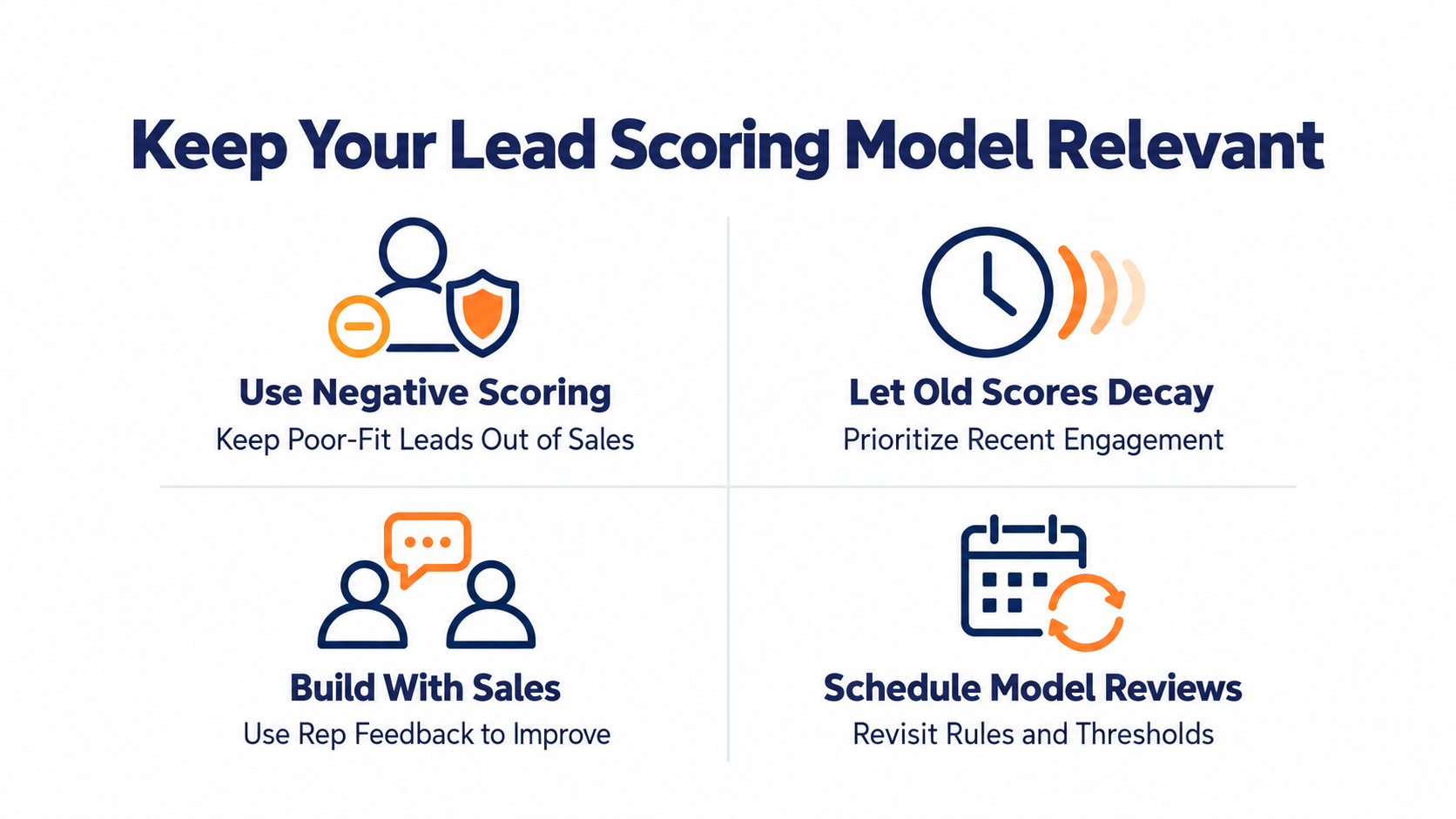
Skipping negative scoring
Without negative scoring, a competitor researcher who downloads everything and attends every webinar looks identical to a hot prospect. Positive points alone reward activity, whoever is behind it.
Unsubscribes, complaints, and failed fit checks should pull a contact out of sales routing, not just slow them down.
Letting old engagement prop up the score
Practitioners in Adobe's Marketo community list scores that keep rising without decay among the common reasons scoring models fail. A contact who clicked five times last spring and nothing since is not this week's priority.
Without decay, people who went quiet months ago can keep sitting near the top of your list.
Building the model without sales
Marketing can build a technically clean model that sales ignores. Ediware notes that the MQL threshold is negotiated between marketing and sales, and that a rep's feedback on leads that weren't ready should flow back to correct the model.
Bring reps in before you set point values. Ask them which recent leads were worth the call and what those people did first. Our guide to sales and marketing alignment covers how to keep that conversation going.
Setting it once and walking away
Your offers change, your content changes, and your audience changes. One practitioner thread recommends reviewing lead scoring models quarterly so thresholds and qualification criteria stay relevant.
Whatever cadence you pick, put it on the calendar. A model nobody reviews slowly turns into a list of who opened the most emails two years ago.
How to Tell Whether Your Lead Scoring Model Works
The only test that matters is whether higher scores turn into leads sales accepts. Everything else is decoration.
You don't need a data team to run that test, you need solid cross-functional communication between your sales and marketing teams.
Compare scores with what sales accepted
Pull the leads that crossed your threshold over the last few months. Mark which ones sales accepted and which turned into opportunities, then group them by score band.
If acceptance doesn't climb as scores climb, your weights are off. Look at which events the rejected leads had in common, and that's usually where the scoring rules are too generous. For the revenue-side numbers worth tracking next to it, see our guide to email marketing metrics.
When a spreadsheet stops being enough
You can start with a shared spreadsheet and a written list of point rules. Leadfeeder describes manual lead scoring as a resource-intensive, time-consuming process, and that cost grows with every new lead and every new rule.
The tipping point is usually speed. Once a hot lead waits days for someone to update a sheet, the score is describing last week.
Turning Email Lead Scoring Into Handoffs Sales Will Act On
A useful email lead score starts with signals you can trust. Opens get tracked but not scored, clicks get filtered and weighted by where they land, and replies get sorted before they count. Caps, decay, and negative scoring keep the total honest, and a fit gate plus a threshold sales agreed to decides who gets the call.
The scoring math is the easy part. Trusting the events that feed it is where most models break.
Using engagement data to trigger smarter follow-ups
That puts the weight on your email data. Pinpointe's webhooks send open, click, bounce, unsubscribe, and spam complaint events to a URL you choose in near real time, and each click arrives with a timestamp and the destination URL.
That's the raw material for weighting clicks by destination and spotting bursts no person would produce, wherever your scoring runs. Zapier connects Pinpointe to other apps without writing code, and the API covers custom connections.
Inside Pinpointe, a Journey can start when a contact clicks a specific link you choose, so a pricing-page click can move someone into a follow-up path while you're still deciding who gets the call.
Find the leaks in your handoff with a free audit
If engaged leads are slipping between your emails and your sales team, our free marketing automation audit is a good place to find out where. It's a 30-minute 1-on-1 session that looks at your current setup, identifies manual work draining your team's time and the points where prospects drop out of your funnel, and leaves you with an automation roadmap whether or not you work with us.
Bring your current scoring rules and a few months of handoffs. We'll look at where the signal is getting lost.
Email Lead Scoring FAQ
What is a good email lead score?
There's no universal good score, because the number depends on the point values you chose. What matters is the threshold that marks the moment a contact becomes an MQL, negotiated with sales. If sales rejects most leads that cross it, raise the threshold or reweight the events behind it.
Should email opens count in lead scoring?
Opens deserve little or no weight. Apple's Mail Privacy Protection downloads remote content in the background whether or not the recipient engages with the email, so an open from a protected inbox isn't proof anyone read it. Track opens for deliverability and score clicks and replies instead.
Do you need software for email lead scoring?
Not to start. A spreadsheet and clear point rules will do, though Leadfeeder notes manual lead scoring is resource-intensive and time-consuming. Most teams move to automation once leads start waiting on manual updates.
How often should you review a lead scoring model?
Review it on a regular schedule and after any big change to your offers or audience. One practitioner community recommends a quarterly review to keep thresholds and qualification criteria relevant.