
Send too much too fast from a new IP or domain, and Gmail treats you like a stranger showing up with a moving truck at 2 a.m. Suspicious first, helpful second. Most senders learn this the hard way, usually during a platform migration or a big list move, right when they can least afford a deliverability crater.
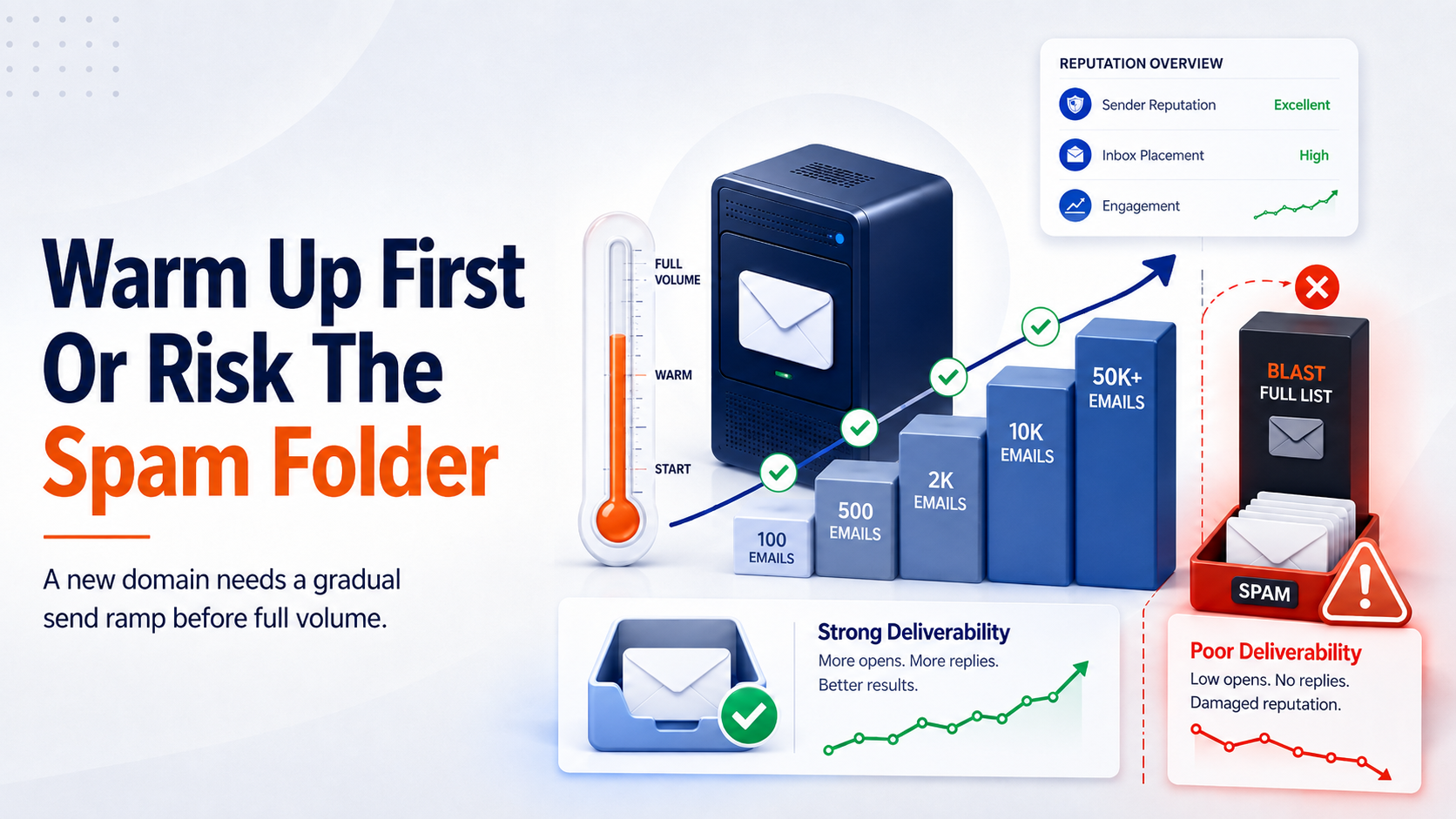
Skip domain warmup and risk the spam folder
Warmup is not a checkbox. It is the only thing standing between a new domain and a spam folder that swallows your first quarter of sends, and it is one of the biggest levers you have over your own email deliverability.
We have watched this play out with our own customers more than once. A team migrates platforms, gets everything configured beautifully, and then blasts the full list on day one because the setup finally works. Two weeks later they are asking why open rates cratered and nobody can explain it.
What IP And Domain Warmup Actually Protect
Every mailbox provider keeps a running trust score, usually called sender reputation, on every sending IP and every sending domain. A brand new one has no history at all. No history reads as risk.
That blank slate is the entire problem. Filters cannot tell the difference between a legitimate brand switching platforms and a spammer who just burned through their last IP, and that trust score is the foundation your email deliverability actually rests on.
The trust problem mailbox providers are solving
Spammers cycle through IPs constantly, because their old ones get blocked. So when Gmail or Outlook sees a fresh IP suddenly pushing volume, the pattern looks familiar for the wrong reasons.
Warmup exists to prove you are not that pattern. Slow, consistent, engaged sending is the opposite fingerprint of a spam blast.
What counts as new in the eyes of an inbox provider
Not every "new" carries the same risk, and treating them all the same either wastes time or creates risk you did not need to take. IP warmup and domain warmup often get lumped together, but they follow different rules.
A new domain is always a cold start, even for an established brand with years of sender history somewhere else. The domain itself has no reputation yet, so it needs the full, slow, controlled ramp in this guide. There is no shortcut here.
Let real-time performance data dictate your subdomain timeline
A new subdomain sitting on a warm root domain is a lighter case. It still needs monitoring, and it is not automatically treated as fully trusted, but Google Postmaster Tools rolls subdomain signals back up to the root domain's status, so an established root domain gives a new subdomain a real head start.
In practice, that often means clearing warmup faster than a brand-new domain would need, as long as the signals stay clean the whole way. Let the data set the pace instead of assuming a fixed number of weeks going in.
How pre-warmed shared IPs speed up platform migrations
A new dedicated IP is where people most often get this backwards. An IP with no sending history at all needs the full ramp, no matter how established the domain or the brand behind it is. But moving onto an existing IP inside an already-warm, high-volume shared pool is a different situation.
That IP already carries real reputation from the traffic already running through it, so an established sender moving into a pool like that can sometimes clear warmup in days instead of weeks. The deciding factor is always the IP's own history, not the sender's reputation elsewhere.
|
Sending setup |
Warmup needed |
|
Same IP and same domain you have always used |
No, this is the one safe combination |
|
New dedicated IP |
Yes, warm the IP from zero |
|
New domain on an IP you already own |
Yes, especially with a large Gmail audience |
|
New subdomain on a warm root domain |
Yes, but can ramp up faster. Often in as little as 2-3 weeks as long as you monitor the domain's reputation signals |
|
Established brand moving to a new domain |
Yes, old reputation does not transfer. Treat as a cold start with a slow controlled ramp up |
|
Established brand moving to a new IP |
Not necessarily. If you move to an IP pool that already has existing traffic, you might not need to ramp for more than a few days. With qualified traffic, you can ramp quickly. |
Why warmup is not the same as authentication
SPF, DKIM, and DMARC prove you are who you say you are. They say nothing about whether recipients want to hear from you.
Warmup proves the second thing. You can be perfectly authenticated and still get filtered straight to spam if you skip it, because authentication and reputation answer two completely different questions.
When you can skip it entirely
If your reputation is already thoroughly wrecked and you have nothing left to protect, sure, skip it. That is the only real exception.
Everyone else, including established brands with a great sender history on their old setup, starts the new IP or domain from zero. Your old reputation does not transfer.
Why Switching Platforms Doesn't Have To Mean Starting Over
The most common warmup question we hear has nothing to do with schedules. It's from teams staring down a platform migration, worried that moving off their old ESP means torching years of sender reputation overnight.
That fear made a lot more sense a few years ago than it does now.
The old fear of a hard cutover
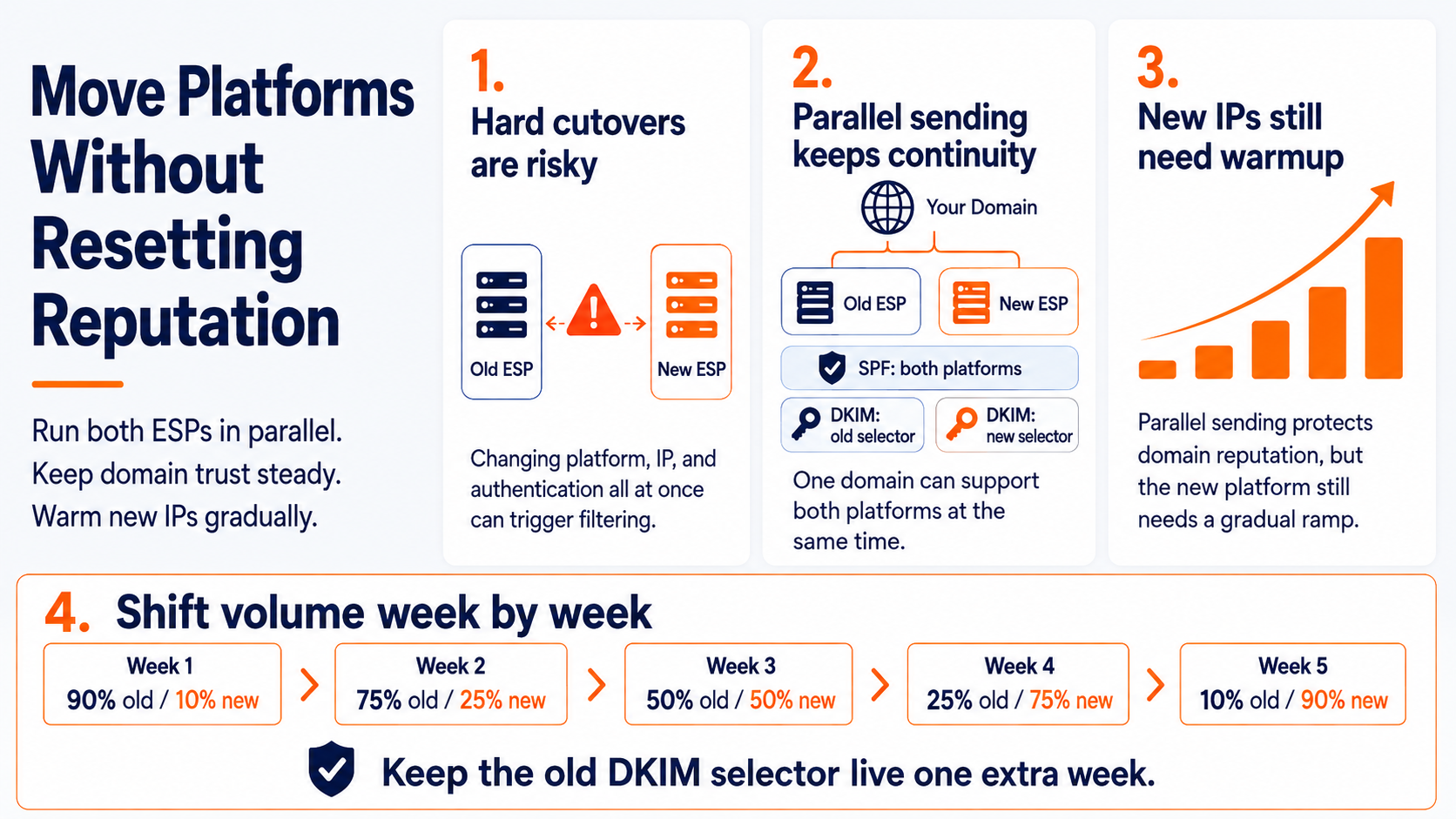
The old playbook was a hard cutover. Turn off the old platform, turn on the new one, and hope the domain's reputation somehow follows along. It usually didn't, at least not cleanly.
A hard cutover changes your sending IP, your authentication setup, and your platform all in the same moment. Mailbox providers have no way to tell that from a compromised domain suddenly sending through new infrastructure.
How DKIM selectors let two platforms run at once
This is where the fix actually lives, and it's been available longer than most marketers realize. DKIM was built to let a single domain run multiple signing keys at once, and SPF was built to authorize more than one sending source at a time, specifically so a domain doesn't have to go dark on one system before lighting up another.
In practice, that means you can authorize your old platform and your new one in the same SPF record, and publish a separate DKIM selector for each. Both stay valid at the same time. Nothing about that setup is new or experimental. It has just gone underused.
What this does and does not solve
Here's the part worth being precise about. Running two platforms in parallel with separate selectors keeps your domain-level authentication and reputation continuous. That part gets easier no matter which platform you are moving to.
What happens on the IP side depends entirely on where you are moving. If you are migrating to a cold, dedicated IP with no sending history, that IP still needs the full gradual ramp described earlier in this guide, even though your domain reputation is intact. Domain continuity does not transfer to an IP that has never sent anything before.
Seamlessly transition platforms without domain downtime
If you are migrating to an existing, high-reputation shared pool that already carries real ongoing volume, the IP side of the equation looks very different.
The IP is not starting from zero, so you are often looking at days rather than weeks before you are sending at full volume, assuming your monitoring confirms it.
The DKIM and SPF setup from the previous section is what makes that fast a transition possible without your domain ever looking like it went dark.
A parallel-run plan that actually shifts volume
Authorize both platforms in SPF and publish both DKIM selectors before you send a single message from the new one. Start your new platform's ramp using the same engaged-audience approach from earlier in this guide, while your old platform keeps carrying the rest of your volume.
Shift a growing share of sends to the new platform each week as its ramp advances, the same doubling logic as any other warmup, until it's carrying everything. Keep the old platform's selector live for at least a week after you've fully moved off it, since messages already in transit may still reference it.
|
Pro Tip: Don't retire your old platform's DKIM selector the same day you finish the migration. Give it at least a week of overlap so nothing already in transit fails authentication. |
Building Your Warmup Seed List Before You Send Anything
The list you warm up with matters more than the schedule you follow. Send your best content to your most indifferent subscribers, and no schedule will save you.
Build the seed list before you touch the send button, not after the first bounce report comes in.
Start with the audience that already trusts you
Pull the subscribers who have opened and clicked repeatedly in the last three to six months. These are the people least likely to complain and most likely to open, which is exactly the signal you want mailbox providers to see first.
Everyone else waits. That includes big-spending customers who happen to be quiet in their inbox behavior right now.
Pull performance data, not gut feel
Look at your last six to nine months of sends and find the specific messages with the strongest open and click-to-open rates. Lead with those, not with whatever you happen to be launching this week.
A newsletter that already performs well is a safer opening move than a brand-new marketing campaign nobody has reacted to yet.
Behavioral triggers deserve extra weight here too. Triggered sends made up only 2% of total email volume last year but drove 37% of all email-driven sales, which tells you something about where the real engagement lives. Lead your warmup with that kind of content whenever you have it.
Size the seed list to the volume you are ramping toward
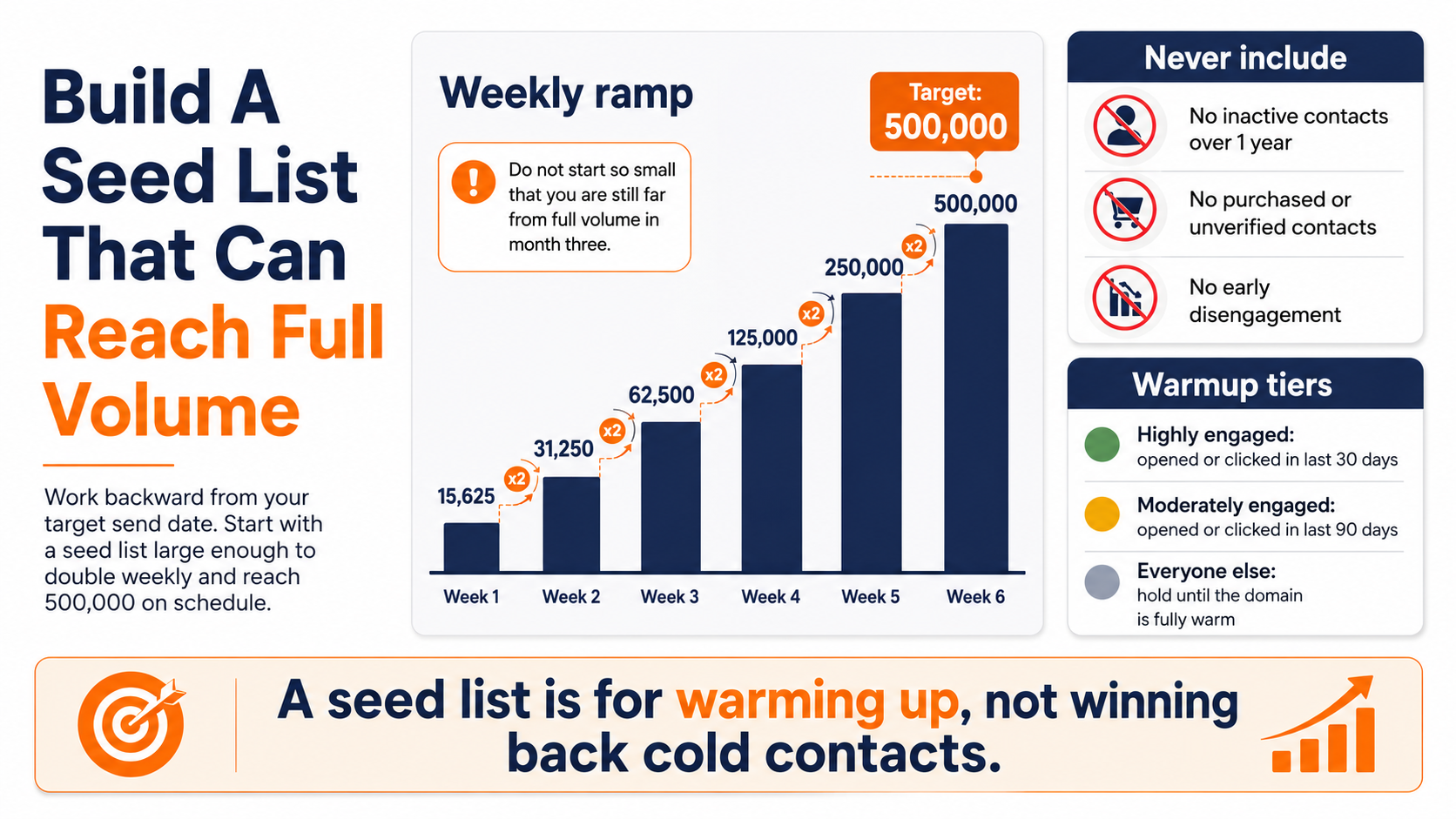
If you are eventually sending to 500,000 people, your seed list needs to be big enough that doubling it weekly gets you there in a reasonable number of weeks, not so small that you are still at 3% of volume in month three.
Work backward from your target send date, then build the seed list size that actually gets you there on schedule.
What the seed list should never include
Never include contacts who have not opened anything in over a year. Never include unverified or purchased contacts. Never include anyone already showing early signs of disengagement on your current sending setup.
A seed list is not the place to try to win back cold contacts. That is a separate campaign, run later, on an already-warm domain.
Segment your warmup list into three simple tiers before you send anything:
• Highly engaged: opened or clicked in the last 30 days
• Moderately engaged: opened or clicked in the last 90 days
• Everyone else: holds until the domain is fully warm
The Week By Week Ramp That Actually Works
The math behind warmup is simple even when the discipline is not. Start tiny, double consistently, and let the mailbox providers watch you build a track record in real time.
Most warmups run 4 to 8 weeks, longer for a brand new dedicated IP paired with a brand new domain.
Why doubling volume works better than guessing
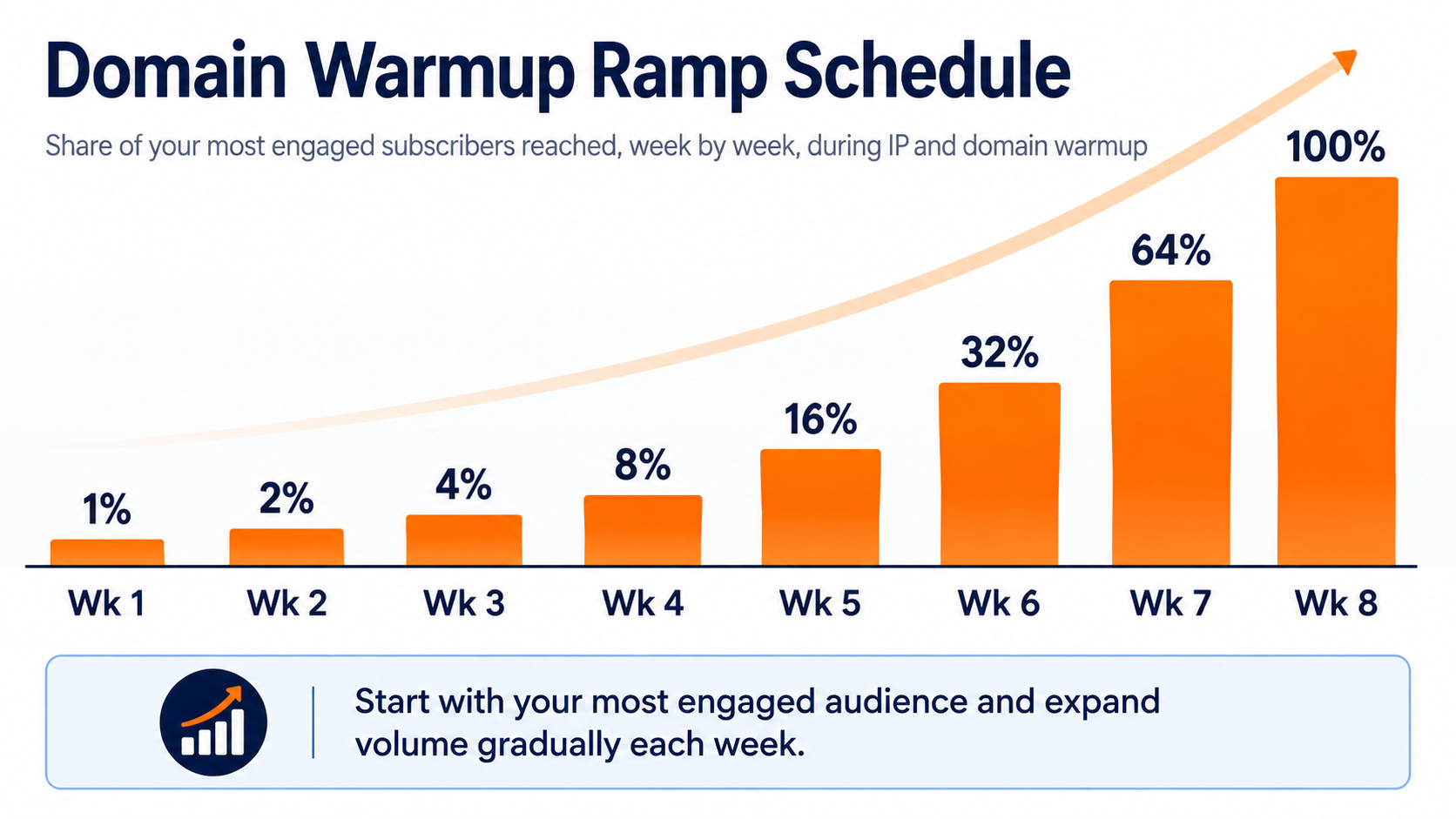
A flat daily increase feels intuitive but front-loads risk into the first two weeks, right when your reputation is thinnest. Doubling front-loads caution instead, and it's why starting at roughly 1% of your most engaged subscribers in week one and doubling that share each week keeps the earliest, riskiest days small.
By week eight, you are sending to your full engaged base, having proven yourself the entire way there.
Weeks one through four
Week one starts at roughly 1% of your list, all highly engaged. Week two doubles to 2%, week three to 4%, week four to 8%. Every send in this stretch should still be your strongest-performing content.
Watch open rates daily during this stretch. A dip here is cheap to fix. The same dip in week seven is not.
Weeks five through eight
Volume keeps doubling, 16%, then 32%, then 64%, then the full engaged list by week eight. This is also where your less-engaged tiers can start entering the rotation, carefully.
Keep monitoring per-provider performance, not just the blended average. A strong Gmail number can hide a quietly struggling Outlook number.
When to slow the ramp down
If engagement dips or complaints tick up at any point, pause the doubling and repeat the current week's volume instead of advancing. Isolate the affected provider if you can see which one is the problem.
A slower warmup that finishes clean beats a fast one that has to restart from scratch in month two.
The chart below lays out a sample 8-week ramp, based on doubling the share of your most engaged subscribers each week, from 1% in week one to your full engaged base by week eight.
Reading Postmaster Tools While You Ramp
A warmup schedule without monitoring is just a guess with extra steps. Postmaster Tools turn the guess into a feedback loop you can actually act on, and they are the clearest window you get into your real email deliverability during the ramp.
Set these up before you send the first warmup email, not after week three raises questions.
Google Postmaster Tools and the numbers that matter
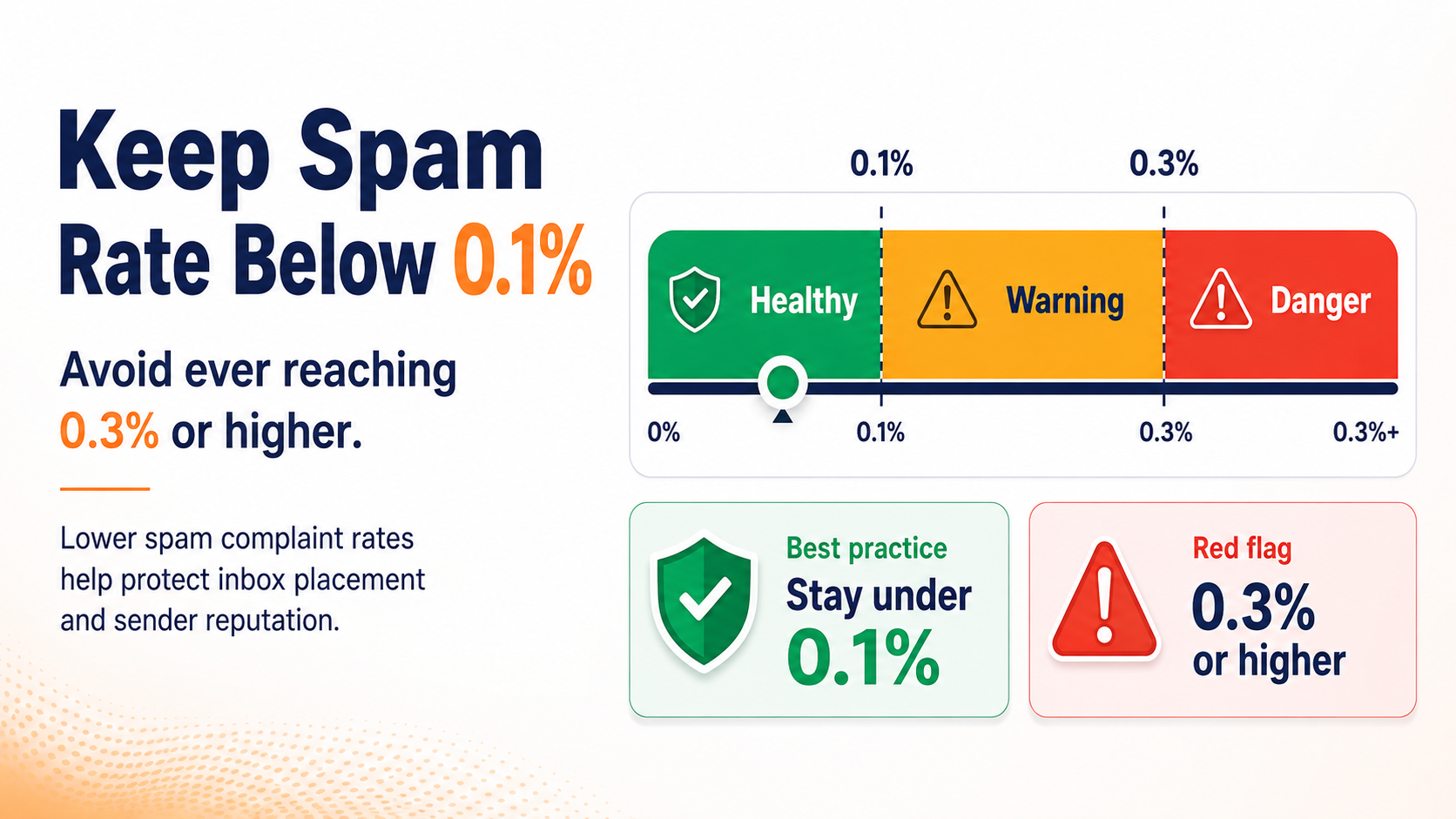
Spam rate is the number to watch above everything else. Gmail expects senders to keep their spam rate below 0.1% and to avoid ever reaching 0.3% or higher, and that threshold applies during warmup just as much as it does once you are at full volume.
This is where you actually watch sender reputation take shape, split into domain reputation and IP reputation, each on its own graph. Watch both, since a domain can look fine while an individual IP quietly struggles.
Microsoft SNDS and what it is actually telling you
Outlook and Hotmail run on their own separate signal, and it only shows data once an IP crosses a real volume threshold. Complaint rate, spam trap hits, and a color-coded filter result tell you how Microsoft's own filters currently treat your traffic.
Set this up early even if your Microsoft-domain volume feels small during warmup. You want the account active and reporting before you need it.
What a healthy dashboard looks like mid ramp
Spam complaints stay near zero. Domain and IP reputation both read as good or better. Delivery errors stay flat instead of climbing week over week.
None of these numbers need to be perfect. They need to be stable and trending in the right direction as volume increases.
What to do the moment a number turns
Stop advancing the schedule immediately. Isolate which provider is affected before you touch anything else, since a Gmail problem and an Outlook problem call for different fixes.
Drop back to your most engaged micro-segment for a few sends, confirm the number recovers, then resume the ramp from a lower step than where you paused.
The card below is the single number worth memorizing out of this whole section.
Volume Discipline Is What Separates A Warmup From A Wish
Every warmup plan looks disciplined on a spreadsheet. The real test is whether it survives contact with a launch calendar that was set months before anyone thought about IP reputation.
Volume spikes are the single fastest way to undo four clean weeks of progress.
The spike that undoes four weeks of progress
A sudden jump from 8% to 50% of your list, even for an important campaign, reads as suspicious no matter how good your content is. Mailbox providers cannot see your calendar. They only see the pattern.
The safest move is almost always the boring one: hold the campaign, or send it through your already-warm setup, and let the new domain keep climbing on schedule.
This is also where your monitoring earns its keep. Microsoft's SNDS only starts reporting data once an IP crosses roughly 100 messages sent in a single day, so a volume spike that pushes you past that threshold for the first time can suddenly expose reputation problems that were invisible the week before, simply because there wasn't enough traffic for Microsoft to score you on.
Splitting sends instead of scaling one big blast
If you truly cannot wait, split the send into smaller batches spread across several days instead of one large blast. This keeps the daily volume inside what your current warmup step can absorb.
It is slower than firing everything at once. It is also the difference between a delayed campaign and a domain that needs to start warming up again from week one.
What happens when a promotion collides with your ramp
Seasonal spikes are exactly the scenario that breaks warmups that were otherwise going well. A big sale during week three of an eight-week ramp puts pressure on a domain that has only proven itself at 4% of volume.
Either push the promotion to your existing warm domain, or accept a smaller reach on the new one until the ramp catches up to where the campaign needs it to be.
Holding the line even when the calendar argues with you
Someone will ask why the new domain cannot just send everything now that it technically works. This is usually the moment warmups quietly fail.
Explain the reputation math once, clearly, and hold the schedule. A domain that finishes its ramp on time earns the volume permanently. One that gets rushed often loses ground it has to rebuild.
|
Pro Tip: Build your campaign calendar around your warmup schedule, not the other way around. Reordering a launch date is cheaper than repairing a reputation. |
Common Warmup Mistakes That Look Like Progress
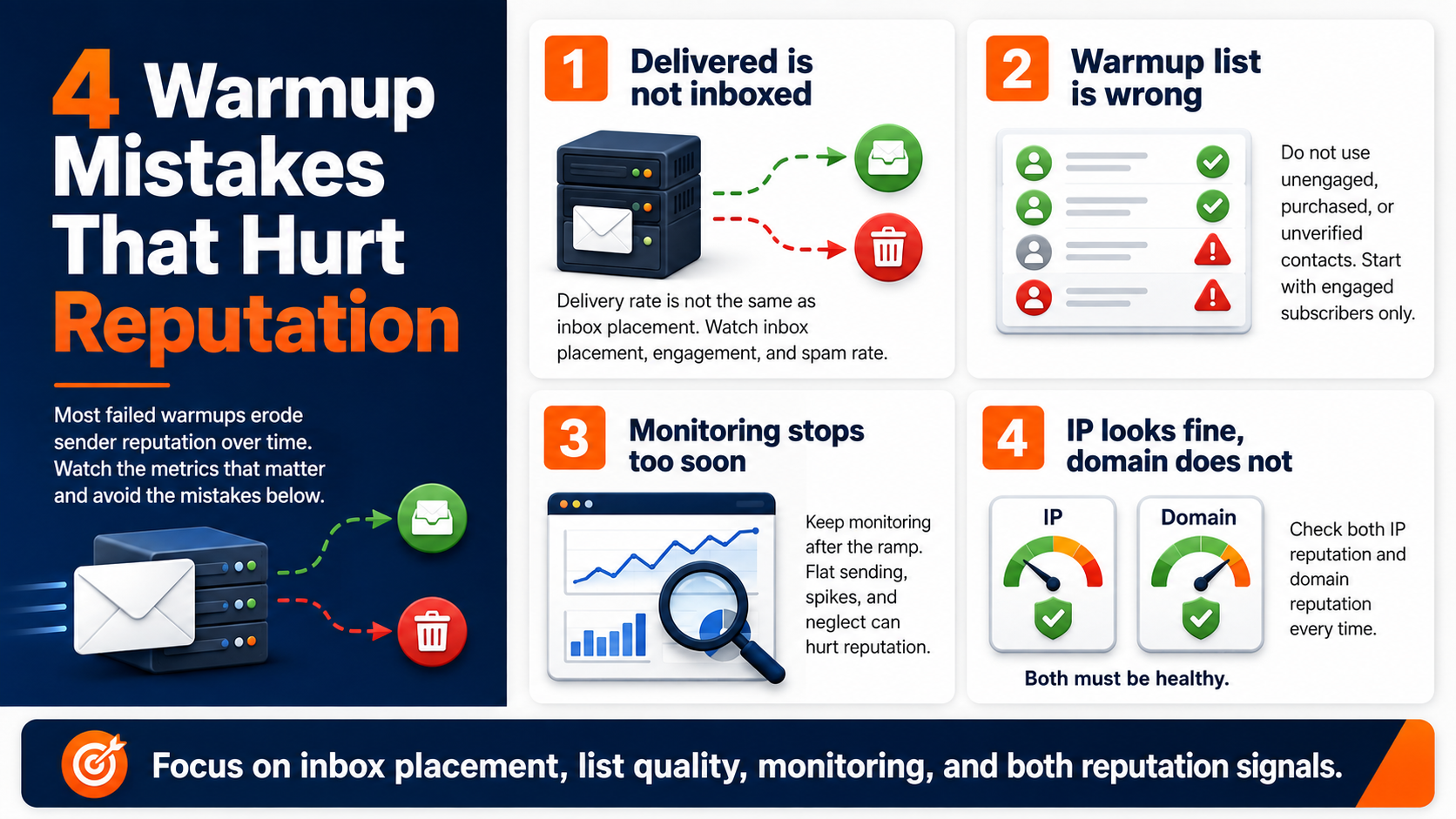
Most failed warmups do not fail loudly. They unknowingly erode sender reputation a few percentage points at a time, until someone finally checks the postmaster dashboard and finds a mess.
These are the mistakes that feel like they are working right up until they are not.
Mistaking delivered for landed
A message can leave your server successfully and still land in spam. Delivery rate and inbox placement are different numbers measuring different things entirely.
Watching only bounce rate during warmup is watching the wrong metric. Inbox placement, engagement, and spam rate tell the real story.
Warming up with the wrong list
Sending warmup volume to your entire list, engaged or not, defeats the purpose of warmup completely. So does warming up with a purchased or unverified list, which guarantees the bounce and complaint signals you are trying to avoid.
The seed list discipline from earlier in this guide is not optional once volume starts climbing.
Abandon ramping and send full speed
Reputation is not a one-time achievement. Stopping active monitoring the day the ramp finishes, or letting volume sit flat for months and then spiking again, both reset the clock in different ways.
A domain needs consistent sending behavior to hold its reputation, not just to build it.
Ignoring the domain because the IP looked fine
IP reputation and domain reputation are tracked separately by most major mailbox providers now. A clean IP sitting on a domain with a messy history will not save you.
Check both, every time, especially if the domain has any prior sending history you inherited from somewhere else.
Watch for these four mistakes specifically, since they account for most of the warmups that stall out:
• Judging success by delivery rate instead of inbox placement
• Warming up with unengaged or unverified contacts
• Treating the end of the ramp as the end of the monitoring
• Checking IP reputation while ignoring domain reputation
Where Expertise Fills The Gap A Tool Cannot
Warmup rewards patience, but almost nobody gets their first ramp exactly right on paper alone. The gap is usually judgment, not math.
We do not have an automated tool that runs your warmup schedule for you. What we do have is a support team that has walked dozens of customers through exactly this process, and they have seen almost every way a ramp can go sideways before it happens to you.
That matters more than a dashboard, especially the first time a number looks strange and you are not sure whether to pause or push through.
Get expert answers when warmup metrics take an unexpected dip
Pinpointe's email deliverability infrastructure exists to give your emails a clean foundation to warm up on, and our team is the part that tells you what the numbers actually mean when you are staring at a dip at 9 a.m. wondering if it is real.
Most of our customers do not need software to hold their hand through a ramp. They need someone who has already seen this exact dip on someone else's domain, knows whether it is a two-day blip or a real problem, and can tell them which one it is before they either panic or ignore something that needed attention.
There is also a real head start on the IP side. Pinpointe customers send on established, shared sending infrastructure with a long aggregate sending history behind it, so you are not starting an IP from a dead stop the way you would on a brand-new dedicated IP. That takes real pressure off one half of the warmup equation.
|
Pro Tip: Treat "we've been sending email since 2005" as brand credibility, not IP credibility. Mailbox providers only remember the IP and domain, not your company history. |
It does not take domain warmup off the table, though. Mailbox providers score your domain's reputation on its own, separate from whatever IP it happens to be sending through at the moment.
The seed-list and ramp-schedule steps earlier in this guide still apply in full, no matter how established the IP underneath you is.
What Would Your Next Launch Look Like On A Domain That's Already Trusted
Warmup comes down to a short list of decisions done consistently. Start small with your most engaged subscribers. Double volume on a schedule instead of guessing. Watch Google Postmaster Tools and Microsoft SNDS every day, not once a week. Protect the ramp from your own launch calendar.
None of that is complicated. All of it requires actually doing it every week for two months, which is exactly where most warmups fall apart.
The domains that come out the other side with strong sender reputation and healthy email deliverability are not the ones with the fanciest tooling. They are the ones that stuck to the plan on the boring weeks, when nothing looked urgent enough to justify the discipline.
Build a custom warmup schedule
If you are about to move to a new IP, a new domain, or you inherited a sending setup nobody has warmed up properly, schedule a marketing automation audit with our team.
We will look at exactly where your setup stands and build the ramp schedule around it before you send anything that could cost you the reputation you are trying to build.
What would it be worth to you if your next big send just worked, on the first try, from day one?