
Your open rates are fine. Your click rates are the problem. And there's a good chance the fix has been sitting in your content calendar the whole time, untouched, because video still feels like "extra work" instead of "the thing that actually moves the number."
Why Adding Video to Email Can Enhance Marketing Results
Emails with video convert at 9.1%, compared to 5.4% for emails without it. That's not a rounding error. That's a 69% lift sitting on the table for anyone still treating video as optional.
You don't need a production team to get there. You need a strategy that respects how people actually behave inside their inbox, which is different from how they behave on YouTube or TikTok. Let's get into it.
Content volume isn't the issue, how it's promoted is
Most teams already have raw video sitting around unused, product demos recorded for sales calls, onboarding walkthroughs built for internal training, screen recordings from a webinar nobody repurposed.
The content problem isn't production. It's distribution, and email is the channel most teams have completely overlooked for it.
Spotting the Shift Before Your Competitors Do
Video used to be a nice-to-have line item in the content plan. That's over.
Ninety-one percent of businesses now use video as a core marketing tool, and email is one of the channels where the gap between adopters and non-adopters is widest. If your competitor started embedding product walkthroughs into their nurture sequences last quarter, they're already lapping you on click-through rate.
The brands sitting this out aren't being careful. They're just behind.
Here's the part that should actually worry you. Adoption curves like this don't stay gradual for long. Once a tactic crosses the halfway point of an industry, the remaining holdouts don't catch up gently. They get compared against it, campaign by campaign, until the gap shows up in cost-per-acquisition reports that someone above you is reading.
Measuring What Video Actually Moves
Forget vanity metrics for a second. The number that matters is click-to-conversion, not just click-to-open.
Video shortens the gap between "I saw something interesting" and "I understand what this product does." That's why the conversion lift shows up downstream, not just in your open rate report.
If your dashboard only tracks opens, you're measuring the wrong stage of the funnel.
This matters more for complex products than simple ones. A fifteen-second walkthrough can do the job of three paragraphs of feature copy, and it does it without asking the reader to translate text into a mental picture on their own. That translation step is exactly where most readers bail.
Why This Shift Is Happening Now, Not Two Years Ago
Two things changed at once. Production got cheaper, and attention got shorter. Neither trend is reversing.
You don't need a full crew or a studio to produce something worth sending anymore. A screen recording with a clean voiceover, cut down to under thirty seconds, beats a static screenshot every time it's tested against one.
That's the real unlock. It was never about production value. It was about giving the reader a faster way to understand what you're offering.
Winning the Subject Line Before You Win the Click
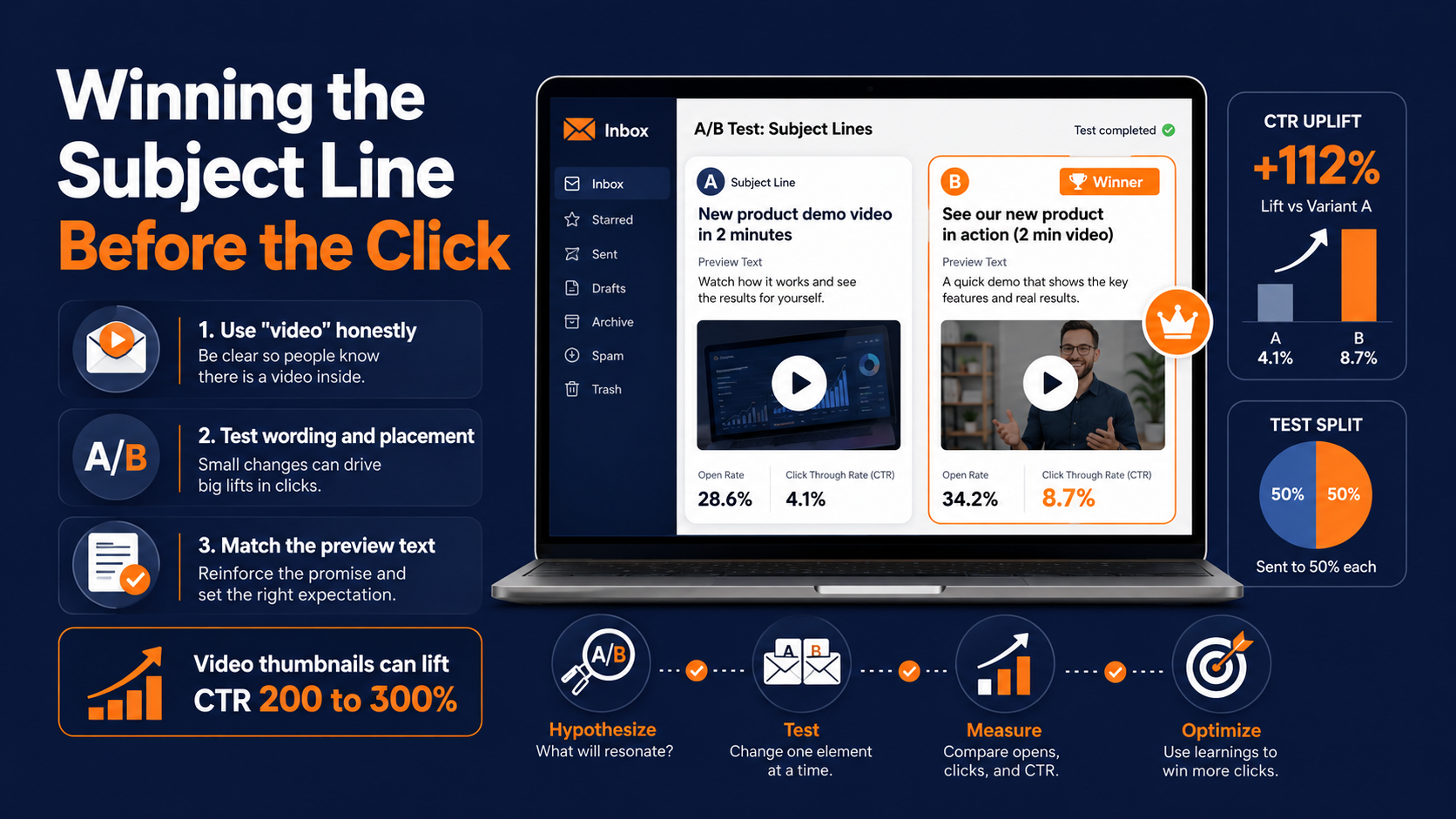
Your subject line has one job: earn the open. Video helps here too, but only if you use the word honestly.
Naming the Format Without Overselling It
Emails with video thumbnails see click-through rates jump 200 to 300% compared to static images. That's a massive lift, and it starts before the reader even opens the email.
Put "video" in the subject line when there's actually a video inside. Readers scan fast, and they remember which brands lied to them about content format.
That memory works against you fast. One mismatched subject line, and your next campaign gets skipped before it's even read, because the reader has already filed you under "not worth the click."
Testing Your Way to the Right Wording
Not every audience responds to the same phrasing. B2B lists tend to respond better to "watch" or "see it in action." Consumer lists respond to "video inside" or a specific benefit tied to the video.
Run this as a real A/B test, not a gut call. Two subject lines, same send time, same list split, different phrasing. Let the data pick the winner.
Give the test enough volume to mean something. A fifty-send split test tells you almost nothing. You need enough recipients per variant that the difference in clicks isn't just noise.
Placement Matters as Much as Wording
Where the word "video" sits in the subject line changes how it reads. Front-loaded, it reads like a promise. Buried at the end, it reads like an afterthought, and readers treat it that way too.
Test placement the same way you'd test wording. Small shifts here compound across a list of any real size.
Preview text plays a role too, and it's the part most teams forget to touch at all. If the subject line promises a video but the preview text reads like generic promotional copy, you've undercut the exact thing that was supposed to earn the open.
Choosing Between GIFs and Full Video
This is the decision most teams get wrong, mostly because they treat GIFs and video as interchangeable. They're not.
Reading the Engagement Data Honestly
GIFs are lightweight, load fast, and work in almost every inbox without a compatibility headache. Email campaigns that use animated GIFs see click-through rates increase by up to 26%, which makes them a strong default for quick product reveals or promotional flourishes.
Full video wins when you need to explain something, not just show it. A three-second GIF can tease a feature. It can't walk someone through a workflow.
Matching Format to Message
Use a GIF when the goal is attention and delight. A product spinning, a before-and-after transition, a subtle animated CTA button.
Use embedded video when the goal is comprehension. Onboarding sequences, demo requests, and anything where the reader needs context before they'll click through.
Mixing the two inside a single campaign works fine. Mixing them inside a single email usually just adds load time for no real benefit.
Here's a quick way to decide which format fits the send you're building right now.
| Situation | Best Format | Why |
|---|---|---|
| Announcing a new feature | GIF | Fast, visual, no explanation needed |
| Onboarding a new customer | Video | Requires context and sequencing |
| Promotional flash sale | GIF | Speed and urgency over depth |
| Demo request follow-up | Video | Reader needs to see the product work |
| Re-engagement campaign | Either | Depends on what's being re-explained |
File Size Still Matters More Than You Think
A GIF that's too heavy defeats its own purpose. If it takes three seconds to render, you've traded one problem for another.
Compress before you send. Most email platforms will silently strip or block oversized files anyway, so testing render speed isn't optional.
Building an Embed Strategy That Survives Every Inbox
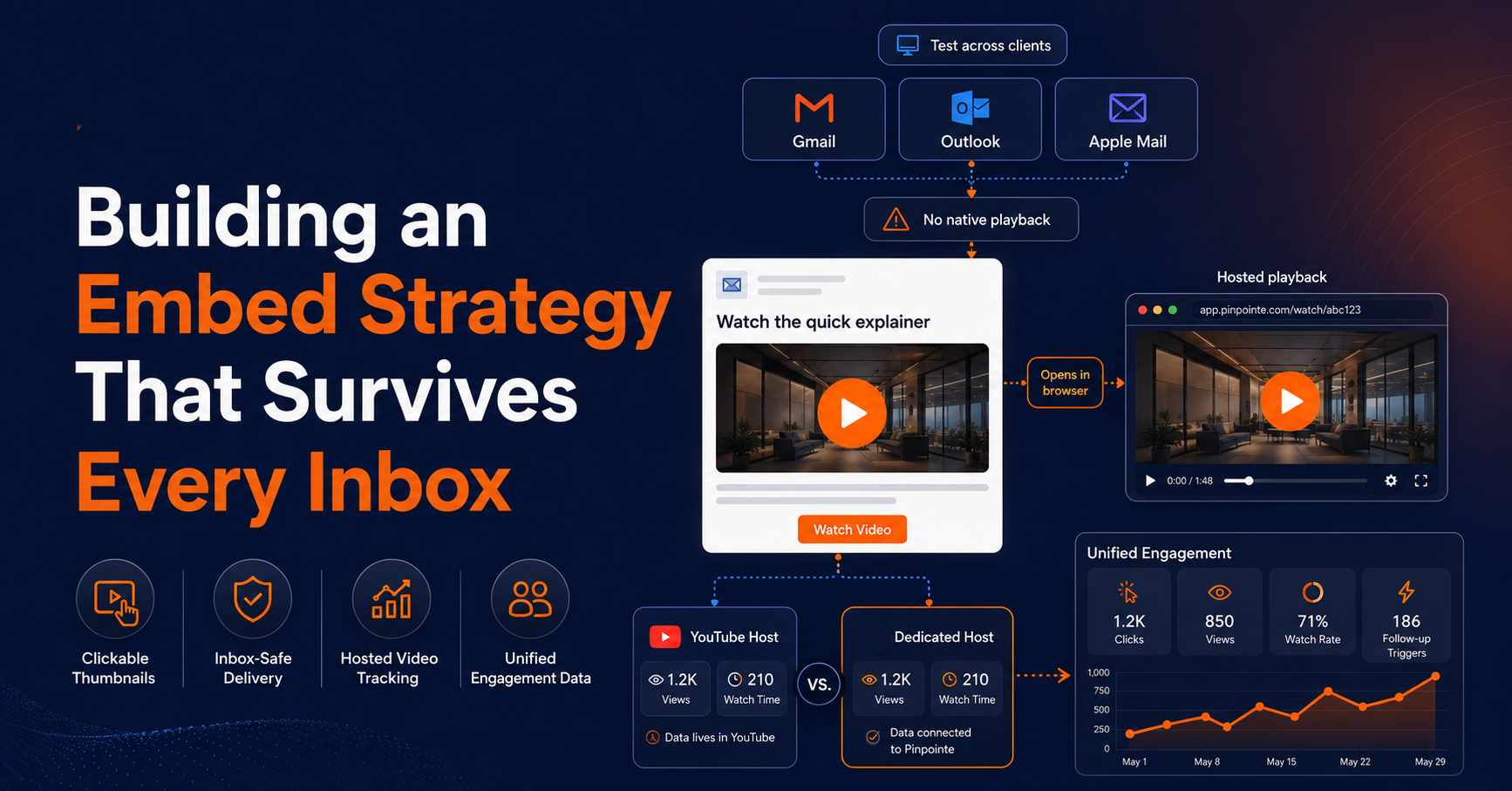
Here's the part nobody wants to hear: you can't actually embed a playable video in most inboxes. Gmail, Outlook, and Apple Mail all block native video playback to protect load times and security.
Working Around Client Limitations
The workaround that actually works is a clickable thumbnail with a play button overlay, styled to look like a video, that links out to a hosted version. Readers click, it opens their browser or a lightweight player, and the video plays there instead of inside the email client.
Gmail and other clients will render a linked thumbnail just fine. What they won't do is autoplay an embedded file, so stop fighting that battle and design around it instead.
Some platforms support AMP for Email, which allows a bit more interactivity directly inside supported clients. It's worth testing, but treat it as an enhancement, not your primary strategy, since support is inconsistent across providers.
Picking Tools That Don't Break Deliverability
Platforms like Vidyard, TailoredMail, and BombBomb exist specifically to solve this handoff, generating the thumbnail, hosting the file, and tracking the click without triggering spam filters the way a raw video attachment would.
Whatever tool you pick, test the render across Gmail, Outlook, and Apple Mail before you send to your full list. A broken thumbnail in one client can tank your click rate across the whole campaign.
Hosting Choices Affect More Than Load Time
Where you host the video changes what you can measure. A YouTube-hosted thumbnail gets you views and watch time on YouTube's dashboard, but it splits your data across two platforms.
A dedicated video hosting tool tied to your email platform keeps engagement data in one place, which matters more once you start triggering follow-up sends based on who actually watched.
This becomes a real decision point once your list grows past a few thousand contacts. At that scale, stitching together data from a third-party video host and your email platform manually turns into a reporting job nobody wants, and the segmentation quality suffers because the two data sources never quite line up on timing or contact matching.
Respecting the Click Before You Ask for It
Autoplay feels efficient until you remember most people open email in public, at work, or with sound off entirely. Forcing playback is a fast way to get marked as spam.
Giving Control Back to the Reader
Let the recipient choose when the video plays. A static thumbnail with a clear play icon respects their context and their bandwidth, and it still captures the click when they're actually ready to watch.
This isn't about being cautious. It's about matching the format to how people genuinely behave when a video shows up uninvited.
Designing the Optional Play
Make the thumbnail itself do some of the selling. A compelling freeze-frame, paired with a short caption describing what's in the video, will outperform a generic "watch now" button every time.
Think of the thumbnail as a second subject line. It has one job: earn the click, not assume it.
What Happens After the Click Matters Too
Landing the reader on a slow-loading external player kills the momentum you just built. Test the full path, not just the email itself.
If the video opens in a new tab that takes four seconds to load, you've lost a chunk of the people who clicked in good faith.
Common Mistakes That Kill Video Email Performance
Most video email campaigns don't fail because the video was bad. They fail because of decisions made after the video was already finished.
Sending Without Testing the Full Chain
Testing the email is not the same as testing the experience. You need to click your own thumbnail, on a phone, on a slow connection, the same way a distracted reader would.
A lot of teams test rendering in the inbox and stop there. The thumbnail looks great, the email passes review, and nobody actually clicks through to see what happens next.
That's the gap where conversions quietly disappear. If the landing player takes too long to load or requires an extra login step, the reader is gone before the video even starts.
Ignoring Mobile Rendering First
More than half your list is opening on a phone, and thumbnails that look sharp on a desktop preview often crop badly on mobile. A play button that gets cut off at the edge of the frame won't get clicked, no matter how good the video behind it is.
Design for the smallest screen first, then confirm it still holds up on desktop. Going the other direction almost always means a late-stage scramble to fix cropping issues after the send is already scheduled.
Treating Every Send the Same Way
A cold prospect and a customer three months into onboarding are not the same audience, even if they're both getting a "video inside" email this week. The context they're watching in is completely different, and the video that earns a click from one will get ignored by the other.
This is where a lot of well-produced video content underperforms. The video itself is fine. It's just aimed at the wrong stage of the relationship.
Fixing this doesn't require multiple video versions for every stage. It usually just means pairing the same core video with a different opening line and a different CTA, adjusted to where that specific contact actually sits in the journey.
Where Pinpointe Fits Into Your Video Email Strategy
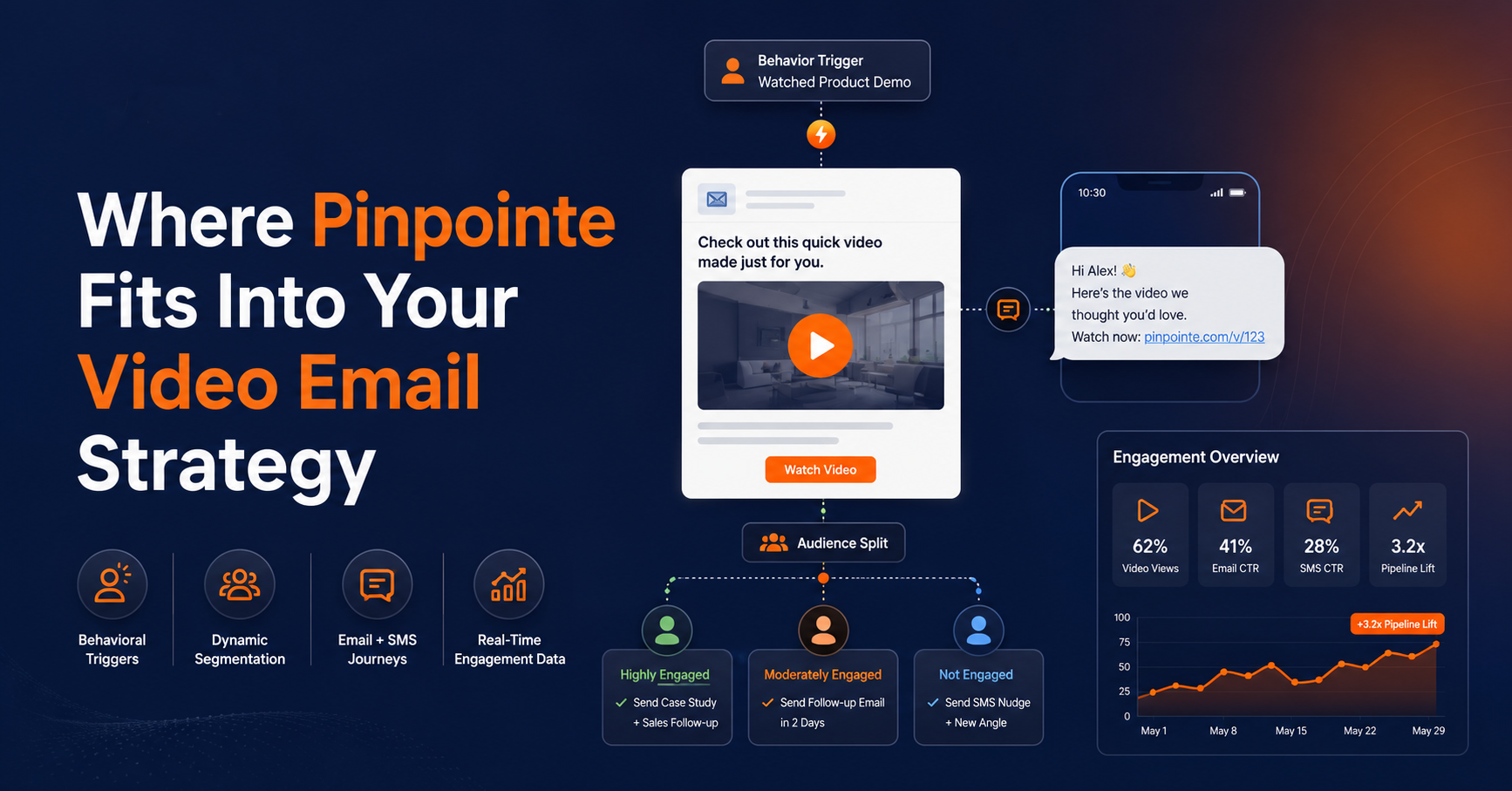
None of this works as a one-off campaign. Video email marketing performs best as part of a sequence, triggered by real behavior instead of a static send date.
That's the part most teams skip, and it's exactly where our platform is built to help. Pinpointe's behavioral triggers let you fire a video-driven email the moment someone takes a specific action, like abandoning a demo request halfway through or opening a previous email three times without clicking. Instead of guessing when someone's ready for a deeper explanation, the video shows up right as their interest peaks.
Use dynamic segmentation to send the right video to the right person
Dynamic segmentation means you're not sending the same explainer video to your entire list.
A prospect three touches into a nurture sequence gets a different video than someone who just downloaded a whitepaper, and Pinpointe's segmentation engine handles that split automatically based on real engagement data, not guesswork.
Reach your audience with video in both email and SMS
Since Pinpointe runs email and SMS from the same platform, you can extend the video moment past the inbox.
Send the thumbnail-driven email, then follow up with a short SMS nudge for anyone who opened but didn't click, all inside one journey instead of stitching together two disconnected tools.
Keep your reputation solid with superior deliverability infrastructure
Our deliverability infrastructure handles the sending side, so a heavier campaign with thumbnails and tracking pixels doesn't put your sender reputation at risk.
And because engagement data flows back into the platform in real time, you can see exactly who opened, who clicked through, and who needs a different follow-up entirely, without exporting anything into a separate analytics tool.
The Video Email Strategy That Actually Converts
Video email marketing isn't a content trend. It's a measurable lift sitting in data you already have access to, and the brands capturing it are doing three things consistently: naming the format honestly in the subject line, choosing GIFs or videos based on the actual goal, and triggering the send based on behavior instead of a calendar date.
Everyone else is still sending static promotional blasts and wondering why click rates keep sliding.
Repurpose video effectively without increasing your budget
The good news is that none of this requires a bigger budget or a new hire. It requires treating the video assets you already have as part of the send strategy instead of a separate project that gets planned once a quarter.
The gap between those two groups is only going to widen, so pick your side now.
Ready to Put Video to Work Across Every Channel?
If your video content is sitting in a folder instead of a customer journey, that's revenue you're leaving unclaimed. Schedule a demo with our team, and we'll show you exactly how behavioral triggers and cross-channel journeys can turn your existing video assets into a real conversion engine.