
There are dozens of small changes you can make to an email campaign to improve response rates. From updating a subject line with a subscriber’s name to using email scheduling features to personalize delivery times, marketers test and tweak campaigns regularly to get better results.
Email Scheduling Features That Improve Email Response Rates
There are plenty of articles online that provide suggestions on the best time to send emails. There are specific times for B2B companies versus B2C companies, and oodles of studies and stats that tend to weigh heavily in favor of sending emails in the morning.
The truth is, every audience is different. You need scheduling tools that adapt to your customer base, as opposed to taking generic advice from some study.
In this comprehensive guide, we will break down why traditional send-time advice fails, look at the technical shifts rewriting the rules of the inbox, and explore how advanced scheduling features, like Predictive Send, Time Zone Delivery, and Auto-Batch Sending, help you optimize your email campaigns and drive higher open rates.
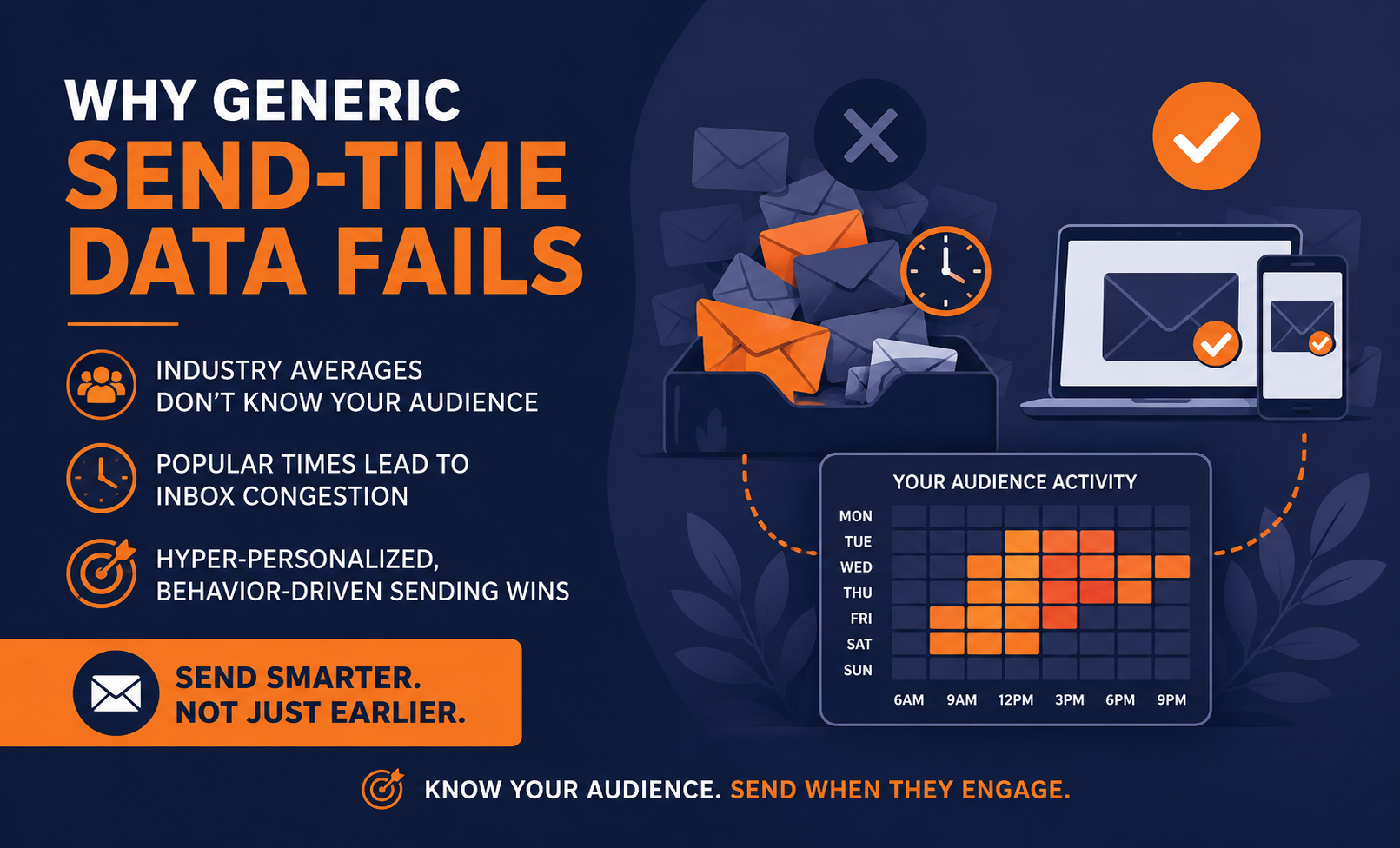
Why Generic Send-Time Data Fails
If you search online for the "best time to send an email," you will find a mountain of conflicting data. One major marketing study will tell you that Tuesday at 10:00 AM is the golden hour. Another insists that Thursday at 2:00 PM yields the highest click-through rates. A third will argue that weekends are an untapped goldmine for B2C brands.
Why is this data so inconsistent? Because industry averages lie.
Going by industry averages for best email send times skews the data
When a study aggregates data across millions of emails, it lumps radically different audiences together. It treats a busy corporate executive clearing their inbox at 6:00 AM the same as a retail shopper browsing fashion brands on their couch at 8:00 PM.
Furthermore, relying on generic advice creates a self-defeating phenomenon known as inbox congestion. When thousands of marketers read the exact same study and schedule their campaigns for Tuesday at 10:00 AM, thousands of emails hit the consumer's inbox at the exact same moment. Your meticulously crafted message instantly gets buried under an avalanche of competitors, newsletters, and spam.
To win the battle for attention in the modern inbox, you must move away from macro-marketing trends and shift toward hyper-personalized, behavior-driven sending.
The Modern Inbox Dilemma: Apple MPP & Image Caching Tech Breakdown
Shifting to individual data has become a technical necessity rather than just a smart strategy. The infrastructure of the modern inbox has fundamentally changed, rendering traditional real-time tracking methods obsolete. If your email service provider is still calculating your audience's habits using old-school tracking methods, your data is likely incorrect.
Two major developments have altered the email tracking landscape:
1. Apple’s Mail Privacy Protection (MPP)
Launched by Apple, MPP fundamentally disrupted email analytics. When a subscriber uses the Apple Mail app with MPP enabled, Apple automatically pre-downloads (or prefetches) all email content, including the invisible tracking pixels used to measure opens, regardless of whether the user actually opened the email.
To your analytics platform, it looks like the user opened the email the exact second it hit Apple’s proxy servers. This distorts your "time of open" metrics and makes it impossible to know when the user actually interacted with your message if you rely on standard tracking pixels.
2. ISP Image Caching
Inbox giants like Google (Gmail), Yahoo, and Hotmail use a practice called image caching to protect user security and speed up email loading times. When you send an email with images, these providers download the images to their own secure proxy servers.
When your recipient opens the email, the images are served from Google or Yahoo's servers, not your email platform. As a result, standard IP address lookups often pull the geographical location of Google’s data center (such as Mountain View, California) rather than where your customer is actually sitting.
The Solution:
To overcome these technical hurdles, you cannot rely on real-time pixel triggers or unstable IP lookups. You need email marketing infrastructure that looks at long-term, historical, first-party engagement data and clean subscriber profile records.
Let's explore how Pinpointe’s specialized features bypass these issues to optimize your delivery.

1. Predictive Send
There’s no shortage of research on the perfect time to send an email. For most companies, finding an optimum time to deliver an email to your subscribers is simply impossible unless you use Predictive Send.
With this feature, you can send emails to subscribers when they’re most likely to open emails.
Wondering how it works?
Predictive Send analyzes subscriber engagement behavior over time and sends an email when a subscriber has a history of opening emails. By delivering the email at an individualized time, the subscriber is more likely to open it. As a result, Pinpointe users have seen a boost in email campaign open rates by 18% or more.
What if you’re sending a cold email to a new subscriber, or to subscribers who haven’t opened any emails yet? In this case, we won’t have historic engagement data for the subscriber yet, so the subscriber will receive the email after everyone else. Data tells us that this is the best option until subscriber patterns are established.
Want more information about Predictive Send? Here’s a great video that explains how it works:
What are the benefits of Predictive Send?
One of the biggest reasons to use predictive campaign scheduling is to increase open rates with a flip of a switch. (Seriously, it’s that easy).
When you send your campaign, you’ll have an option to turn Predictive Send on. You flip a switch and your email will now be delivered to subscribers when they’re most likely to open it. Our research shows this simple action can increase your open rates by up to 18%. (That’s a pretty good return for such a simple action.)
Its ease of use is by far the biggest benefit, but it also eliminates the need to test (or guess) the best send times. Predictive Send automatically delivers your message at the best time. Period.
How can you use Predictive Send?
Ready to give this email scheduling feature a try? Follow these steps in Pinpointe:
1. Create a campaign as you normally would and go to Manage Campaigns to send it.
2. As you work through the sending features, you’ll come to Email Campaign Settings. Look under email scheduling options.
3. Find Enable Predictive Send and flip the switch from off to on.
4. Now just work through the rest of the prompts and schedule your email for delivery. Predictive Send will deliver emails within the next 24 hours at a time that’s best for each subscriber.
2. Auto-Batch Sending
Are you working with a fairly large list of subscribers? Or are you warming up a new IP address? If so, Auto-Batch Sending should be part of your email scheduling practices.
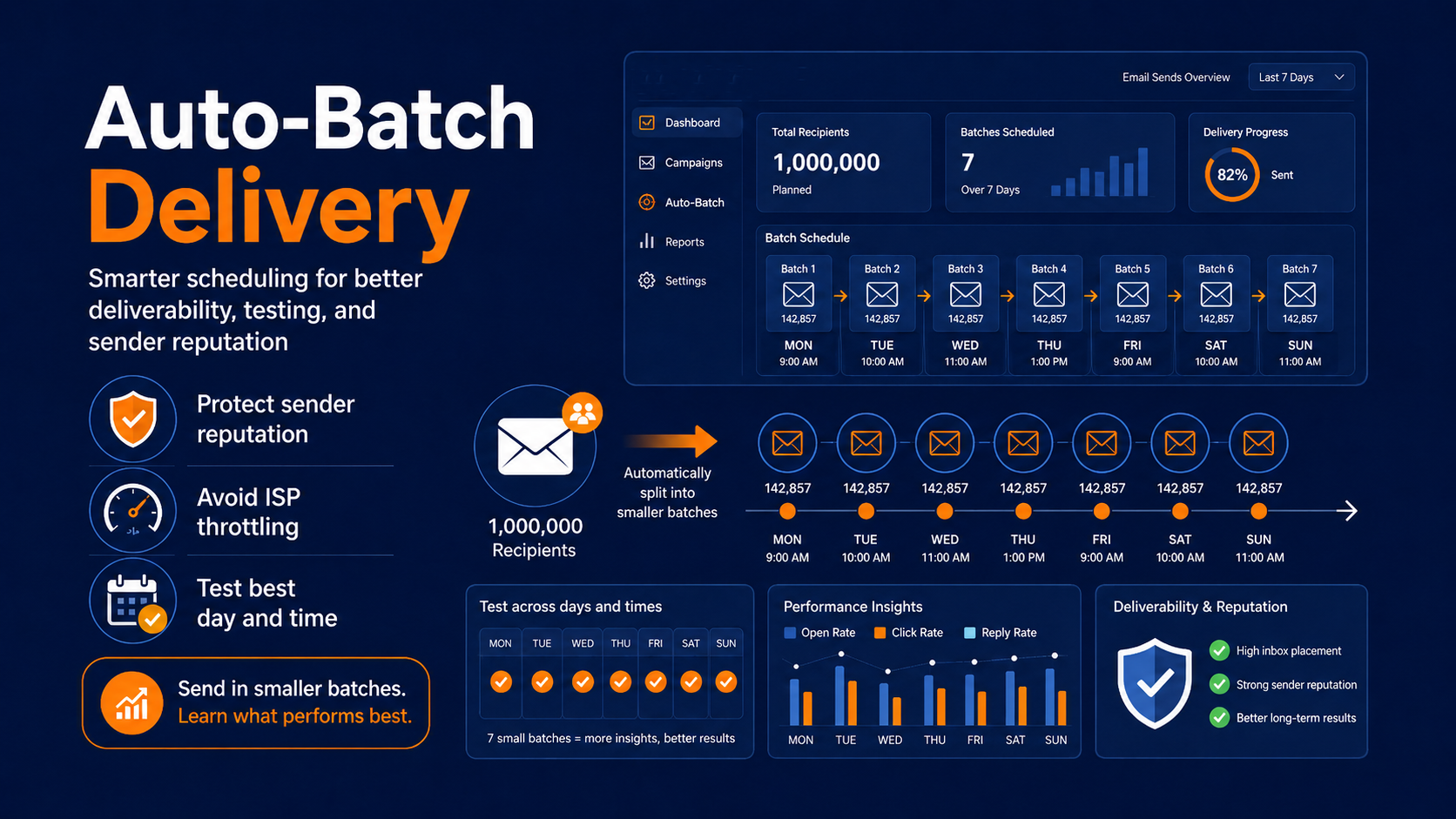
Auto-Batch Sending splits your list into smaller batches and sends them in specified intervals. For example, if you’re planning to send a personalized email to a group of 10,000 subscribers, you can break that batch into three pieces. The first batch can be scheduled for delivery at 9 am, and subsequent batches can be delivered at two-hour intervals, meaning the second batch goes out at 11 am and the third at 1 pm.
Marketers set the initial delivery time and the interval time, or the time in between each batched delivery.
Here’s the best part: Marketers see a 12-16% increase in results by using Auto-Batch Sending.
Here’s a quick video that explains how the feature works and what it can do for you:
What are the benefits of the email scheduling feature Auto-Batch Delivery?
You might be wondering why it’s important to break up large batches of emails. There are a few reasons this feature is helpful. With large sends, many internet service providers start to throttle or even block these messages. Why? It’s a practice associated with spammers, so the ISP assumes that the glut of emails isn’t reputable.
Auto-Batch Delivery is especially important to protect your email send reputation
It’s also an ideal feature for those with a new or “unseasoned” send-from domain. Usually, when you’re just starting out, ISPs give your domain a neutral rating.
However, if you start sending thousands of emails right out the gate, it can hurt your rating. A lower rating can damage your ability to send emails in the future. Sending emails in smaller batches is less likely to hurt your email rating.
Using email autobatch features for split testing
Autobatch is also a useful testing tool. Let’s say you want to send 14,000 emails. Using Autobatch, you can send seven different batches in 24-hour intervals. By doing so, 2,000 emails will be automatically delivered each day of the week. After they’re delivered, you can use Pinpointe’s campaign reports to see which day of the week got the best response rates and use it to guide your next send time.
You can do something similar to test send times too. Schedule batches to go out every hour over the course of 24 hours to find the best send time.
With Pinpointe’s advanced reports, you’ll see metrics broken down by batch so pinpointing the most effective day or time is simple.
How can you use Auto-Batch Delivery?
Like the other features in the Pinpointe marketing automation system, Auto-Batch Delivery is easy to activate. All you need to do is flip a switch during the scheduling process. Here are the steps to follow to trigger this automation:
1. You’ll create an email marketing campaign and set it up for delivery.
2. When you arrive at Email Campaign Settings, you’ll see Enable Batch Sending. Simply flip the switch to On.
3. Next, you’ll decide how many batches you want to split the campaign into and decide the delay in between each delivery.
4. Go through the rest of the prompts to get your message set up for delivery and the email scheduling situated.
The Deliverability Matrix: Why ISPs Throttle Mass Blasts
To understand why Auto-Batch Sending yields a 12-16% increase in performance, you need to understand how Internet Service Providers (ISPs) evaluate inbound mail.
Think of an ISP (like Gmail or Outlook) as a security guard protecting a building. If one person approaches the door, the guard checks their ID and lets them through. If a crowd of 50,000 people suddenly rushes the door all at once, the guard panics, locks the doors, and forces everyone to wait outside until they can verify who they are.
What happens to email deliverability when you send a massive email blast
When you send a massive, simultaneous "blast" to your entire list, ISPs flag the sudden spike in traffic. Spammers routinely hijack servers to send millions of emails at once, so automated spam filters look for this exact pattern.
If your volume surges too fast, the ISP will use throttling (slowing down the rate at which they accept your emails) or will simply route your messages directly into the Promotions or Spam folders.
| Metric / Scenario | The "Blast" Method (All at Once) | The Auto-Batch Method |
| ISP Response | High risk of throttling or spam-box flagging | Smooth delivery, mimics organic human sending |
| Server Load | Can crash smaller corporate receiving servers | Manageable, steady traffic flow |
| Analytics Accuracy | Hard to isolate temporal variables | Easy to A/B test specific hourly windows |
| Sender Reputation | Volatile; prone to sudden volume-based dips | Stable; builds long-term domain trust |
By rolling out your campaign in steady, automated batches, you remain below the risk thresholds set by major ISPs. Your emails land reliably in the primary inbox, protecting your hard-earned domain reputation.
3. Time Zone Delivery
Many businesses have a global reach, which means customers are all scattered in different time zones. Sending an email at 9 am to New York subscribers makes sense, but if you send that same message to email users in India, it hits their inbox at 6:30 pm.
To make sure marketers can deliver messages to their email list at appropriate times, you can set an email to deliver at a specific time in a specific time zone.
Why sending based on IP addresses doesn't always lead to improved email response rates
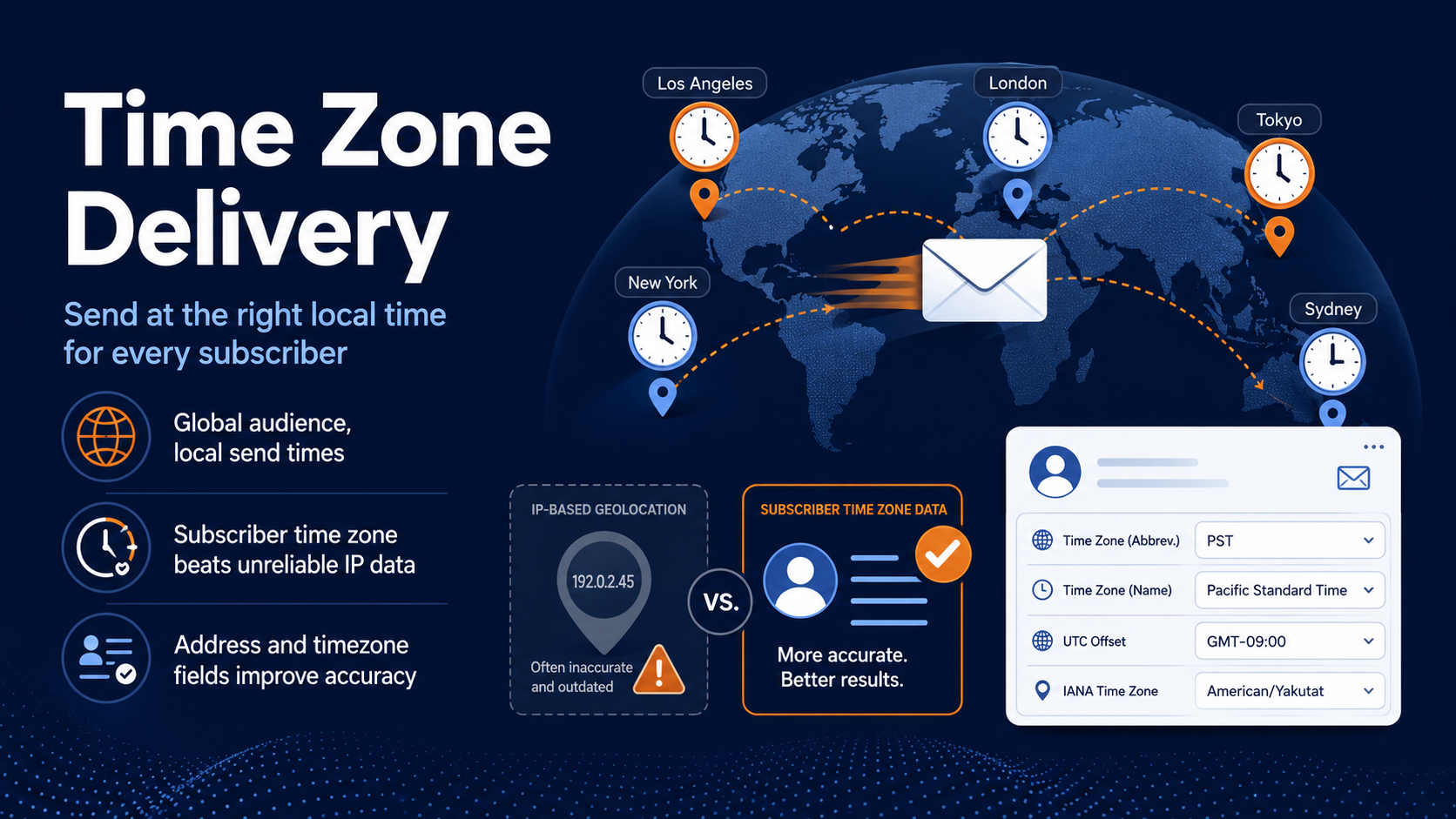
While other email service providers offer this feature of sending by time zone, most adjust time zones based on the location of each recipient’s IP address.
Using this as a baseline for time zones is unreliable these days. This is because the IP location is determined when images are downloaded when the recipient opens the email. However, inbox providers like Google, Hotmail, and Yahoo cache the images that are displayed, so the caching location (where Google, Hotmail, or Yahoo are caching the images) is often provided as the location reported, not where the end recipient is actually located.
All in all, basing an email delivery on the location of an IP isn’t ideal, which is why we give marketers another option.
Collect time zone information along with addresses to further optimize email send times
Marketers often collect subscriber addresses, but with Pinpointe, you can also collect a subscriber’s time zone. This information can be added over time as customers sign up for your newsletter or download a white paper, or marketers can use this email scheduling feature by doing a batch upload of the information by way of a CSV file.
Pinpointe will accept the full string format as shown in the figure below, such as GMT-09:00 American/Yakutat, or the shorter version of GMT-09:00. In the U.S., Pinpointe can also accept timezone formats like PST, MST, or EST.
You can also collect a subscriber’s address, which should contain a state or province. If Pinpointe doesn’t have a subscriber’s time zone listed, the system will refer to his or her address to figure out the time zone that’s accurate to within an hour.
As a last resort, if a subscriber's time zone and address are unknown, Pinpointe will use the geolocation of a subscriber’s IP address, but only as a last resort.
What are the benefits of Time Zone Delivery?
Time Zone Delivery makes it easier for companies to cater to subscribers all over the world. It gives you the power to not only send emails at an appropriate time based on the subscriber’s location, but it also gives you control over when information is released.
Let’s say you plan to send a press release to your customers, but it contains information that can’t be released until a certain time. With Time Zone Delivery, you can ensure every subscriber receives it at a designated time. This feature uses 24 different time zones and will cycle through them all to ensure the message is delivered within 24 hours.
How can you use Time Zone Delivery?
Ready to give your email open rates a boost with Time Zone Delivery? Here’s how to use this email scheduling feature in Pinpointe:
1. You’ll create a campaign and set it up for delivery.
2. When you arrive at email scheduling options, you’ll see Enable Send at Local Timezone. Flip the switch on.
3. Next, add a local time that you want the campaign to be delivered at. If you enter 11:03 am, it will arrive at 11:03 am for every subscriber, regardless of what time zone he or she is in.
4. Work through the rest of the screens for email scheduling.
Industry Playbooks: Tailoring Your Email Scheduling Strategy
How should you combine these tools to match your unique business model? Different audiences require completely different scheduling blueprints. Here are three industry playbooks you can deploy today:
Playbook 1: The B2B & Professional Services Strategy
- The Challenge: Corporate professionals suffer from severe inbox fatigue. Sending an email during the "Monday morning purge" means your email gets deleted along with the weekend's junk.
- The Setup: Pair Predictive Send with strict weekday boundaries. Let the system target the precise lulls in an executive's day, such as their mid-afternoon catch-up window or their early morning pre-commute check, when they actually have the mental bandwidth to engage with deep-form thought leadership or B2B offers.
Playbook 2: The B2C & E-Commerce Blueprint
- The Challenge: Retail relies heavily on psychological urgency and synchronized event timing (e.g., flash sales, holiday promotions, weekend shopping behavior).
- The Setup: Deploy Time Zone Delivery. If you are running a "Midnight Madness" promotion or a "Saturday Morning Coffee & Shopping" campaign, you cannot afford to have your email hit an audience member's inbox while they are asleep. Setting a local time ensures your call-to-action aligns perfectly with the subscriber's real-world environment.
Playbook 3: The SaaS & High-Volume Publisher Playbook
- The Challenge: High-volume software updates or massive content newsletters can easily trigger server crashes on the receiving end or cause huge spikes in customer support tickets if everyone accesses a new update simultaneously.
- The Setup: Rely heavily on Auto-Batch Sending. Distributing your send volume smoothly over 12 to 24 hours spreads out web traffic to your application or landing page, making customer engagement highly predictable and technically manageable.
Beyond the Open: Driving Downstream Conversions
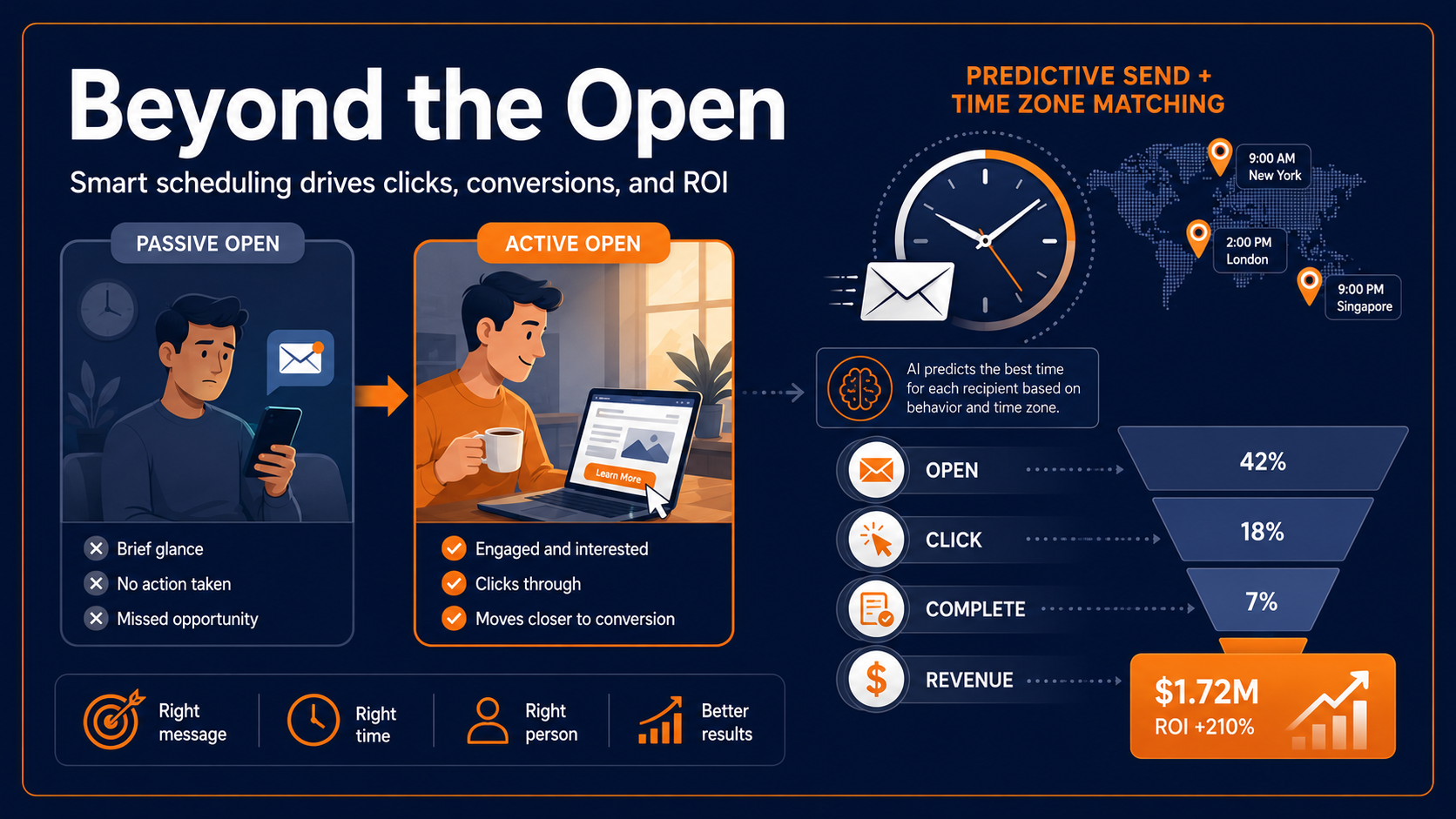
While boosting your open rate by 18% is an excellent metric, opens are only the top of the funnel. The true magic of smart scheduling lies in its impact on downstream conversions: click-through rates (CTR), form completions, and revenue generated per email.
There is a major difference between a "passive open" and an "active open."
- A Passive Open: A subscriber checks their phone while waiting in a drive-thru line. They open your email to clear the unread badge notification, glance at the header, and lock their screen. The open is tracked, but the conversion opportunity is gone.
- An Active Open: Your email arrives exactly when the subscriber has settled at their desk with a fresh cup of coffee, or during their dedicated evening reading time. They open the email, read the copy, click the link, and complete a purchase.
Combine the powers of predictive send and time zone matching
By utilizing Predictive Send and Time Zone matching, you aren't just hacking your way into an unread list, you are aligning your message with the recipient's optimal focus windows.
This behavioral alignment ensures that when they do open your email, they are in a position to take action, leading to cleaner conversion funnels and healthier ROI.
Your 4-Step Send-Time Audit Framework
Ready to stop guessing and start optimizing? Use this simple four-step framework to transition your brand from generic industry averages to data-driven email automation.
Step 1: Audit Geography and Clean Your Records
Before launching your next global campaign, analyze your current list demographics. Do you have physical addresses or explicit time zone data for your contacts?
Take your existing contact list and perform a batch CSV upload to Pinpointe, updating time zone fields to ensure your database is clean and accurate.
Step 2: Evaluate Your Deliverability Health
Review your recent campaign metrics. Are you experiencing sudden drops in open rates when sending to large segments?
Check your bounce records and monitor whether major domains (like Gmail or Outlook) are throttling your volume. If you see signs of delivery lag, prepare to transition your large lists to a batched structure.
Step 3: Run a Baseline Multi-Day Batch Test
If you want to discover your audience's organic peak days, utilize Auto-Batch Sending as an experimental tool. Take a segment of your list and distribute the delivery equally across different days of the week or different hours of the day.
Use Pinpointe's batch-specific reporting dashboards to identify which windows naturally pull the highest response rates.
Step 4: Turn on Predictive Delivery
Once you establish your baseline, hand the heavy lifting over to automation. Follow the process of using Predictive Send for your recurring marketing campaigns below
- Launch: Set up and run the campaign using Predictive Send.
- Complete: Allow the campaign to run through to completion.
- Repeat: Manually reschedule the campaign whenever you want to start a new cycle.
- Optimize: With improved send times in place, your team can focus on A/B testing other elements to improve email response rates.
Future-Proofing Your Email Strategy
Creating personalized email campaigns is getting harder. While digital marketing experts are up for the challenge, it’s best to use an email marketing provider with email scheduling tools that support those efforts.
With Predictive Send, Time Zone Delivery, and Auto-Batch Delivery, combined with stellar email copy and personalized content, you’ll create must-open emails, and you’ll have the response rates to back it up.
Stop Guessing. Start Sending.
Generic studies won't scale your business, but smart data will. Ready to see how features like Predictive Send, Auto-Batch Delivery, and True Time Zone Matching can lift your open rates by 18% or more?
See Pinpointe in action and get a custom strategy for your audience.